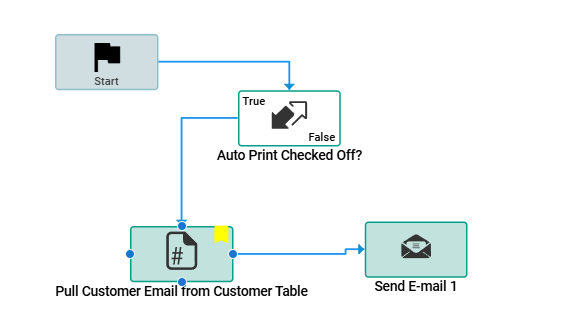
I’m relatively new to BPM creation and have been tasked with creating a BPM which automatically emails out a Sales Order Acknowledgement when Auto Print Ready is checked off. I have the workflow below working for the email generation on SalesOrder.MasterUpdate but I have no clue where to even start with generating the SO and attaching it to an email. I don’t have a background in coding so I’m a bit limited in what I’m able to accomplish on my own or by repurposing other peoples work. I’m just at a complete loss.
Any help at all where to start or what I could try is greatly appreciated.
Did some research and spent some time with Epicor talking through this problem and we were able to come up with the below which seems to work. Still needs testing to make sure there’s no weird behavior but thought I’d share the code for anyone else with a similar issue. Adapted from here: Send an Email containing output of an SSRS template using Data Directive - #13 by Shizar115
var SalesOrderQry = (from OrderHed_row in ds.OrderHed
select OrderHed_row).LastOrDefault();

if (SalesOrderQry != null)
{
var CustomerQry = (from Customer_row in Db.Customer
where Customer_row.CustNum == SalesOrderQry.CustNum
select Customer_row).FirstOrDefault();


if (CustomerQry != null)
{
    if (CustomerQry.EMailAddress == null)
    {
        throw new Ice.Common.BusinessObjectException("Customer email required.");
    }

    // Assign to BPM variable
    custEmail = CustomerQry.EMailAddress;
}


}
//Assign Variables  - Lines 22-36
string company = “”;

int custnum = 0;
int btcustnum = 0;
int shiptocustnum = 0;
string shiptonum = “”;

string billto = “”;
string soldto = “”;
string shipto = “”;

int ordernum = SalesOrderQry.OrderNum;
int ponum = 0;

string shipviacomment = “”;

Func<int, byte[ ]> GetASalesOrderPDF = (paramordernum) =>
{
byte[ ] reportPDF = null;
// Correct service call usage
var serviceAgent = Ice.Assemblies.ServiceRenderer.GetService<Erp.Contracts.SalesOrderAckSvcContract>(Db);
string taskNote = Guid.NewGuid().ToString(); // Unique identifier for this task
var SOAckTS = serviceAgent.GetNewParameters();
var paramRow = SOAckTS.SalesOrderAckParam.First();
// Assign ordernum, initiate task agent and generate report with style 2
paramRow.OrderNum = paramordernum;
paramRow.AgentID = “SystemTaskAgent”;
paramRow.AutoAction = “SSRSGENERATE”;
paramRow.ReportStyleNum = 2;
paramRow.TaskNote = taskNote;
// Execute the service operation
serviceAgent.RunDirect(SOAckTS);

// Fetch the report data
reportPDF = (from sysRpt in Db.SysRptLst
             join sysTask in Db.SysTask on
             new { sysRpt.Company, sysRpt.SysTaskNum } equals
             new { sysTask.Company, sysTask.SysTaskNum }
             where sysTask.TaskNote == taskNote
             select sysRpt.RptData).FirstOrDefault();

return reportPDF;

};
/\*
foreach(var OrderHed_row2 in ds.OrderHed){
company = OrderHed_row2.Company;
ordernum = OrderHed_row2.OrderNum;
}

foreach (var PORelRow in (from PORel_Row in Db.PORel
where  PORel_Row.Company == company && PORel_Row.PONum == ponum
select PORel_Row))
{
ordernum = PORelRow.BTOOrderNum;
}
\*/
foreach (var OrderHedRow in (from OrderHed_Row in Db.OrderHed
where  OrderHed_Row.Company == company && OrderHed_Row.OrderNum == ordernum
select OrderHed_Row))
{
custnum = OrderHedRow.CustNum;
btcustnum = OrderHedRow.BTCustNum;
shiptocustnum = OrderHedRow.ShipToCustNum;
shiptonum = OrderHedRow.ShipToNum;
}

foreach (var CustomerRow in (from Customer_Row in Db.Customer
where  Customer_Row.Company == company && Customer_Row.CustNum == custnum
select Customer_Row))
{
soldto = CustomerRow.Name;
}
foreach (var CustomerRow in (from Customer_Row in Db.Customer
where  Customer_Row.Company == company && Customer_Row.CustNum == btcustnum
select Customer_Row))
{
billto = CustomerRow.Name;
}

foreach (var ShipToRow in (from ShipTo_Row in Db.ShipTo
where  ShipTo_Row.Company == company && ShipTo_Row.CustNum == shiptocustnum &&  ShipTo_Row.ShipToNum == shiptonum
select ShipTo_Row))
{
shipto = ShipToRow.Name;
}

try{
Dictionary<string, byte[ ]> dicReports = new Dictionary<string, byte[ ]>();

int salesOrder1 = ordernum;
//int salesOrder2 = 26680;

dicReports.Add($“Report\_{salesOrder1}.pdf”, GetASalesOrderPDF(salesOrder1));
//dicReports.Add($“Report\_{salesOrder2}.pdf”, GetASalesOrderPDF(salesOrder2));

string jsonDicReports = JsonConvert.SerializeObject(dicReports);

//this.EfxLib.EmailLibrary.Email(fromEmail, toEmail, “Test 2 Report Attachments”, “Hello, here are two reports”, jsonDicReports, false, false, “”, “”, “”, “”, “”);
string body = “Please see attached for your recent sales order from Hudson Lock.”+ “Sold To:”+soldto+“”+“Bill To To:”+billto+“”+“Ship To:”+shipto+“”+“”    +“ShipVia Default Comment:”+shipviacomment+“”  +“Please add sales@ABC.com to UPS Tracking”+“Please add to Reference Number 3:”+ponum.ToString()+“”+“Please add to Reference Number 4:”+ordernum+“”;
string subject = “I finally did it” ;
//var mailer = this.GetMailer(async: false);
//var message = new Ice.Mail.SmtpMail();
var mailer = this.GetMailer(async: false);
var message = new Ice.Mail.SmtpMail();
message.SetFrom(“”);
message.SetTo(body);
message.SetTo(custEmail);
message.SetCC(“;”);
//message.SetBcc()
//message.SetBody(“Test”);
message.SetBody(body);
message.SetSubject(subject);
message.IsBodyHtml = true;
mailer.Send(message,dicReports);
}
catch(Exception e)
{
string body = e.ToString();
this.PublishInfoMessage(body, Ice.Common.BusinessObjectMessageType.Information, Ice.Bpm.InfoMessageDisplayMode.Individual, “PrimaryVar”,“SecondVar”);
}
I would strongly suggest looking into getting APR. Not only can it easily auto print reports, but also email them, or archive a PDF to a file location for you.
Plus, once you get Order Acknowledgements done, you’ll want to do purchase order, invoices, statements, maybe even shipping notices. You’ll 100% get your money back.
You can absolutely do it the hard way as you mention, but is it worth your time?