Hello.
We use Handheld to pick products from our warehouse using the Material Queue report.
We used the Portable Menu, then Option 3 - Material Handling and then Option 6 - Process by ID.
We scan the barcode in the Material Queue report and the following screen is populated:
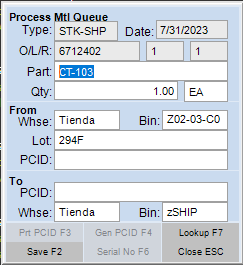
As you can see on this screen, the part is selected, we need to scan the barcode of the part and then press the F2 key.
But, since F2 is enabled by default, we don’t need to scan the barcode in the continue part.
We want to disable the F2 key and enable it only when the part barcode is scanned and matches the part number for this transaction.
Any idea how to do this?