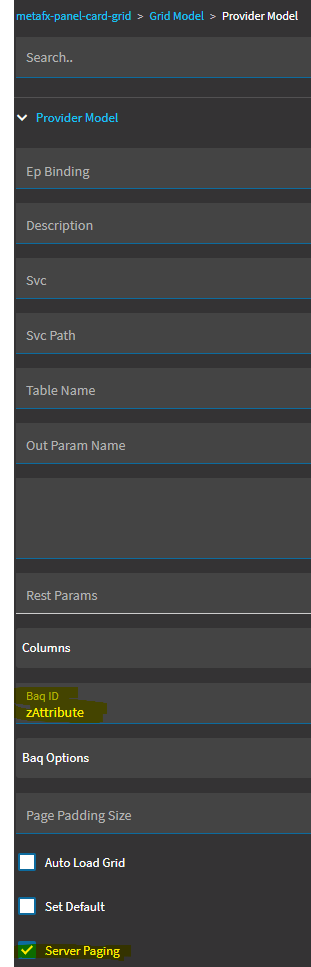
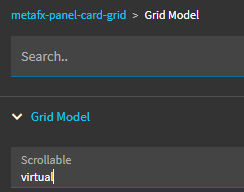
Has anyone found a workaround for the 1000 row limitation in dashboard grids. We have several dashboards that would normally return more than 1000 rows that unfortunately will not work as expected in Kinetic 2024.1.
Not a workaround, but can the data on these dashboards not be broken into more-consumable chunks? or summarized into groups?
My mentor in a previous role had me think about Why I was pulling large sets of data:
When will we need to see item #1000 (or higher)? or even item #500?
Is it really a dashboard if there is more data than can be quickly processed by a single person?
It might be worth it to break up a large query into more-specific queries that return less data, faster … and avoid fighting with the limits of the system.
My two-cents, unsolicited.
Hi! Not sure if this is a solution, but in BAQ designer, I was recently shown how to overcome the limit (because I often don’t have time to make something a dashboard, I just want to export all results to Excel).
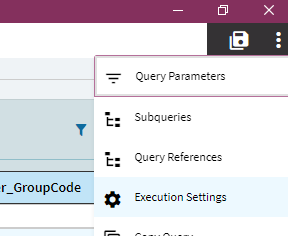
In BAQ designer, go to the Run Query tab and click on overflow menu>execution settings.
Then set it up like this:
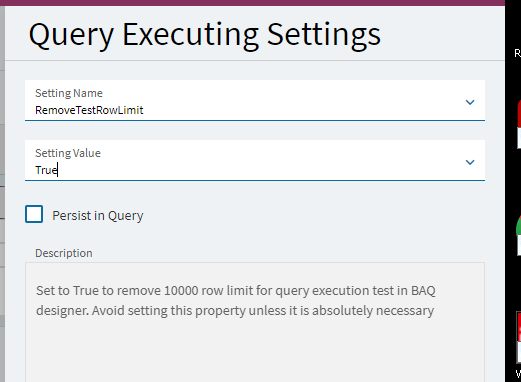
Again, sorry if this doesn’t resolve your issue. But this tip was so helpful for me and wish I’d known how to do that months ago!
That only applies in the baq designer, but it is a good tip for those that need it.