Dashboards - Kinetic and Classic from Same Menu Link Possible? (user choice)

We’re knee deep in migrating from classic to Kinetic on the browser. Is it possible to have a dashboard menu item be set to user choice, like all the other Epicor apps? We have our classic dashboard for the existing users, and the kinetic dashboard (as a separate menu link) for our beta testers.

Instead of two separate menu links, I’d like to use one with the Form To Use set to ‘User Choice’.

Possible?

2 Likes

Try a “Menu Item” program type. You should be able to select the classic and kinetic app at the same time. I don’t have any classic dashboards to test this.

4 Likes

I can confirm this works. It’s what we are doing.

4 Likes

I do it like this which gives users the choice if they select classic. Not sure if it different at all by doing the above.


image

1 Like

Michael and Mike,
Thanks! I’ll give that a try.

Tim,
How does Epicor know what Kinetic dashboard app to open? How is the new dashboard linked to the old menu item for the classic dashboard?

3 Likes

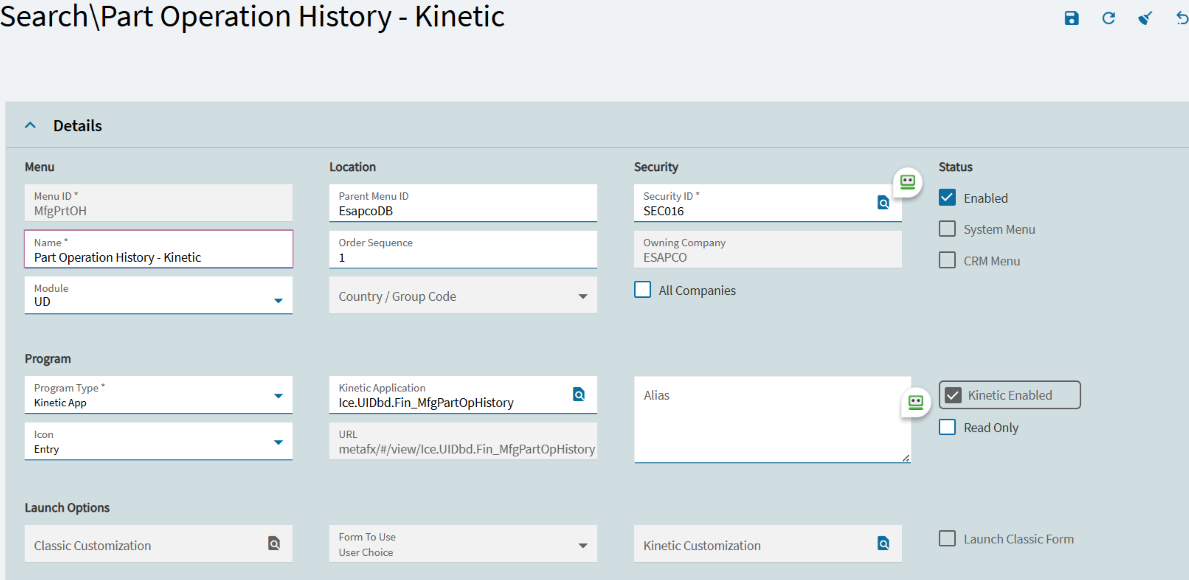
I have a Kinetic dashboard called amazonInventory I made in App Studio. If a user has their preference set to Classic it will open the classic dashboard Ice.UI.Dashboard.dll (Person before me called it this. I do not like the name), but if it is set to Kinetic it will open the kinetic.

1 Like

It’s called that because it is using the dashboard runtime, not a deployed dashboard.
If you had deployed it, it would be a dashboard assembly, and have a proper name.
4 Likes

Thanks for this solution. I have tested this and it works in my environment.

My one concern is how do you know this is a dashboard after you change the Program Type field in the menu?

My reason for asking is that I have a dashboard of all the custom objects in my menu joined to the Activity tracker data for the menu (type 2). This allows me to focus on only those custom menu options that are used by staff.

I figured this dashboard, with only a few modifications, would allow me to monitor which dashboards have been uplifted to Kinetic. My method of knowing this was a dashboard was the Program type.

My only idea (so far) is to join the program name (after “Erp.UI.” and before “.dll”) to the classic dashboard table. This would allow me to know that this is not just a Kinetic Application but a dashboard.

Any ideas of a better way? Thanks for any suggestions.

1 Like

A quick and dirty way would be to set all dashboards to use the same icon and link on that.

Thanks Kevin. Makes sense. This is only until my conversion is complete so hopefully I can control which menu options have what icons until then. Going forward it will be tougher to figure out what kinds of applications we have if these are just considered Kinetic apps.

I suppose having UD as the module will help - we do not have the SDK.

Just trying to think ahead when Epicor announces the next major interface change that requires another 2 person years of work!

2 Likes

@Graemer What about using a naming convention where the MenuID starts with DASH or DBD? Use Actions > Copy to New Menu. It’ll save everything except it’ll leave the MenuID blank for you to set.

1 Like

Thanks Andris. I guess I could do that but I ended up reverse engineering the dashboard from the excellent “Slaying the dashboard dragons “ post. I found I could build a calculated field that checked the WebURL field and check for “UIdbd” and this would tell me it was a kinetic dashboard.this allows be to show, by user or group of users, all the dashboards converted and yet to be converted. My plan is to have a work list that dynamically updates as we convert custom classic objects to kinetic ones.

