We are considering the creation of some dashboards that would make it easier for certain users to compare data across multiple records, to help ensure data quality and setup consistency. However, we are also concerned about securing that same data with respect to preventing easy downloading or extracting of sensitive information (e.g. copy to Excel). Curious if/how others have accomplished both simultaneously, considering that the objectives are essentially conflicting to each other.
This seems like a bit of a paradox to me. Either they are allowed to see it, or they aren’t. If you can see it you can take a picture with your phone, or a screenshot, or save the html page in your browser, etc, etc.
Can you think of any example of what you are asking for in another website or piece of software?
I believe in the case of Kinetic Dashboards you can disable at least some, if not all of the Copy options.
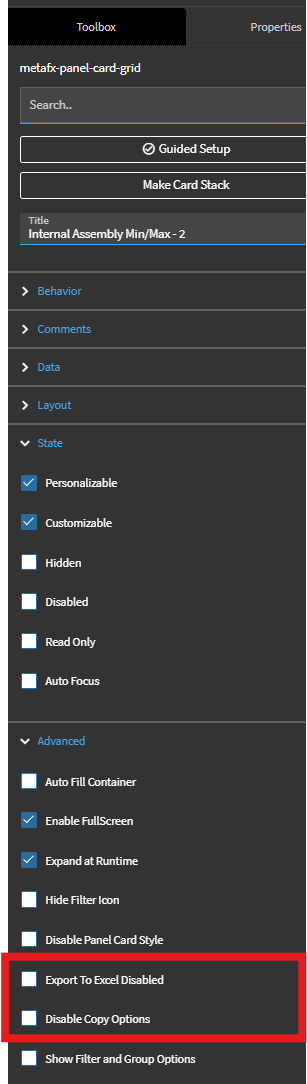
I’ve never tried this myself so I am not sure how well the system honors those flags but I have to believe it would.
I’m sure if a user really wanted to get the information out they could though, it wouldn’t surprise me if it was buried in the developer tools/console tbh.
A savvy or motivated user will always be able to automate some level of export for data they can see.
For example, no matter what you might do to secure the export in the UI, the browser has F12 Dev Tools, and the user can exfiltrate from multiple places there. You could block that by Company-level Policy through whatever GPO is called in Entre nowadays (been a while since i’ve IT’ed), but i’m sure that only puts you a few minutes away from the next method to exfiltrate data.
Disable Export to Excel, Disable Copy, Disable “Editible” so that the user can’t drag to highlight text easily, that’s about as much as you can reasonably do.
You could also set the state to read-only for the grid, so the user can’t select and copy data.
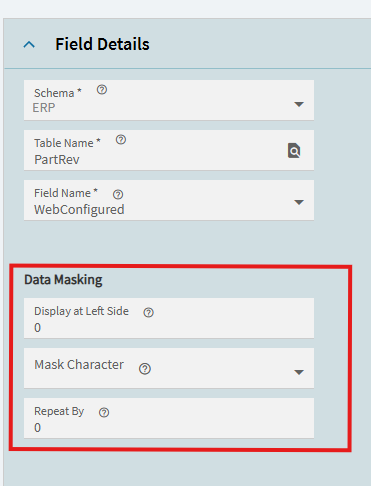
Bet you $5 that doesn’t work in kinetic 
If I can see it, it’s mine.
Especially with all the AI tools nowadays.
Oh, I already know that the Field Security itself regardless of Data Masking doesn’t work in Kinetic. We tried it for setting some fields read only for specific groups, but it always looks and acts editable until the user saves. Then when we updated to 2025.1 this past fall we found that by having the Terms field in POHeader set to read only, it was clearing the terms entirely from the row when our Buyers created new POs. So we stopped using it and went strictly to UI settings through App Studio.