Hi!! I am trying to DMT Menu Security–there is a flag on the Security screen called Allow Access to All Groups and Users. This is noted as an external type–I cannot find the correct field to set to false. I do see in the DMT tool AllowAccess is actually a delimited string, which I have–but just updating does not set the toggle to false. I have to manually set to false and then the groups defined under Allow Access can update correctly. Any advice where they are hiding the toggle? Or what’s the correct logic to get the update to load?
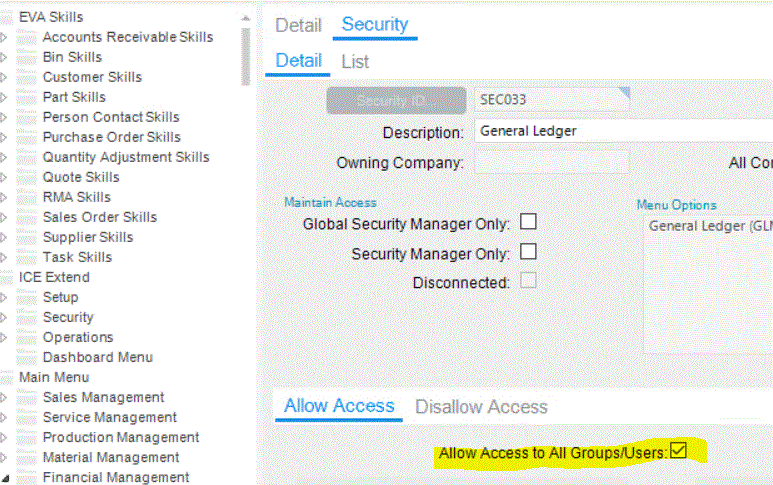
Allow access is a list of users/groups. If you want all, just use the *. Then the screen will show that checkbox as checked.
1 Like
Thank you, Doug. That’s my understanding, too.
But in my DMT file, I’m trying to update security groups for a specific Menu. However, it doesn’t update. It only updates if I go into Menu Maintenance and manually deselect the Allow access toggle.
Here’s a sample of my file.

Try the heading AllowAll and set to TRUE.
What I have found but not had the time to properly look at is I had to split the import file, putting all the AllowAll = True on one file and the remaining AllowAll = False on an separate upload.
If this doesn’t work then what version of DMT are you using?
1 Like
Thank you for your response. I actually tried TRUE, FALSE, 0, 1 for AllowAll and no combination worked. What I am finding is the version of DMT I have has several bugs that have since been fixed (2022.2.21) . We ended up deselecting the toggle in Epicor and then I ran the DMT to update the Security Groups. We are going live March 1–so I’m hesitant to take a patch.
1 Like
