We are looking to add in a bunch of setup times for parts using DMT. I can’t determine which table to update. It seems ECOOpr, ECOOprDtl, PartOpr, JobOpr, all have an EstSetupHrs field. Are all these fields interconnected? Is there a master field that I need to update? Do I have to update each table and field?
Use Bills of Operations to do a check out, update and check in just like Eng WB and it will update PartOpr
JobOper is a different run using Job Operation. You will need a query of the JobOper you want to update, add your setup in and update the jobs.
4 Likes
Well, that didn’t seem to work. I queried the ECOOpr table, which is used for Bill of Operation and made a small DMT for a few parts. All I did was add a Setup estimate (ECOOpr.EstSetHours) of 0.25. The DMT ran with no errors but the 0.25 hours didn’t get written to the operation. I reviewed the part method and built a job for it and the setup time doesn’t appear.
Next I tried setting up Operation Standards and adding the 0.25 setup times there. When I query the operations the times show there but again, when I build a job I don’t get the setup hours.
Not sure where to go from here. We need to update about 25,000 part operations with this data.
ECOOpr is the transition table. You want to query PartOpr. This is my BOO update template and the query that pulls the data. run the baq, copy to excel update the times and it is ready to dmt.
PartNum RevisionNum OprSeq OpCode EstSetHours ProdStandard Company ECOGroupID Plant
/*
 * Disclaimer!!!
 * This is not a real query being executed, but a simplified version for general vision.
 * Executing it with any other tool may produce a different result.
 */

select
	[PartOpr].[PartNum] as [PartOpr_PartNum],
	[PartOpr].[RevisionNum] as [PartOpr_RevisionNum],
	[PartOpr].[OprSeq] as [PartOpr_OprSeq],
	[PartOpr].[OpCode] as [PartOpr_OpCode],
	[PartOpr].[EstSetHours] as [PartOpr_EstSetHours],
	[PartOpr].[ProdStandard] as [PartOpr_ProdStandard],
	[PartOpr].[Company] as [PartOpr_Company],
	(Constants.CurrentUserID) as [Calculated_ECOGrp],
	(Constants.CurrentPlant) as [Calculated_Plant]
from Erp.PartOpr as PartOpr
inner join Erp.PartOpDtl as PartOpDtl on
	PartOpr.Company = PartOpDtl.Company
	and PartOpr.PartNum = PartOpDtl.PartNum
	and PartOpr.RevisionNum = PartOpDtl.RevisionNum
	and PartOpr.AltMethod = PartOpDtl.AltMethod
	and PartOpr.OprSeq = PartOpDtl.OprSeq
inner join Erp.PartRev as PartRev on
	PartOpDtl.Company = PartRev.Company
	and PartOpDtl.PartNum = PartRev.PartNum
	and PartOpDtl.RevisionNum = PartRev.RevisionNum
	and PartOpDtl.AltMethod = PartRev.AltMethod
PartOprExport.baq (23.0 KB)
2 Likes
That definitely gets me the setup data, thanks. But now I don’t see that table in my DMT. When I search for Op, or Operation I only get Bill of Operations (ECOOpr), Job Ops (JobOpr), Operation Standard (OpStd), Operations (OpMaster) and Quote Operations (QuoteOpr).
I don’t see the ability to upload to the PartOpr table in DMT. We are running 2022.2 and DMT 11.2.200
You want bills of operations
It is doing a check out, update and check in for each line in the file.
1 Like
Can confirm, select “bill of operations” in DMT.
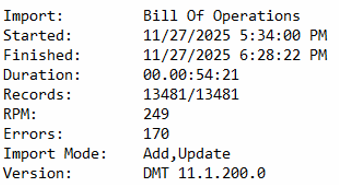
This doesn’t just update the operation, it actually does a lot of things! If you’re pushing an update to a checked-in and approved revision, for each updated operation DMT will unapprove and check out the parent part’s revision, make the update to the operation (here’s where your change is written to PartOpr), then check in and approve the parent part’s revision. From your perspective it’s a one-step update that automatically does all of the steps we’d do in the real world. The downside is that it’s slow by DMT standards, I usually see 6 to 10 updates per minute.
The only thing to watch out for is that last check-in operation. Sometimes it isn’t successful. Like, less than 1% in my experience. Just check engineering workbench for any stragglers under the ECO group you used for your DMT set.