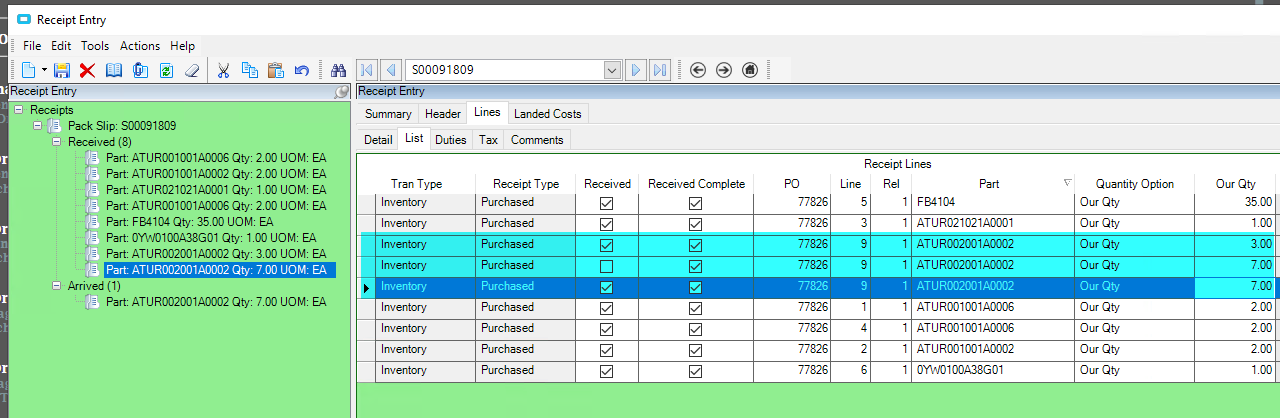
Time phase sometimes shows an exception of ‘Arrived Receipt’ on a PO which we have came to find is a duplicate line in receipt entry.
We are trying to find out HOW this duplicate is getting created, it does not seem to be manual. It is causing issues because MRP treats them as ‘real’ stock even though they are not.
Has anyone ran into this?
Receiving currently has to go into receipt entry, re-open the packing slip and PO, and then delete the duplicate record.
Also, it would be nice to somehow search all POs that have an ‘Arrived Receipt’ exception but so far cannot find anywhere within the system that shows exceptions and what they are linked to.
That line you have is in arrived. Usually happens when they start to enter it and forget to click receive or they walk away, forget where they left off, create a new line and leave the previous, unfinished line hanging out there in arrived, etc.
While I totally respect the end user, I think that you most likely have an issue with the user, not the system.
I tend to agree with you and believed this to be the answer as well, until.. Receiving said they cannot just leave a line open without adding a qty.
I tested this and that seems to be true.
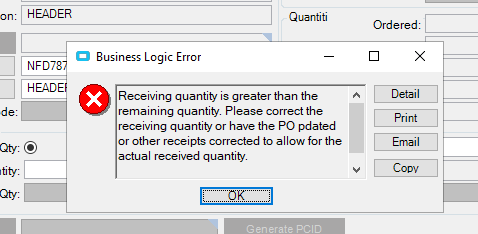
I can create a line and leave it at ‘arrived’ but if I then try to make another line (pretending I forgot I made the first one), it doesn’t allow it. I get this error.. Thoughts??
Create a BAQ on RcvDtl with Received as False for the criteria. This would list all the PO Receipts that are in your system that have arrive but have not been received.
The total qty is 20 on that PO, so yes the error is expected. What I mean is if that error pops up when trying to create an extra line, then how are the extra lines being created?
Example - Here is another PO receipt where an extra line was generated.
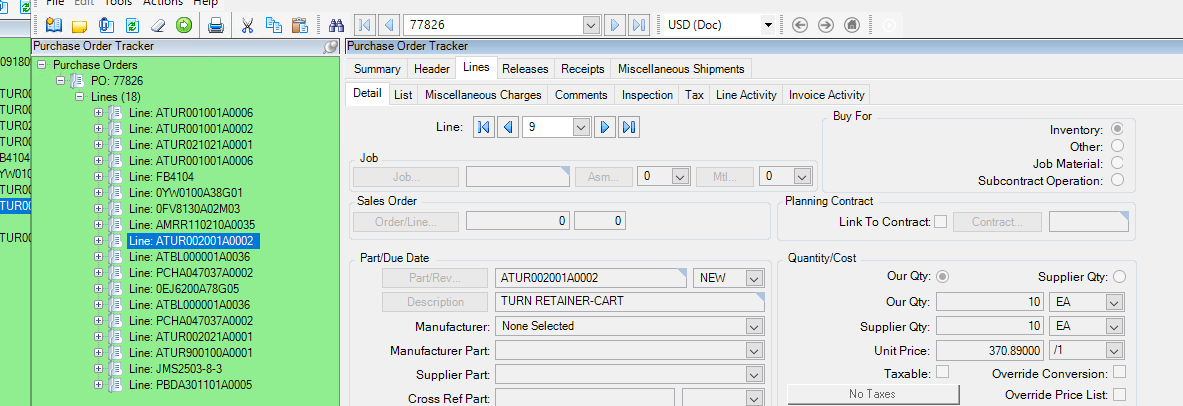
Line 9 rel 1 on the PO is for qty 10. You can see they did two receipts to equal qty 10, but then theres that extra line for qty 3 that is stuck in arrived.
Why wouldn’t the error have popped up in this case and prevented the line from being created?
@jrc1293 is it possible that they didn’t receieve the whole PO Line quantity at the time? Like was the PO quantity larger at the time and did it get revised down?
Also, are you sure they aren’t clicking okay to that message and proceeding?
Total qty for line 9 is 10. Does not look like there were any changes to the PO prior to receipt.
And when that message pops up you can click OK but it will not allow you to add an additional line, it will just continue to pop up because its a hard stop and will not let you save unless you correct it.
What happens if you enter a line for quantity less than the total. And then you enter a new line after that for the remaining and receive that next line.
Then go back and change the previous line to 3… does the same error message come up?
Hmmm, good thought!
I just tested it (using the 77939 PO with qty 20)- I created the first line for qty 10, then created another line for qty 10. Went back and changed the first line to qty 13 which brings the total to 23. I did get the ‘receipt quantity is greater than the purchased quantity error’ but did NOT get the hard stop business logic error, so it allowed me to save with the qty higher than the PO.
Again, I have no idea if that’s happening or not, or if the PO is being revised down at a later date, you’d have to ask for the original copy of the PO that got sent to the vendor to verify.