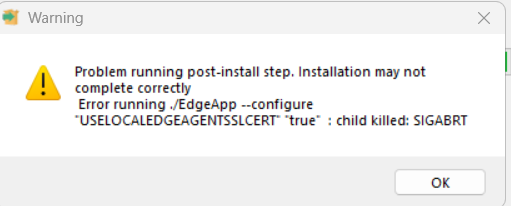
Has anyone seen the below when installing Edge Agent and if so how did you fix it?
1 Like
it cannot create and install certificate. Are you running as admin? What operating system your machine has?
Its my IT Manager that has the problem  , he is running as Admin and its Windows 11. We have just had another report of someone else having the issue as well now.
well, they can also check edge edgeagent_install.log in the %USERPROFILE% folder maybe there are more details about it.
Maybe there are some restriction on your system that prevent cert generation.
1 Like
I could understand that if it was happening to all the users the update was pushed out to but it is only 2 of about 50 that have reported this.
Configuring Edge Agent certificates
Executing ./EdgeApp --configure “USELOCALEDGEAGENTSSLCERT” “true”
Script exit code: unknown signal
Script output:
Error during EdgeApp configuration: The provided issuer certificate does not have an associated private key. (Parameter ‘issuerCertificate’)
Maybe this is the error related to permissions, or it covers the original error happened with cert, but I would go to the Local computer certificates, delete the Root CA for Epicor Edge Agent from Trusted root and rerun the installation.
Maybe it will work or it will show what when wrong with it at the first time.
I am seeing the same issue with 1 user…so far. I have tried un-installing Edge Agent and downloaded/re-installed but didn’t help. The re-install is returning the Warning Daniel shows.
Initially the user was getting the below error:
System.InvalidOperationException: Unable to configure HTTPS endpoint. No server certificate was specified, and the default developer certificate could not be found or is out of date.
To generate a developer certificate run ‘dotnet dev-certs https’. To trust the certificate (Windows and macOS only) run ‘dotnet dev-certs https --trust’.
For more information on configuring HTTPS see Enforce HTTPS in ASP.NET Core | Microsoft Learn.
at Microsoft.AspNetCore.Hosting.ListenOptionsHttpsExtensions.UseHttps(ListenOptions listenOptions, Action1 configureOptions) at Microsoft.AspNetCore.Server.Kestrel.Core.Internal.AddressBinder.AddressesStrategy.BindAsync(AddressBindContext context, CancellationToken cancellationToken) at Microsoft.AspNetCore.Server.Kestrel.Core.Internal.AddressBinder.BindAsync(ListenOptions[] listenOptions, AddressBindContext context, Func2 useHttps, CancellationToken cancellationToken)
at Microsoft.AspNetCore.Server.Kestrel.Core.KestrelServerImpl.BindAsync(CancellationToken cancellationToken)
at Microsoft.AspNetCore.Server.Kestrel.Core.KestrelServerImpl.StartAsync[TContext](IHttpApplication1 application, CancellationToken cancellationToken) at Microsoft.AspNetCore.Hosting.GenericWebHostService.StartAsync(CancellationToken cancellationToken) at Microsoft.Extensions.Hosting.Internal.Host.<StartAsync>b__15_1(IHostedService service, CancellationToken token) at Microsoft.Extensions.Hosting.Internal.Host.ForeachService[T](IEnumerable1 services, CancellationToken token, Boolean concurrent, Boolean abortOnFirstException, List1 exceptions, Func3 operation)
at Microsoft.Extensions.Hosting.Internal.Host.StartAsync(CancellationToken cancellationToken)
at KineticTray.Program.Run(StartupInfo startupInfo, CancellationToken token) in C:\agent_work\2\s\src\KineticTray\Program.cs:line 153
at KineticTray.Program.Main(String args) in C:\agent_work\2\s\src\KineticTray\Program.cs:line 64
1 Like
We managed to fix it and it was because our Anti-Virus was not allowing the generation of the certificate to be stored in the file location that it gets stored in. We have setup an exception for the moment.
4 Likes