We have had instances where our Zebra GK420 D printers would do this,
We found that using the Zebra ZP 450 driver corrected this even though its not for said device or model number.
Hate to say it but it prints the label upside down now, lol.
It doesn’t bother me but the people on the floor are complaining.
I tried going into the Printer Preferences and selecting 'Rotate 180 degrees but that did nothing.
I have not been successful flipping the SSRS report behind the labels, I think its because our current version off SSRS doesn’t support the expression to flip.
Other than that, possibly order labels that are wound the opposite direction? if the image coming out upside down is a huge issue, seems a bit trivial to me as the label can be applied right side up still after it prints.
I don’t see anyone finding a resolution for this issue, and I’m having the same issue as the original poster, except with a Dymo Printer. The issue lies within Edge Agent, as it’s specifying a “Paper Size” that I don’t have set anywhere. The logs contains:
And the issue is that I have the Printer setup, the RcvLabel rdl setup to print to DYMO 99014 Shipping / Name Badge Labels 54x101mm (2 1/8 x 4")
Has anyone figured out where Edge Agent could possibly be storing this rediculous smaller label size?
FYI, I’m setup for Client Printing, and the Dymo Printer is connected directly to my computer via USB - and I even redownloaded the driver for my exact printer model (Dymo LabelWriter 450 Twin Turbo)
I just can, for the life of me, figure out where Edge Agent is getting that information from. I have restarted edge agent, cleared out all Cache and Temp logs I can find. I simply don’t know where it’s getting this label size from, as it’s certainly not from the printer settings.
OP is talking about network EA, it takes settings from Printer UI.
As I understand, you are using local EA?
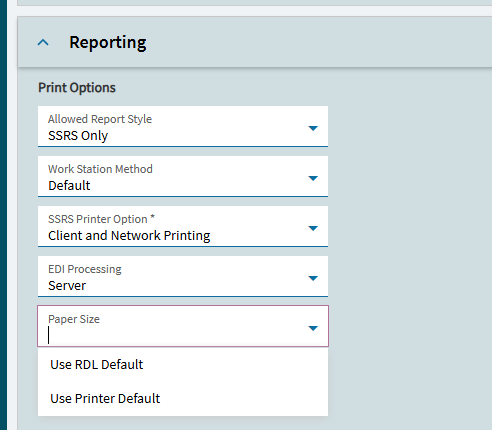
Depending on version, it takes size from SSRS report by default, see the call to
/Ice.BO.ReportSvc/GetSsrsReportPageSettings in the network log.
In can be changed in the Company Maintenance UI to use printer default stuff
I had a number of other projects come up in the past three weeks that put this on the backburner, so I apologize about the delated response. I’ll play around with that setting to see if it resolves my issue, as that looks very promising.
Thank you for the feedback! If it resolves my issue, I’ll come back and state as much (including which specific setting resolved it).
We also had this issue recently with some users and changing the printer settings (in Windows Devices & Printers) on their local machine pulled in the new correct dimensions when direct printing and printed the labels correctly.
Post from a few years ago but we are running into this exact issue. I am wondering if you were able to resolve the sizing issue “TDudek” and if so how?
I’m still waiting for Epicor Support to help me with an issue of Edge Agent not consistently processing print jobs to printers that I opened in October. I hadn’t even gotten back around to trying to resize labels, since more often than not all of my print jobs go directly into print preview.