Edge Client Now Required to open web pages in attachments?

Thanks for checking Simon!

@rich, sorry to bother you about this. Is this expected behavior? That is, requiring the Edge Agent to get to Internet Resources (like Google.com) in the Attachment Listing but not from the Document Link itself? This is the message from Support: CS0004738326 - Attachment Link Document Type requires Edge Agent for Internet Resources

It’s odd to require the EA in one slide out but not the other.

Thanks!

Mark W.

1 Like

What is in the Edge Agent log? you can access to them from EA tray icon context menu

Going to have to revisit. This layer in the day (Aus time)

Support says this is working as designed. I’ve added an Epicor Idea to suggest consistency between the two slide-outs.

Make Attachment Links consistent when requiring Edge Agent - 6005

I agree unless it is configuration problem which we will know when Simon shows us logs.

1 Like

Discovered this is still an issue in the latest 24.2.

2 Likes

Oops sorry @Olga forgot totally about this… Now my brain hurts thinking about that… Will try and get something later..

Sorry for the day, been staring at and rocking in the corner since that on-prem email came out :sob:

3 Likes

We don’t have the edge agent installed and our docs spawn but our weblinks dont. For links we have to click on the ref number and click on the link shortcut, as posted above.

For people that want their docs to spawn w/o the agent (this means you can also view the doc on an android tablet when in kinetic and attachm them too) you need to set Kinetic to handle the files and not the client.

We are on prem.

3 Likes

This is still an issue in 2025.2 as well and will be very annoying for our users as we use Attachment Links to URL throughout Epicor.

3 Likes

For Urls it needs the agent in 2025.2.10 but documents it’s happy with.

3 Likes

I opened another ticket about this.

5 Likes

Well I forgot my question anyway. So you don’t need to

2 Likes

Only just installed in on Wednesday so have not really had a chance to play with it.

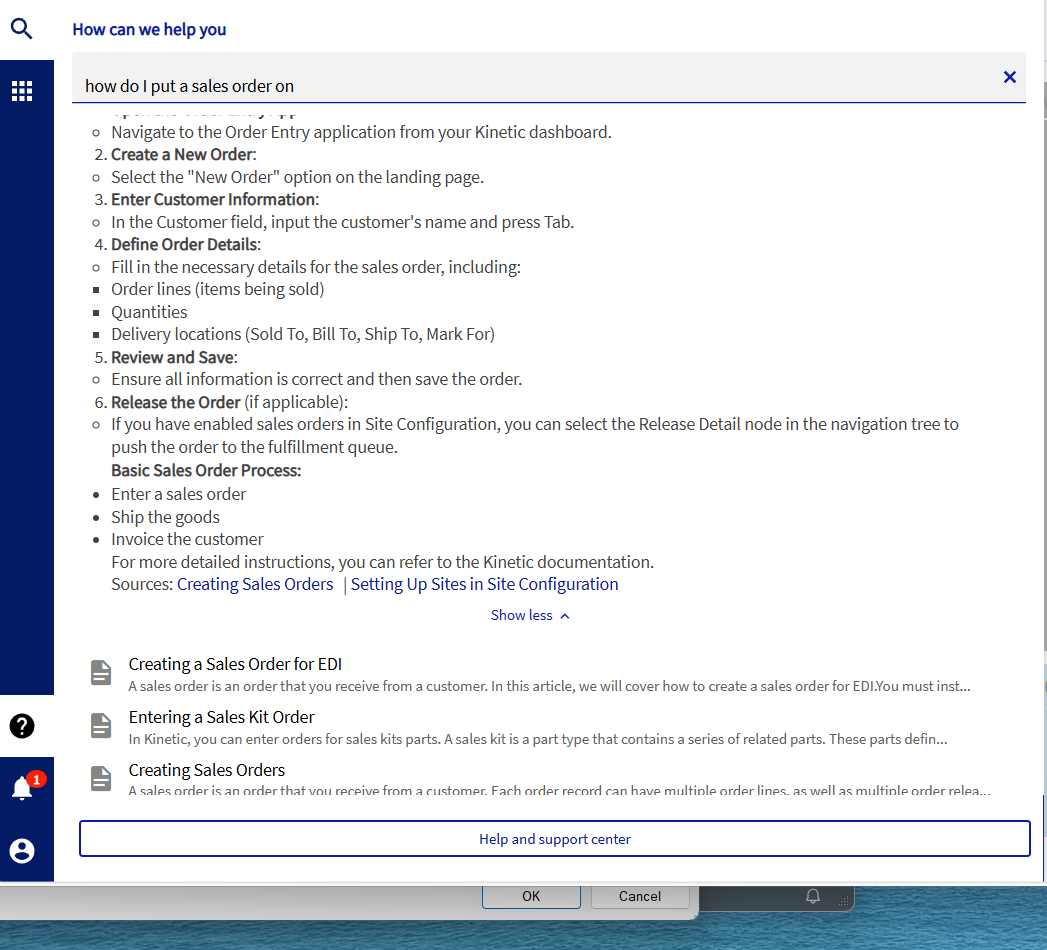
If you are on 2025.2 have you tried the AI in the search? If you click on the normal ? mark on the bottom left where you look for aticles. Type something in like “How do I put a sales order on” leave it for a good minute and you get an AI response. This is on prem BTW. Seems to work OOTB with no setup requirements, our ERP server does have an internet connection though.

Whaaat! (shuffles off to the office to check that out)

Tried various prompts, like “Do you have any tasty recipes?” and What colour is a baseball?" and got nothing so I guess that’s a good thing isn’t it?

I then gave it this “How can I make a BPM that sets the customer credit limit off?”

And actually got results.

AI Answer:
To create a BPM (Business Process Management) workflow that sets a customer’s credit limit to zero (effectively turning it off), you can follow these steps based on the provided content:

Create a BPM Workflow:

Open the BPM Workflow Designer.
Start a new workflow for managing customer credit limits.
Set BPM Data Field:

Use the Set BPM Data Field widget to configure the credit limit.
Select the appropriate field from the callContextBpmData table (e.g., ShortChar05).
Invoke Customer Method:

Add the Invoke BO Method widget to your workflow.
Configure it to call the GetById method of the Customer service to retrieve the customer details.
Update Customer Credit Limit:

Use the UpdateCustomer widget to set the credit limit.
Bind the local variable (e.g., dsCustomer) to the ds in-out parameter of the Update method.
Test the Workflow:

Save and enable the directive.
Create a test order for the customer to verify that the credit limit is set to zero and that the customer is placed on credit hold if necessary.
Promote to Production:

Once tested successfully, promote the BPM workflow to production.
This process will ensure that the customer’s credit limit is effectively set to zero, preventing any further credit transactions.

For more detailed steps and configurations, you can refer to the full guide on setting a customer on credit hold.

Sources: Putting Customer on Credit Hold
, not sure about you but I feel the answer is a bit off… I feel at this stage it would be a bit better if it returned just the Putting Customer on Credit Hold link.

I was talking to a person that works for a Generator company here in Aus and we were talking about AI. He said that currently total data center usage of grid supply is 2% with this going up to 8% by 2030! … It me to thinking… I feel there is an argument for every AI response to include the actual energy cost… and funnily he also mentioned the amount of water these buildings use, so a water consumption metric would be handy too. Sounds a bit to “Green” but it did make me sit back and think a bit about how you use AI.

Apparently the water consumption in our state has gone up in state so much in the last two years it warrants an extension to the Desal plant… a bit of a catch 22 you need water, but you need electricity to run the plant!
And perhaps it’s time to put down the keyboard, I think Friday night drinky poos is catching up with me :woozy_face:

2 Likes

I have tried to jailbreak the AI and got the same results. This AI is basically the 101 example MS show you how to code in AzureAI studio with data linking.

Just goes to show though … dont need to be on the cloud for this to work! :slight_smile:

2 Likes