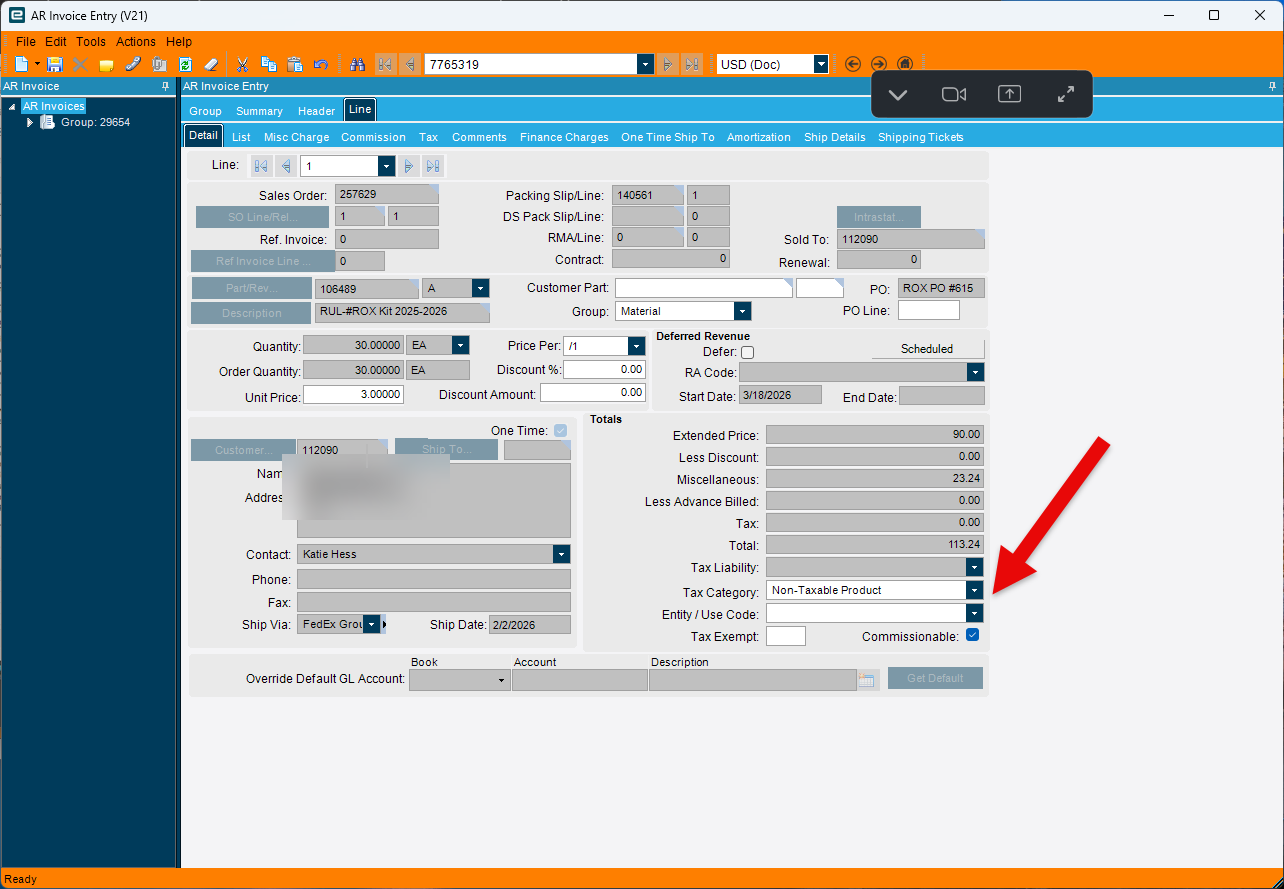
We just went LIVE with Kinetic a few weeks ago and are having a heck of a time editing AR invoices after something is shipped through quick ship. The process we’ve been advised to take is outlined below. Is there an easier way? We are losing our minds with this process…
Create cancellation invoice if the invoice has been posted OR delete the invoice if not posted
Find the pack and “un-ship” the pack so it becomes “freighted” again
Ensure we log into a shipping workstation that is NOT enabled (because if you are logged into a workstation that IS enabled, you cannot edit anything regarding freighting or staging)
Type something into the stage field and press the button at the top that says “stage”
Right-click on the stage field to open up ‘stage ship confirm’
Check the box to un-stage on the overflow menu
Navigate back to the pack and the status now says closed
Re-open the pack
Re-open the sales order
Edit sales order as needed
Navigate back to the same pack and check the box for shipped
Re-invoice by going to “get shipments” from AR invoice entry group
It might help to step back and understand why Epicor makes this so difficult. What you’re describing is generally meant to be the exception, not the rule.
Once something is shipped through Quick Ship, a physical label is printed and that package has effectively left the building. From a system perspective, it is trying to preserve that as a real world event. So when you go back and undo it, you are essentially rewriting history, which is why the process is so heavy.
That said, I am curious about your use case. Are you typically needing to:
correct quantities after shipment?
fix pricing or billing details?
handle partial shipments or mistakes at the dock?
Depending on what you are trying to accomplish, there may be an easier path that avoids fully unshipping and reprocessing everything, for example adjustments on the invoice side instead of reversing the shipment.
Correct quantities on line items (although this is less common than the above)
I totally understand what you’re saying regarding basically trying to re-write history, therefore making it difficult. However, these adjustments seem like every-day items that will come up often in normal course of business so I’m hoping there’s a better way to handle them. Like you noted, perhaps there’s an ability to adjust these on the invoice itself instead rather than un-doing the shipment and navigating back to the sales order?
The Unit price and billing aspects are fully updatable in the AR Invoice side before posting. Once the invoice is posted you’ll have to cancel it and re-create it. (but no ned to mess with the shipment)
Sales Tax similarly fully adjustable in the AR Side you don’t need to touch shipping to adjust Unit Prices, Taxes etc.
The only time you’d have to modify the Shipment is if you are physically changing the quantity that is shipping. Which again if you are using Quick Ship i’m not sure how that would ever be a thing because Quick Ship has Labels attached to that and changing the quantity would require new labels…
By the way I don’t necessarely recommend this approach but we place every shipment on Invoice Hold until we’ve verified that everything shipped correctly etc before Invoicing. This gives us a chance to revise things before posting the Invoice and having to go back and cancel it.
We attempted to edit the AR invoice, but the only thing we could adjust was line item unit pricing. We were still unable to edit sales tax or change the bill to or sold to customer.
Avalara taxes are based on the Ship To Address. If you printed a physical label that shipto address was already right (or you just mailed it to the wrong place all together)
So you shouldn’t have to adjust taxes. If you do it is because of Use Tax cattegory which can be adjusted at the Invoice Line level.
Avalara is looking at the sold to company to find tax certs, but tax rates will generate based on the ship to address. In this particular case we need to update the sold to customer as we have an exempt cert on file for the customer that’s supposed to be noted as the sold to.
Congratulations on going live it’s a big milestone.
I believe you can unship and unstage from the stage ship confirm screen so you only have reopen (maybe unfreight, I am not a quick ship person) the shipment.
100%, having to do that should be an exception so the root cause needs to be followed up. It does sound like partly data and data entry disciplines that Kinetic is calling out.
You mention you can catch the invoice, which is suggesting to me you do not have Auto invoicing enabled, it’s a blessing and a curse.
Whilst not a good business practice, it might be sensible to save your sanity for the short term to delay the posting of shipment invoices while you work through these exceptions. You could use the transfer invoice feature to move those exceptions to another invoice group if desired, so the rest can be processed.
Other features that may help is the posted invoice update, but based on what you have mentioned that would not add much value to assisting with this problem.
As far as orders go and quantity, you should be able reopen the order either add a new line, or open the line and add a new release which you could do another shipmen If you have oversupplied then you could RMA the qty. Later versiona of kinetic allow you to create the from RMA the shipment as well, something you were not able to do previously.
I totally understand that’s a whole lot of extra steps. It can be frustrating. Welcome to ERP.
We are here to support you on your journey as best we can.