Hi
I would like to Execute A BAQ within a Function to create multiple records in a UD Table. I have read some posts and have not had much luck doing this. I would also like to send this BAQ some parameters . From what I understand widgets are what I should be using but am open to any suggestions as I am pretty new to this technology and perhaps there is an example I am overlooking. Any help is greatly appreciated!!
Say more
Execution a baq within a function while not imposible seems like jumping over a dollar to pick up a cent.
In a function you are already server side and have access to the entire Db context.
Can you tell us more about the business problem
First, I completely agree with Jose about knowing what business problem you’re trying to solve.
I will push back a little bit on using a BAQ. If you need company, site, territory security or have complicated joins, then a BAQ can be a better choice IMHO.
I developed a complicated program in vb.net for the classic interface and do not have alot of skills in C# at the moment. My thoughts are that I should try and minimize writing code so I developed a reasonably complex BAQ that does perform all the calculations needed. At this point all I really would need to do is create records in a UD table by looping through all the rows in the results of the BAQ. Any suggestions on a better approach are certainly appreciated as I am not that great at Customizations in Kinetic yet.
Yes. This is a description of your technical problem trying to implement a particular solution. What is the business problem you are solving? What is going into a UD Table? Who is accessing this table? Knowing this can sometimes lead to other opportunities.
The business problem is i had to develop a custom Work In Process report.We have worked with consultants to try and use the existing one in Epicor and it will not meet our needs.The reason a UD Table is being used is to store the values for all periods upon which it is executed so that a comparision can be done to previous months.
The users accessing this are the Finance department.
Gotcha. It’s a BI solution. I assume we run this at month end then?
yes and sometimes mid-month
I think all the code you need exists around here:
- Execute a baq from a function
- Reference data in the results
- Insert records into a UD table
There are threads on all these topics just have to piece it together.
there are a couple to get you started . . .
But there is actually an easier way to do this if you are able to run it on a schedule and don’t need ad hoc parameters - just set up an executive query. This stores the results of your BAQ into a cube. You can schedule your executive query in the system agent and it will do either delete/replace or upsert for you depending on how you configure it. The catch is that your data has to be unique to two key values (dimension 1 and dimension 2).
But if you can get your data to fit this solution requires zero code.
Interesting. Have you considered splitting the extract and the upload? It’s fairly easy to schedule BAQ execution and download from PowerShell using the BAQSvc REST endpoint. This gives you the option to run this as often as you like. You can continue to upload into the UD Table but in the future it paves the way to upload into other BI systems like a Data Lake or Data Lake House. 
We do not have an exact schedule for when the report needs to be run and it does require parameters .
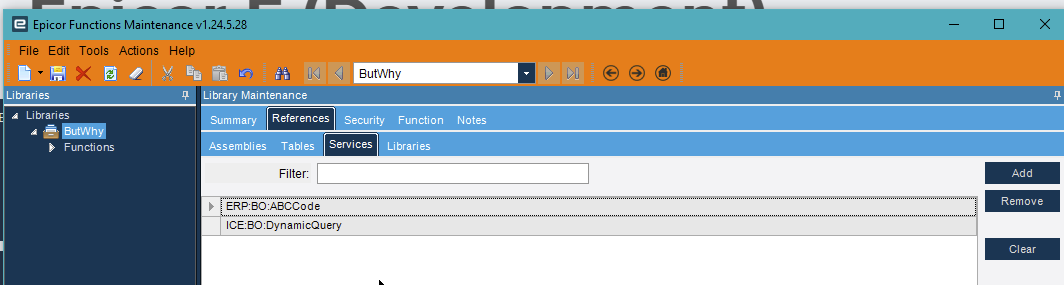
You can do it with widgets in a function. You need to add the service to the function so you can get to the BO. Then you’ll get paramaters by ID, set the results to a queryexecutiondataset variable that you create. Then you set a field by query, where you set each of your parameters in the dataaset, then you call you BAQ with GetListByID. You’ll make a table variable for the results, then you do what you want with it from there.
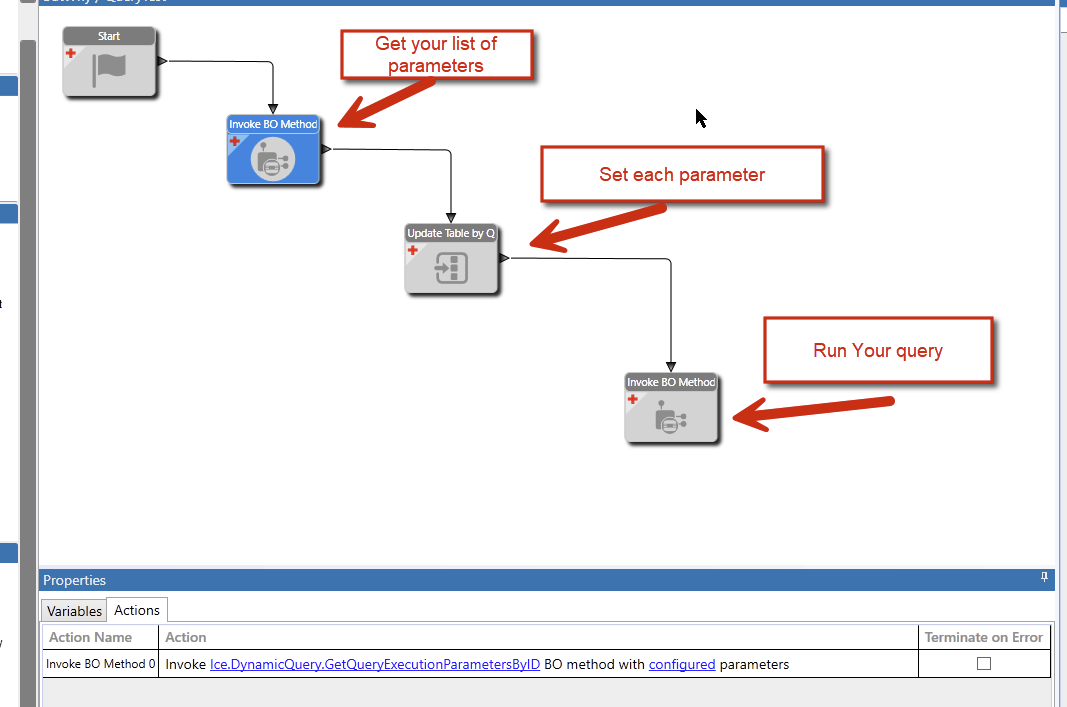
But, like others have mentioned, you can do the updates that you want in an updateable BAQ, so making a function for this is mostly pointless unless there is more information to the story that you haven’t shared. You can just run “BAQ Export” process to just run the BAQ, or slap it on a dashboard to run it.