I am modifying order tracker for my Engineering department. I have field level security on all the fields pertaining to price. My question is how do I hide the $$$ information on the explorer page? That page is helpful for them, but I don’t need them seeing the total amounts. I cannot do it in application studio and I can’t figure out what fields they are to add field level security on them.
Additionally, is there a way to do field level security on calculated fields?
I thought in field security maintenance you could set the access to Read, Full or None. I’ve never tested it, but I would think setting the access to none would mean you could not read the value.
To your other questions about security on calculated fields. If you mean UD fields then it would be in the same place, but I assume you’re talking about calculated fields for BAQs. I am not aware of anything you could do but let me know if you find something on that end.
For calculated fields, as far as I know your only option there would be to restrict one or many of the fields being calculated (since its not an actual stored field).
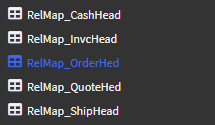
I couldn’t tell you what calculations they are doing but the explorer tab pulls from CashHead, InvcHead, OrderHed, QuoteHed, and ShipHead tables, so with some trial and error you should be able to find which fields to add security to.
(These are the data views, if curious) →
To secure the Order Tracker for Engineering, create a Post-Processing BPM on SalesOrder.GetRows or GetList. Use a Condition widget to check if the user is in the Eng SecGrp.
If true, use a Custom Code block to loop through the result dataset and set all pricing fields—like OrderAmt, UnitPrice, and any Calc Fields—to zero.
This server-side approach is more robust than FLS or App Studio because it wipes the data from the BO response before it reaches the UI, effectively hiding it from the Explorer/Tree views and grids regardless of user personalizations.
So for anyone curious, the invoice field referenced is invoiceamt on invchead. Even though I have field level security on it, it apparently doesn’t apply to the explore page. This has been confirmed by epicare and they recommended I submit and idea. So Enable Field Level Security on Explore Page | Epicor Ideas Portal