Is it possible to attach a part drawing from Epicor to a custom Job Traveler (Shop Order) BAQ SSRS Report?
We are trying to get the part drawings to print on the back of the shop order reports in one printing, I have tried to do this in an APR and it does not print on the front and back because the printer cannot combine two print jobs onto one paper.
100% if you have ECM. You can use APR to to add the drawing.
Failing that then you would have do a custom print from a button calling a function to do the work. I am sure I have seen other posts about this previously
I have never had a need for this, so there may be a configuration option, that enables this which would be rather nice.
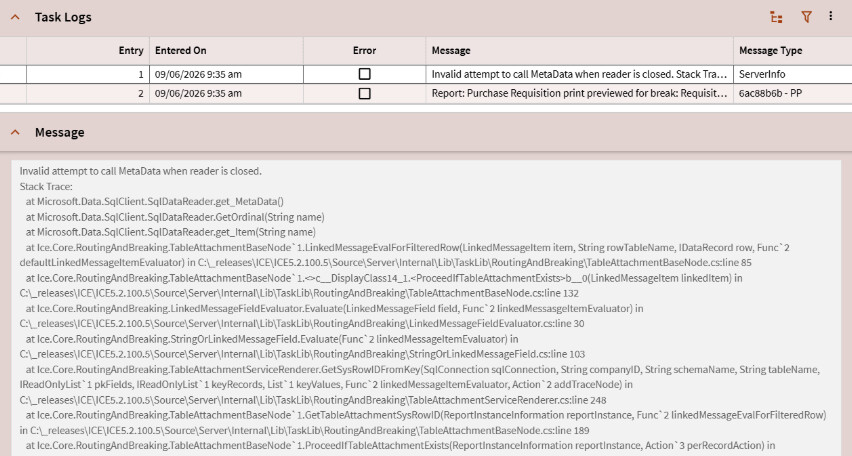
I put your screenshot in to see what Claude.AI says and this is what it suggested you to look into: Where it’s happening:
The stack trace points squarely into the Routing and Breaking / Table Attachment pipeline:
TableAttachmentBaseNode — this is the ICE framework component that handles linked messages / table attachments on reports (things like routing rules, linked BAQs, or attachment conditions on print jobs)
LinkedMessageEvalForFilteredRow — it’s evaluating a linked message condition against a row of data
TableAttachmentServiceRenderer.GetSysRowIDFromKey — it’s trying to resolve a SysRowID from a key, which involves a DB query via SqlConnection
The reader closes before the metadata resolution finishes — likely because the SqlDataReader is being accessed outside its expected scope, possibly due to a nested read operation or a connection being reused.
Common causes:
A BAQ-linked message or routing rule attached to the Purchase Requisition report has a condition that triggers a secondary DB lookup, and the outer reader is already closed by the time it executes
The report style or routing rule references a table attachment or linked message with a filter expression that causes this re-entrant read
ICE version bug — this pattern (SqlDataReader misuse in TableAttachmentBaseNode) has appeared in specific ICE 5.x patch levels
Things to check:
Report Style in Report Style Maintenance — look at the Purchase Requisition report style being used and check if it has any linked messages, routing rules, or table attachments configured
Auto-Print / Task Agent routing rules — if this report is being submitted via agent (looks like it from “previewed for break”), check the routing/breaking rules on the task
ICE patch level — you’re on ICE 5.2.100.5 per the stack trace paths (C:\_releases\ICE\ICE5.2.100.5). It’s worth checking if a later patch addresses this
Try a different report style — if there’s a simpler style without linked messages, see if it reproduces