Function to Print Customer Statement then save to a file share

I’ve managed to get a function to preview a report or to email it.

Is there a way to get it to save the file say to the file share that Epicor gave us? There is a save local method but it was cryptic and I was not able to get it to do anything concrete.

Working code to email customer statement

using (var context = Ice.Services.ContextFactory.CreateContext<ErpContext>())
{

    var custStatSvc = Ice.Assemblies.ServiceRenderer.GetService<Erp.Contracts.CustomerStatementSvcContract>(context);
    var ds = custStatSvc.GetNewParameters(); 
     
     var paramRow = ds.CustomerStatementParam[0]; // Row 0 is parameters, Row 1 is Report Style parameters
     
     paramRow.EndDate = DateTime.Now;  // Default today
     paramRow.BeginDate = DateTime.Now.AddDays(-30);  // Default 30 days ago
     paramRow.AgentID = "System Task Agent";
     paramRow.ReportStyleNum = 1001;
     
     paramRow.AutoAction = "SSRSPrint"; // "SSRSGenerate"; // "SSRSPreview";    // Generate or Print - Preview opens Excel, Print forces PDF
     paramRow.TaskNote = DateTime.Now + " Test";
     
     paramRow.SSRSRenderFormat = "Excel";


     paramRow.EMailTo = "you@yourcompany.com";
     paramRow.EMailBody = "Customer Statement";
     
      string userID = callContextClient.CurrentUserId;
      paramRow.WorkstationID = "web_" + userID;
     
      paramRow.SSRSRenderFormat = "Excel";  // To force render 
      paramRow.AttachmentType ="Excel"; // To force attachment type
      
      
     //custStatSvc.SubmitToAgent(ds, "System Task Agent", 0, 0, "Erp.UIRpt.CustStat");
      custStatSvc.SubmitToAgent(ds, "SystemTaskAgent", 0, 0, "Erp.UIRpt.CustStat");
}
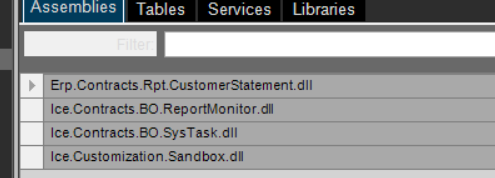
Yes, you will want to switch to RunDirect, and then just grab the bytes, and push them.

Let me dig up one of my examples.

byte[] reportPDF = null;
string taskNote = Guid.NewGuid().ToString(); //Magic

CallService<Erp.Contracts.CustomerStatementSvcContract>(custStatSvc =>
{
    var ds = custStatSvc.GetNewParameters(); 
     
     var paramRow = ds.CustomerStatementParam[0]; // Row 0 is parameters, Row 1 is Report Style parameters
     
     paramRow.EndDate = DateTime.Now;  // Default today
     paramRow.BeginDate = DateTime.Now.AddDays(-30);  // Default 30 days ago
     paramRow.AgentID = "System Task Agent";
     paramRow.ReportStyleNum = 1001;
     
     paramRow.AutoAction = "SSRSGENERATE";
     paramRow.TaskNote = taskNote;
     
     paramRow.SSRSRenderFormat = "Excel";

     custStatSvc.RunDirect(ds);
});

long sysTaskNum = 0;

CallService<Ice.Contracts.SysTaskSvcContract>( st =>
{
    sysTaskNum = st.GetList( $"TaskNote = '{taskNote}'", 0, 0, out _ ).SysTaskList.FirstOrDefault().SysTaskNum;
});


CallService<Ice.Contracts.ReportMonitorSvcContract>( rm =>
{
    var rptSysRowID = rm.GetList( $"SysTaskNum = {sysTaskNum}", 0, 0, out _ ).SysRptLstList.FirstOrDefault().SysRowID;
    
    reportPDF = rm.GetReportBytes(rptSysRowID);
    
});

if(reportPDF != null)
{
    var sb = (ISandbox)Sandbox; //Makes autocomplete behave
    
    var fp = new FilePath(ServerFolder.FileShare, "SomeFileNameYouDoYou.xlsx");

    sb.IO.File.WriteAllBytes(fp, reportPDF);
}

Probably not exactly right, but should get you started. Coding here in the editor lol.

Thank you so much, I was able to work with it

//P0001 - Setup function

byte[] reportPDF = null;
string taskNote = Guid.NewGuid().ToString();

using (var context = Ice.Services.ContextFactory.CreateContext<ErpContext>())
{

    var custStatSvc = Ice.Assemblies.ServiceRenderer.GetService<Erp.Contracts.CustomerStatementSvcContract>(context);
    var ds = custStatSvc.GetNewParameters(); 
     
     var paramRow = ds.CustomerStatementParam[0]; // ParamRow.BeginDate
     
     paramRow.EndDate = DateTime.Now;  // Default last day previous month
     paramRow.BeginDate = DateTime.Now.AddDays(-30);  // Default first day last month
     paramRow.AgentID = "System Task Agent";
     paramRow.ReportStyleNum = 1001;
     
     paramRow.AutoAction = "SSRSGENERATE";//  "SSRSPrint"; // "SSRSGenerate"; // "SSRSPreview";    // Generate or Print - Preview opens Excel, Print forces PDF
     paramRow.TaskNote = taskNote;
     
     paramRow.SSRSRenderFormat = "Excel";


      string userID = callContextClient.CurrentUserId;
      paramRow.WorkstationID = "web_" + userID;
     
      paramRow.SSRSRenderFormat = "Excel";
   
      custStatSvc.RunDirect(ds);  // Generate the report
      
      // Get the task number
      long sysTaskNum = 0;

      CallService<Ice.Contracts.SysTaskSvcContract>( st =>
      {
          sysTaskNum = st.GetList( $"TaskNote = '{taskNote}'", 0, 0, out _ ).SysTaskList.FirstOrDefault().SysTaskNum;
      });
      
      // Get the report
      CallService<Ice.Contracts.ReportMonitorSvcContract>( rm =>
      {
          var rptSysRowID = rm.GetList( $"SysTaskNum = {sysTaskNum}", 0, 0, out _ ).SysRptLstList.FirstOrDefault().SysRowID;
          
          reportPDF = rm.GetReportBytes(rptSysRowID);
          
      });
      
      string filename = DateTime.Now.ToString("yyyy-MM-dd") + " CustSt " + ((DateTime)paramRow.BeginDate).ToString("yyyy-MM-dd") + "_to_" +  ((DateTime)paramRow.EndDate).ToString("yyyy-MM-dd") + ".xlsx";  


      // Add subfolder
      filename = "Daily/" + filename;
    
      if(reportPDF != null)
      {
          var sb = (ISandbox)Sandbox; //Makes autocomplete behave
           
          var fp = new FilePath(ServerFolder.FileShare   ,filename);
      
          sb.IO.File.WriteAllBytes(fp, reportPDF);
      }
}

Edited to preformat text and to add a subfolder.