Forsooth mine database lacketh the necessary tables and fields to meet mine needs.
I have avoided these monstrosities so far. Something about the generic nature gives me the creeps. I like my table names and fields to make some form of sense and this feels a bit janky, however I do have a situation that a nice table in Epicor could help fix.
What is the general feeling on using the UD tables? Avoid them at all costs? Only use them if your hair is on fire, OMG is my hair on fire? Or maybe its more like, hey if it meets your needs that is what they are there for?
Minimal situation details:
Line items have a UD field that will inform our installers how to install the product, but the field contains a Code, not plain text. The installers would like a plain text description of the code and a second field that defines how it will mount. If I had a table that contained the definition of these codes I could use that in the report style to display the Description and Mounting type.
An alternative I could use; create two new UD fields on the line items to store that information directly on the line item. The tool that is populating this information could be expanded to populate that information.
Treat the UD tables like any other. Structurally, they’re sound. Don’t fear them.
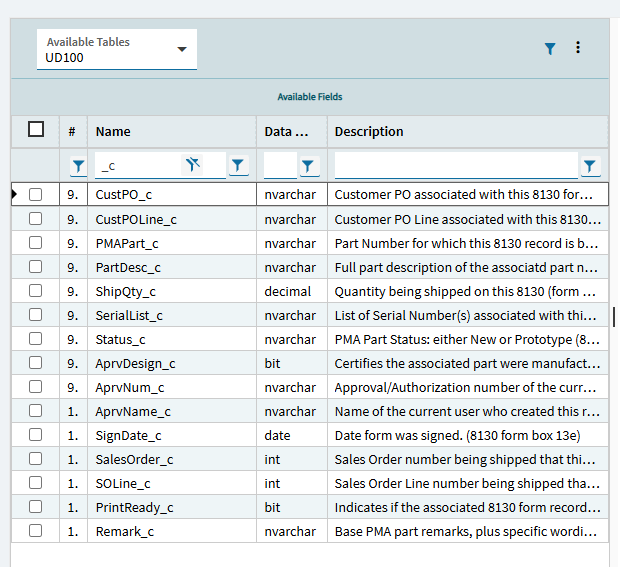
BUT… my advice is to pretend the stock fields they provide don’t exist. Create your own UD fields ON your UD tables.
Then you can have UD14.PartNum_c instead of UD14.ShortChar01.
Don’t settle for the generic fields (names) they give you. Create your own so you can easily know what they are.
Based on your use case, though… have you thought about using User Codes? You create a code, give it a description. Add the UserCode table to whatever you’re working on. May be a good direction for you. I use them all the time.
It sounds like just the UD fields on the line would meet your need pretty easily, not sure I would go to a UD table for that.
On another note, I share your generic column name phobia and wanted to let you know that UD tables can have UD fields added to them. You need to use the UD table key fields, but you can create UD fields instead of using the generic ones. A lot more work, but possible.
Sorry have to disagree. UD tables are fine up to a few thousand records. Once you get into the tens and hundreds of thousands of records they are a major struggle because they aren’t indexed and you can’t add indexes to them.
For a Code/Desc lookup use UD Codes instead (User Codes).
UDCodeType is the Header, UDCodes in the child. All native functionality. In the UDCodes table you put your ID into CodeID and your friendly description into CodeDesc. Any reporting just link to the UDCodes table (criteria = CodeTypeID that you gave it).
We use a ton of the UD tables but we also keep an Excel document that just lists what the generic fields are actually.
As others have said, you can also add your own fields to them. Some of the ones that I want to do specific things, I have added. i.e. and EmpID_c field that is like ERP.EmpBasic.EmpID so it allows me to use it in the same way.
As basically everyone else has said, I add my own UD fields to the UD tables, and I second (or third? fourth?) using User Codes for the scenario you mentioned.
Another thing I do, since you have to use the UD table key fields, is to update their label in Extended Properties, so that at the very least when I use that field in a BAQ or add it to something, it will come across with a label different than the generic Key1, etc.
so funny thing about that. When you are looking at the list of fields in the baq designer, before you select anything, the labels are not there. But then once you move a field to the selected list, the label shows up. Irritating but I don’t have the motivation to log a ticket about it. I just move all to the right side to see the labels and then remove what I don’t want.
Another thing I now always do is even if I’m not creating any UD fields in one of the Ice.UDxx tables specifically, I still go to UD Column Maintenance and create the table - then in the description capture what it is used for. Be kind to your future self, document it - and go back and document the ones that have been used in the past and the legacy Excel sheet isn’t up to date!
You can query the Ice.BpDirective table, Ice.QueryHdr table etc for any references to UD01, UD02 etc to try and gain some understanding of what it might be used for.
We have used UD Tables for years with no issues for solutions that are not met by standard Epicor modules and require multiple fields, for example PTO maintenance and project install details including trucking schedules, etc. The tables can also be made available within the standard modules, for example adding trucking schedules as a dashboard or BAQ to Order Header using App-Studio. We have also used UD Codes when the need is simpler, for example a drop-down list of static values in a couple of fields. If the information needs to be dynamic and the end user needs to be able to add/remove records then I suggest UD Tables whereas if the list is static we would use user-codes. So far the standard available fields in the UD tables have met our needs. The UD fields can also be “re-named” in Extended Properties so they automatically display that name when adding to BAQ’s, etc. We are on cloud and have not seen performance issues however the qty of records in these tables is less than 5K records.