I have been struggling with generating reports via REST for months. I found that Epicor seems to require a UI user session for doing anything with the system monitor (lease let me know if my judgement is incorrect here). The way I found to get around this is for any project that requires generating reports or PDFs is to make a virtual machine, start an automated Selenium browser session to log in and wait while the rest of my code executes, generating my PDFs and reports and downloading their bytes. Along with that, I need to include backup code in case Selenium doesn’t establish, crashes, session timeouts, wait/retry conditions while the PDF generates and downloads (IF it generates) etc. As you can imagine, my code gets extremely complex for projects that seem relatively simple. I want to know once and for all if anyone else is having this issue, whether functions should be used here or I am just using the wrong calls. The task I am trying to complete right now is generating a Stock Aging report and exporting as a CSV. I could do this with selenium/playwright while I execute the call, but I want to know if there are better and faster methods.
I mainly code in Python for our Epicor projects, and I am open to doing more with functions, but I can’t ever figure out how to use them properly for what I need.
So, a few thoughts:
Decide if you need the data or the report. If you can get the same data from a BAQ, the task is so much easier.
If you have to do a report, you don’t have to go through the System Agent. Each report has a RunDirect method.
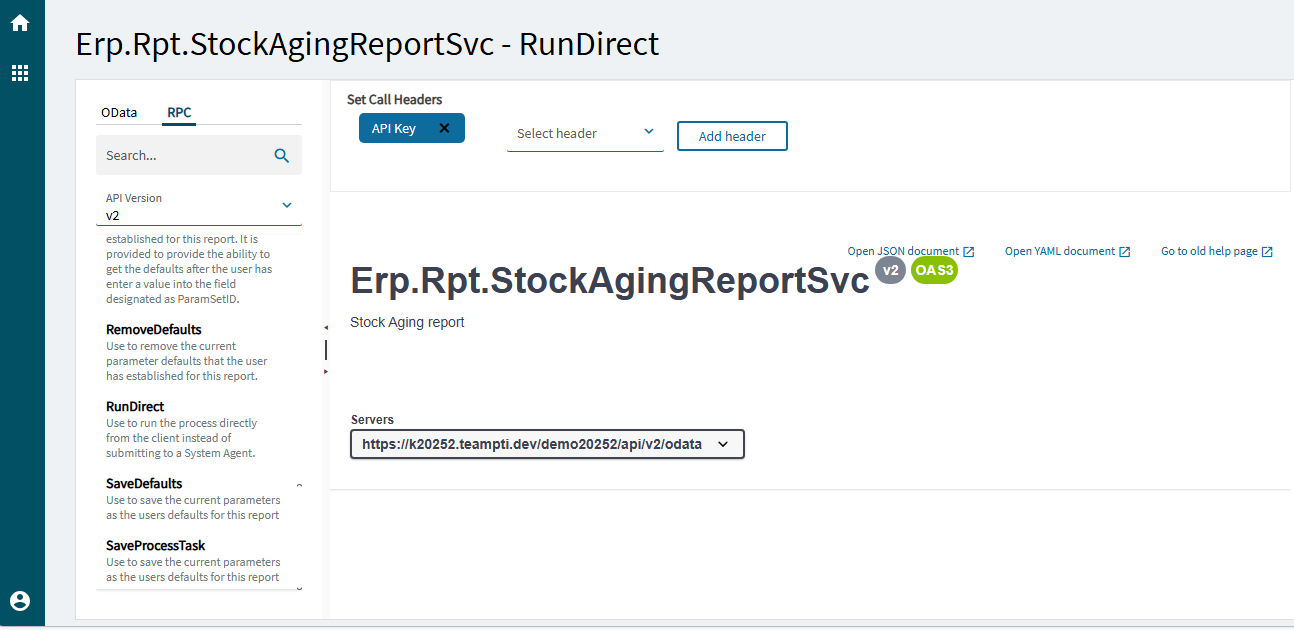
Warning: the System Agent will prevent a bunch of reports running at the same time and bringing down your system. Having a bunch of people using RunDirect could affect performance. It’s a blocking call, so if it takes too long, the REST request may timeout.
Alternatively, you could go the Generate Only route when submitting to the System Agent and then put a directive on SysTask that calls a WebHook that lets your program know it can grab the bytes.
Not to my knowledge. You can call a Report Service and execute the SubmitToAgent() method to execute reports within a function. You can have the function save the file, email it somewhere, or return the byte array (you’d need to encode it to a string) from an outside call.
Since you’re looking for csv, you could even just return the whole thing as a text string and save it locally as a .csv.
Thanks, Mark. I have tried RunDirect earlier, but I can’t seem to get the payload right. I tried copying & pasting the payload from SubmitToAgent in the UI, and when I make the call in my program, it takes a few seconds to execute but returns empty JSON, just like SubmitToAgent does. Then when I log into the UI, I see the task as completed in my system monitor but it won’t let me download it as if my call got corrupted along the way.
Using SubmitToAgent then GetReportBytes with the same UI payload with wait conditions works for my other projects. I have used it in PO PDF generation and payment remittances, however, I found that GetReportBytes will only download when I have the UI open, hence my use of Selenium.
For my projects involving PDF generation, they sort of look like this: open selenium and log in → use the payload from the UI to call SubmitToAgent under my username → find the number of system tasks I used → while number of completed tasks < tasks + 1, wait 5s → call GetReportBytes with that new sysRowId.
If I could use RunDirect to just return the raw bytes, I would totally do that. I have tried it several times on different projects and I have not been able to get it right and I feel like I waste time. I also tried it with functions, but I only got as far as getting the task to show up in my notifications and my code IDE locking up.
Hi Kevin,
See my response to Mark. I can call SubmitToAgent with the same dataset from the UI (typically), but using GetReportBytes only works for me when I am actually in the UI. I found this behavior very strange with Epicor. When I try RunDirect with the same payload, it seems to run but it doesn’t return anything. When I try RunDirect in an Epicor function, my code IDE freezes.
Submit to agent hands the report processing off to the system agent to process and releases the thread back to the client. If using this you then need to poll for the systask / report to be completed before running get report bytes.
Run direct runs the report straight away in the current thread. This still returns a blank response however when you do get the response, which may take time / time out, then you know the process has finished and can call get report bytes straight away.
I thought this was the case as well, so I called RunDirect with the payload in the UI, then called SysMonitorSvc/GetReports and grabbed my latest SysRowID and passed that into GetReportBytes and it did not return my CSV.
Here is my quick “back of the envelope” code to try to eliminate confusion:
ds = {'ds': "extensionTables": [],
            "StockAgingReportParam": [
                  {My report params I won't bore you with unless you really need them...}],
            "ReportStyle": [
                  {Report style I won't bore you with unless you really need them...}]},
      "agentID":"",
      "agentSchedNum: 0,
      "agentTaskNum": 0,
      "maintProgram": "Erp.UIRpt.StockAgingReport"
}

r = requests.post(BASE+'Erp.Rpt.StockAgingReportSvc/RunDirect',headers=H,json=ds) # returns empty JSON (as expected)
# could sleep here but doesnt really matter since I am running this in a notebook
def get_latest_rowid() -> str:
    payload = {
        'RetrivalType': "Days",
        'interval': '5',
        'rptUserID': 'username',
        'rptWorkStationID': ''
    }

    try:
        r = requests.post(BASE + "Ice.BO.SysMonitorSvc/GetReports",headers=H,json=payload)
        rows = r.json()['returnObj']['SysRptLst']
        if not rows:
            raise ValueError("No reports found in system monitor")
        return rows[-1]['SysRowID']
    except (KeyError, IndexError, TypeError) as e:
        raise

rowid = get_latest_rowid()

r = requests.post(BASE+'Ice.BO.ReportMonitorSvc/GetReportBytes', headers=H,json={'sysRowId':rowid})
res = r.json()['returnObj']
import base64
with open('output.csv', 'wb') as f:
    f.write(data)
According to what I have heard so far, this seems like the correct way to do it, but my row ID doesn’t get added to. If I run this again and again the same row ID gets returned and I found a while back that rows[-1] returns the latest SysRowID.
You can get the byte array from the report if you query the SysRptLst table field RptData.
You can find the correct record if you set the SysTask.TaskNote field prior to running SubmitToAgent or RunDirect. Here’s an example:
Func<int, byte[]> GetASalesOrderPDF = someOrderNum => {

    byte[] reportPDF = null;

    CallService<SalesOrderAckSvcContract>( soa => {

        string taskNote = Guid.NewGuid().ToString();

        SalesOrderAckTableset salesOrderAckTS = soa.GetNewParameters();

        SalesOrderAckParamRow paramRow = salesOrderAckTS.SalesOrderAckParam.First();

        paramRow.OrderNum = someOrderNum;
        paramRow.AgentID = "SystemTaskAgent";
        paramRow.AutoAction = "SSRSGENERATE";
        paramRow.ReportStyleNum = 1008;
        paramRow.TaskNote = taskNote;

        soa.RunDirect( salesOrderAckTS );


        reportPDF = Db.SysRptLst.Join( Db.SysTask,
                                    x => new { x.Company, x.SysTaskNum },
                                    y => new { y.Company, y.SysTaskNum },
                                    (x,y) => new { sr = x, st = y } )
                                .Where( z => z.st.TaskNote == taskNote )
                                .Select( z => z.sr.RptData )
                                .FirstOrDefault();

    });

    return reportPDF;
};

var rptBytes = GetASalesOrderPDF( orderNum );
Since this one is a PDF, I have a rptBytes variable that I can encode Base64 and return as text, or attach the bytes to an email, and sent the pdf wherever I want.
The SysRptLst.RptData field appears to be a byte array even when it’s a CSV.
Here’s the PowerShell script I use to download the bytes outside the UI. The sysRowId GUID is the record number that holds the file IIRC. It could be cleaned up. We just couldn’t download a report via the UI and this is what I used to grab it.
# Get-ErpRptDataFile
$pscred = Get-Credential
$headers = @{ 'accept' = 'application/json'
              'Content-Type' = 'application/json'}
$form = ConvertTo-Json(@{ sysRowId = 'F9f07848-77aa-4bb7-837e-6d6a2e11175a'})

$result = Invoke-RestMethod -uri "https://server/instance/api/v1/Ice.BO.ReportMonitorSvc/GetReportBytes" -Method Post -Credential $pscred -body $form -Authentication Basic  -Headers $headers

$result.returnObj | out-file -FilePath "C:\Documents\insp.txt"

$filename = "C:\Documents\insp.xlxs"

$bytes = [Convert]::FromBase64String($result.returnObj)
[IO.File]::WriteAllBytes($filename, $bytes)
Bingo. TaskNote is your friend.
This is how you query and find the proper sysrowid to get your bytes.
Here is an example of using all the business objects instead of using the Db object to get the sysRowId for GetReportBytes.
      //test data
      orderNum = 275977;
      reportStyle = 1005;

      string uniqueStringToIdentifyReport = Guid.NewGuid().ToString();

      CallService<Erp.Contracts.SalesOrderAckSvcContract>(soa =>
      {
          var soaTS = soa.GetNewParameters();

          var soaParams = soaTS.SalesOrderAckParam.FirstOrDefault();

          soaParams.OrderNum = orderNum;

          soaParams.AutoAction = "SSRSGENERATE";
          soaParams.ReportStyleNum = reportStyle;
          soaParams.TaskNote = uniqueStringToIdentifyReport;

          soa.RunDirect(soaTS);

      });

      CallService<Ice.Contracts.SysTaskSvcContract>(sysTask =>
      {
          var thisReportTask = sysTask.GetList($"TaskNote = '{uniqueStringToIdentifyReport}'", 0, 0, out _).SysTaskList.FirstOrDefault();

          if(thisReportTask != null)
          {
              var sysTaskNum = thisReportTask.SysTaskNum.ToString();

              CallService<Ice.Contracts.ReportMonitorSvcContract>(rptMon =>
              {
                  var thisReport = rptMon.GetList($"SysTaskNum = {sysTaskNum}", 0, 0, out _).SysRptLstList.FirstOrDefault();

                  if(thisReport != null)
                  {
                      var reportDataBytes = rptMon.GetReportBytes(thisReport.SysRowID);
                      reportB64 = System.Convert.ToBase64String(reportDataBytes);
                  }
              });
          }
      });
I appreciate everyone’s input and it was helpful! Here is what I decided to do:
Generate a random string of 32 alphanumeric characters and put that in the task notes, send a RunDirect with the UI payload (with the exception of the task note) then use the quick BAQ I wrote on the SysRptLst to filter for that string and return the bytes from the RptData field. I did not know about the task notes prior to this discussion.
The true issue is that my function I shared for returning the row ID only works when a UI session is active, so running that function will return stale row IDs every time. Rather than chasing around the row IDs, I figured it would be better to have a unique identifier directly in the task note after calling RunDirect and filtering to that rather than trying to find the sysrowid to filter against.
I think you really need to write an epicor function similar to above and call that from your program.
Glad you got it working though. 
You are probably right, and that likely is a cleaner and less “hacky” way to do it, but I have a handful of projects that utilize generating reports and it’s just easier for me to copy and paste the payload from the UI and change a few things whenever I need to do this. This eliminates the need for writing individual functions every time I need to do this, it would keep all my code in one language and make my documentation more readable.