First make sure that the Grid is “selectable” (Gridmodel > Selectable), add a Column to the grid called “Selected”(Gridmodel >Columns) mark it as “selector”(Gridmodel >Columns>Selector) and “hidden”(if you dont want the Field Visible).
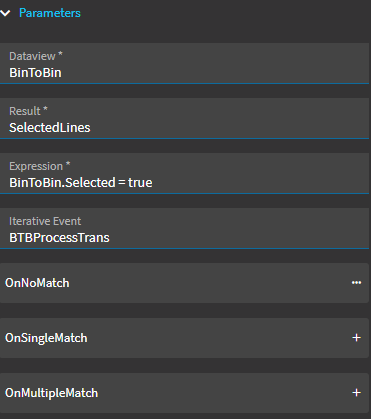
Then inside your event of Choice add a Data-View-Condition.
Set “Dataview” to the Dataview that the grid is using.
Set Result to the Dataview that you want the list of selected rows to be added.
Expression set it to the “selected” column = true
set the Iterative Event to a Event you create that will run once for each Results dataview row. Despite the Itterative Event being marked as Required (*) this is a Lie propagated by Big Epicor and is not required the function will happily just populate a data view and not do a “Iterative event” on it.