I have successfully clocked a user in using Erp.Bo.EmpBasicSvc.ClockIn and I can see in the LaborHed table ClockIn generates a new entry with a LaborHedSeq value. My question is how do I get the newly created LaborHedSeq using the API.
Thanks,
John
I have successfully clocked a user in using Erp.Bo.EmpBasicSvc.ClockIn and I can see in the LaborHed table ClockIn generates a new entry with a LaborHedSeq value. My question is how do I get the newly created LaborHedSeq using the API.
Thanks,
John
Depends on what you want to do with it.
You can start activity directly:
if(!la.StartActivity(LaborHeadNumber, “P”)) throw new UIException(“Failed To Start Labor”);
Note this is the LaborAdapter (not Employee Adapter) - also you noted API so I presume you are looking for the service side stuff.
Erp.BO.LaborSvc will do most anything you want with it, like GetByID
Thanks does LaborAdapter = Erp.Bo.LaborSvc in the API?
What I’m trying to do is StartActivity on jobs in a bulk group. But StartActivity in the API requires a LaborHedSeq
An adapter is for client side use, it talks to the BO. If you are service side, just have a look at the relevant BO (Erp.BO.LaborSvc in this case)
As far as needing the LaborHed, yes you do, but I thought you mentioned you received that from your clock in call.
When I Clock a user in all I get back from the API when I call Erp.BO.EmpBasicSvc.ClockIn is the date the clock in happend. I can call CheckClockInStatus and get more data but I don’t see a LaborHedSeq value
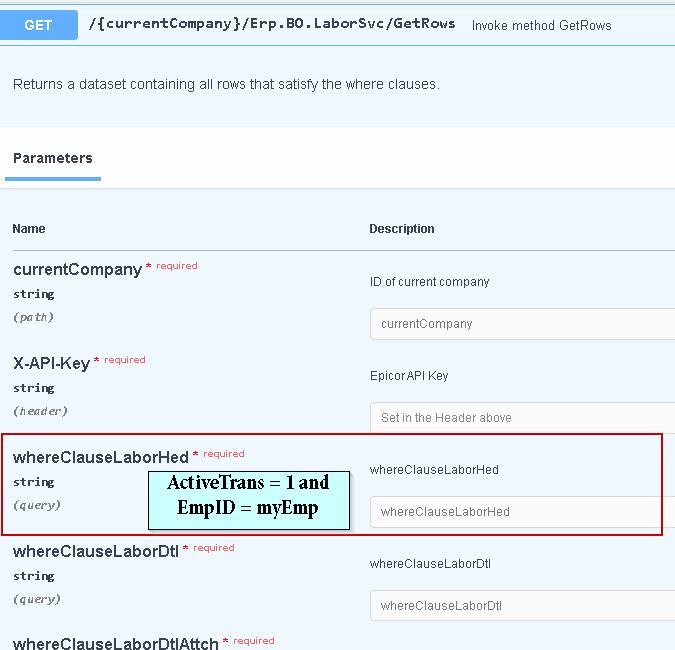
Ah so you should be able just query for Active labor heads by your emp. You cant have more than 1 active header per person (I wouldnt expect, verify that)
With the following code in JavaScript I get an error message: “Sorry! Something went wrong” Do you see anything I might have done wrong? All the {{value}} I used to replace the real values so I could post the code here…
var myHeaders = new Headers();
myHeaders.append(“X-API-Key”, “{{apiKey}}”);
myHeaders.append(“Content-Type”, “application/json”);
myHeaders.append(“Accept”, “application/json”);
myHeaders.append(“Authorization”, “Basic {{credentials}}”);
var raw = JSON.stringify({
“whereClauseLaborHed”: “ActiveTrans = 1 AND EmpID = ‘{{empId}}’”,
“whereClauseLaborDtl”: “”,
“whereClauseLaborDtlAttch”: “”,
“whereClauseLaborDtlComment”: “”,
“whereClauseLaborEquip”: “”,
“whereClauseLaborPart”: “”,
“whereClauseLbrScrapSerialNumbers”: “”,
“whereClauseLaborDtlGroup”: “”,
“whereClauseSelectedSerialNumbers”: “”,
“whereClauseSNFormat”: “”,
“whereClauseTimeWeeklyView”: “”,
“whereClauseTimeWorkHours”: “”,
“pageSize”: 1,
“absolutePage”: 0
});
var requestOptions = {
method: ‘POST’,
headers: myHeaders,
body: raw,
redirect: ‘follow’
};
fetch(“{{url}}/api/v2/odata/t300/Erp.BO.LaborSvc/GetRows”, requestOptions)
.then(response => response.text())
.then(result => console.log(result))
.catch(error => console.log(‘error’, error));
It’s a GET not a POST
When I switch to GET then this is the message I get back
“Message”: “The requested resource does not support http method ‘GET’.”
I’m using the custom methods in the API v2
I think because you are trying to send a body to a GET method, just a guess though. I think it expects parameterized url
Wait. Wrong endpoint.
You should be using:
YourServer/YourEnv/api/v2/Erp.BO.LaborSvc
So no odata?
You can do it with OData, I am just accustomed to always using the BOs.
If you use OData, you are bound by OData rules, ie your filtering is different ala ActiveTrans eq 1, etc
Okay I see if I leave my whereClauses empty I get results back so clearly something wrong with the way I’m trying to use them. Thanks… I’ll have to research how to use the odata style…
Filtering and selecting are probably your most useful for now Basic Tutorial · OData - the Best Way to REST
I got it working, I had EmpId but in the LaborHed table its EmployeeNum once I changed that the following code works. Thanks for your quick responses this solution got me past my road block.
var myHeaders = new Headers();
myHeaders.append(“X-API-Key”, “{{apiKey}}”);
myHeaders.append(“Content-Type”, “application/json”);
myHeaders.append(“Accept”, “application/json”);
myHeaders.append(“Authorization”, “Basic {{credentials}}”);
var raw = JSON.stringify({
“whereClauseLaborHed”: “ActiveTrans = 1 AND EmployeeNum = ‘{{empId}}’”,
“whereClauseLaborDtl”: “”,
“whereClauseLaborDtlAttch”: “”,
“whereClauseLaborDtlComment”: “”,
“whereClauseLaborEquip”: “”,
“whereClauseLaborPart”: “”,
“whereClauseLbrScrapSerialNumbers”: “”,
“whereClauseLaborDtlGroup”: “”,
“whereClauseSelectedSerialNumbers”: “”,
“whereClauseSNFormat”: “”,
“whereClauseTimeWeeklyView”: “”,
“whereClauseTimeWorkHours”: “”,
“pageSize”: 1,
“absolutePage”: 0
});
var requestOptions = {
method: ‘POST’,
headers: myHeaders,
body: raw,
redirect: ‘follow’
};
fetch(“{{url}}/api/v2/odata/t300/Erp.BO.LaborSvc/GetRows”, requestOptions)
.then(response => response.text())
.then(result => console.log(result))
.catch(error => console.log(‘error’, error));