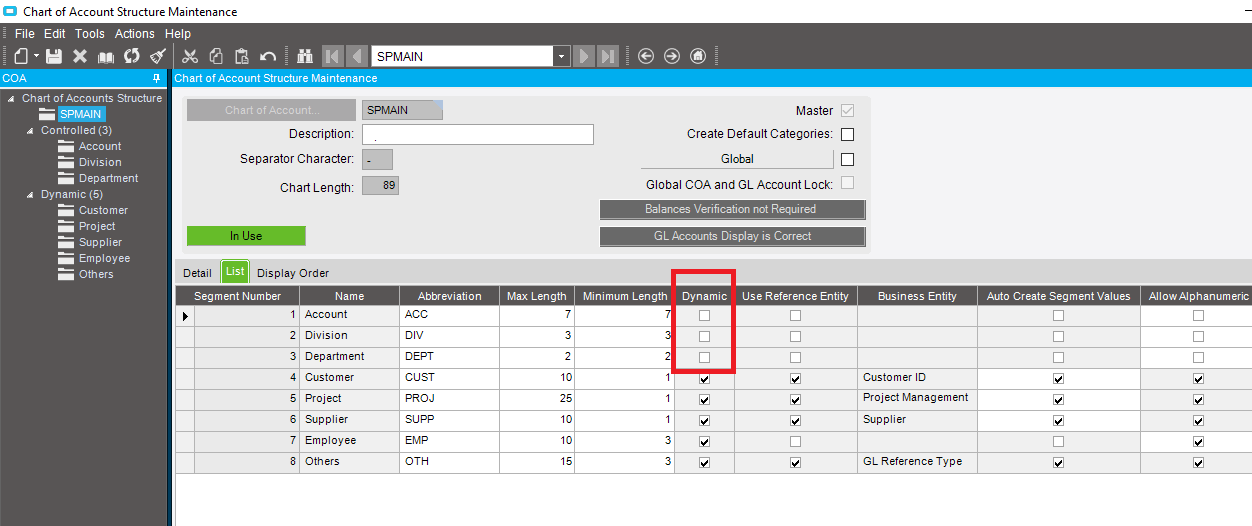
FYR, please find the below screenshot of COA
Are you using Standard Posting Rule or Extended Posting Rule?
Okay. I see that you do have dynamic GL Accts. The first 3 segments are required and the last 5 dynamic. I don’t know if this affects the Division substitution.
If all other GLC’s are setup the way mine are, then maybe it’s in the GL Transaction Type settings. I think it has to use the Standard Posting Rules, and I may have had to re-import them. Sorry that I don’t recall all the details. I think there’s something about it in the Multi-Site / Multi-Company Guide.
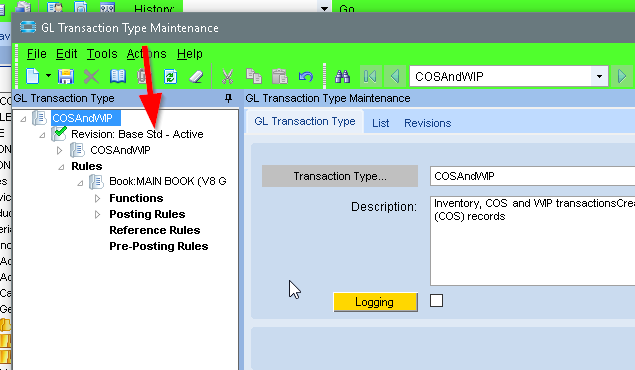
Open up GL TRan Type Maintenance and load the COSAndWIP type. Does it show Std or Adv?
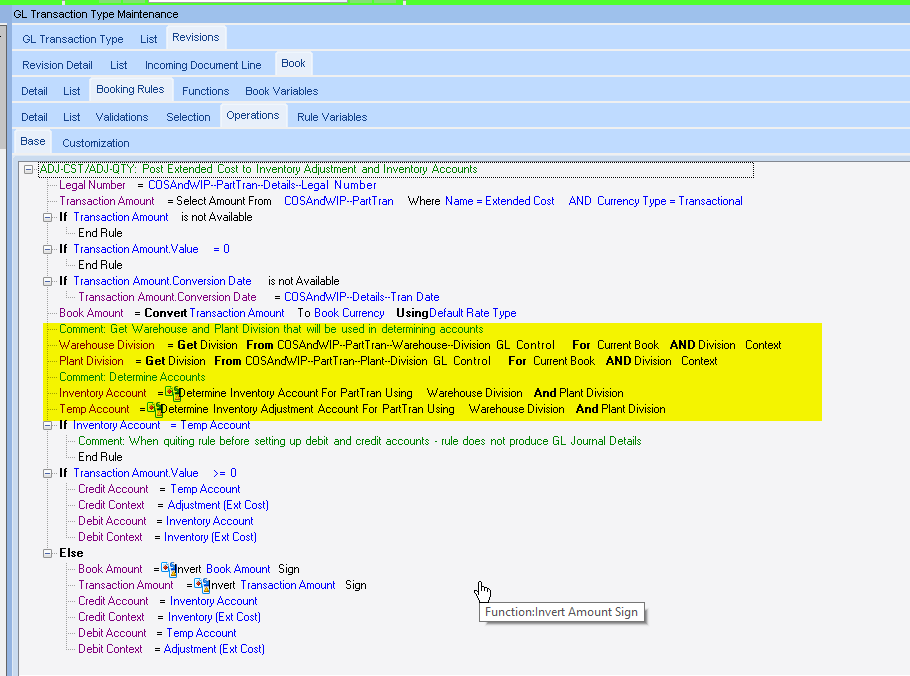
Expand the ADJ-CST/ADJ-QTY node under Posting rules. Does it look like the following:
(particularly the highlighted part, where Plant Division is referenced)
edit
Just realized that you have 5 more segments than me (and they’re all dynamic), so that might make the Booking Rule look much different than mine.
One more thing… See you have GLC’s applied to your warehouse (in Warehouse Maintenance). You’ll have to do it for each warehouse, in each site.
We have no GLC’s applied to any warehouses.
I sure can’t speak to dynamic segments (but wow I wish we knew about them 4 years ago).
But when we went multi-site, I know I had to do a lot of trial and error to get the division to work as intended, and I guess the big thing for us was the department.
While our original site (RID) has roughly a dozen departments and accounts to boot, the new site (PDC) has only one (62), which does not even exist in any the RID accounts. So the flex does not work in that case. In other words, I wanted:
- 7535.RID.24 -> 7535.PDC.62 and
- 7535.RID.26 -> 7535.PDC.62 and
- 7535.RID.42 -> 7535.PDC.62, etc.
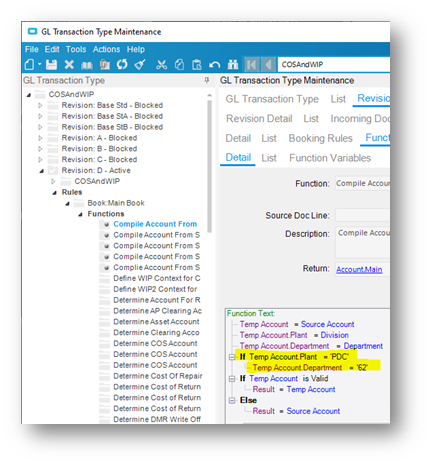
I had to create five custom posting rules on COS/WIP to say “If the flex gives you [PDC] for the division, then make the department be [62] every time.” I was glad it was only 5.
And then PO Release was its own animal, as we have been talking about lately here as well.
Maybe not your situation, but that was the big hurdle for me. It was months of testing to get this all figured out.
This is from my notes:
I wonder if the following would have worked for you:
-
Add
Plant Configto the Entity list of the GL Control TypeInventory and COS
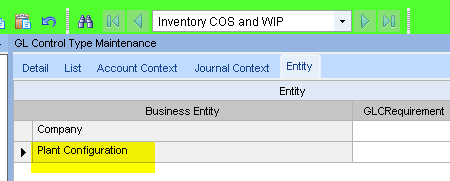
-
Create a GLC of type
Inventory and COS, for the other plant.
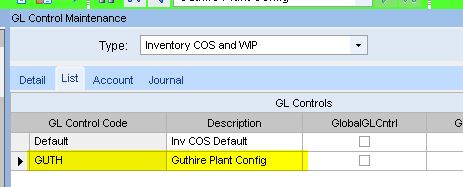
-
Set the Accts, using the desired chart and dept
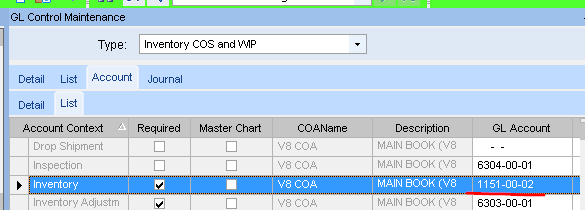
-
Now add that GLC to the Plant Config:
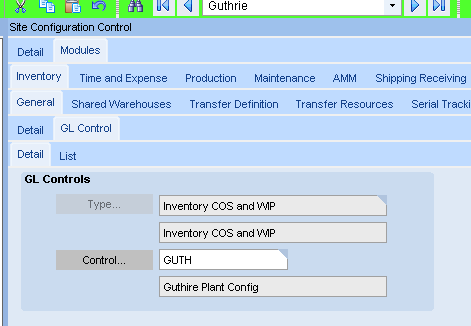
Wouldn’t the posting engine grab the Acct from the Site Config’s Inventory and COS GLC first, and then use the Site Maint’s Division GLC to do the substitution?
Calvin,
Off the top of my head, one problem is that we use GL controls on part classes.
OK, but how does that do anything to the department segment?
Also, I know you can have some success with Sales Categories for flexing departments, but it doesn’t work with part classes. I sure tried. Consultant agreed also.
The department segment in the GLC used by Site Config, would be the one you want for that site. I assumed that the PE would grab the whole acct from the GLC. and then only sub the Div segment.
Company Config GLC’s:
- Type: Inv&COS, GLC Code:
default, Inventory Context Acct:1151-00-01
Site Maint GLC’s:
- Site:
MfgSys- Type: Division, GLC Code:
default, Division Context Acct:____-00-__
- Type: Division, GLC Code:
- Site:
GUTH- Type: Division, GLC Code:
11, Division Context Acct:____-11-__
- Type: Division, GLC Code:
An inventory trans in site GUTH, first grabs the acct from Company Config → 1151-00-01
Then applies the Division override. Making the Acct → 1151-11-01
Had I added the Site Config GLC, I’d have thought aAn inventory trans in site GUTH woukd:
- First grab the acct from Company Config →
1151-00-01 - Override that with the acct from the Plant Config →
1151-00-02 - Applies the Division override. Making the Acct → 1151-11-02
No, I’m pretty sure that is the first thing I tried, too.
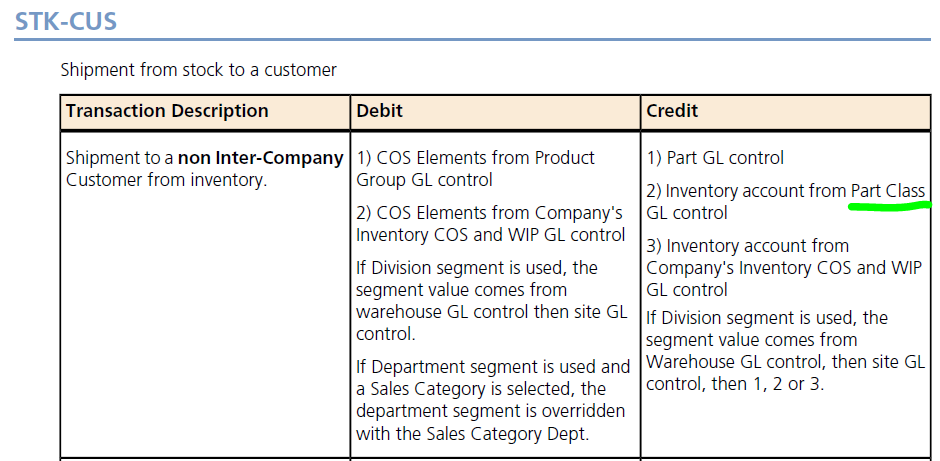
The part class thing is I think the gotcha. It jumps ahead of company, and there is no mention of site.
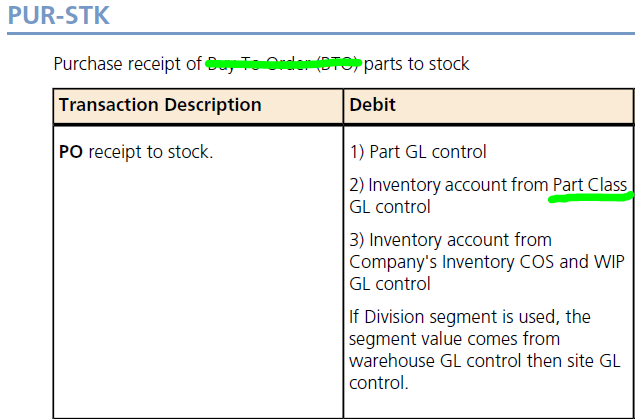
(They really need to get rid of the BTO part. PUR-STK is any PO receipt.)
1 Like
Yeah, I was just spit-balling … The more I think about it, adding Entities to a GLC Type, probably doesn’t actually do anything without creating posting rules to take advantage of them.
And there’s a recent thread (not sure if you were involved) about BTO purchases and shipments.
Seems that a BTO item on a an order, that has a part entry (with BTO=Y, QtyBearing=N and NonStock= N), will create a PUR-UKN upon receipt, but a STK-CUS upon shipment.
While a OTF BTO part makes PUR-UKN and UKN-CUS transactions
Balance sheet accounts need to use a shared department (like 00, 000) as a department (profit centre/cost centre) is related to revenue and costs. Epicor got Sales Category for that purpose in the revenue side in sales order and transfer order. Rest of the areas like PO, AP Invoice and manual journals, user need to select the department. I never found an issue with std. posting rules except in Fixed Assets where Epicor picks department for Accumulated Depreciation.