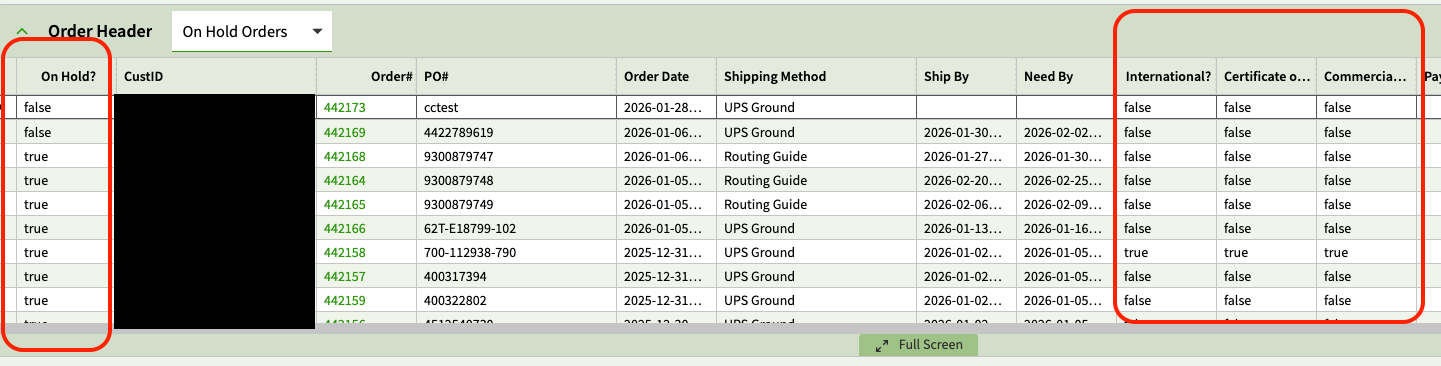
Has anyone seen this before? I’m building a dashboard from an uBAQ and static BAQ and have multiple boolean columns that were showing (correctly) as checkboxes, then all of a sudden started showing true/false instead. Clicking on the field in the grid changes the value from true->false or false->true. I’ve double-checked the ERP Editor settings and they’re all set to Boolean.
3 Likes
Every time I’ve ever tried to use kinetic dashboards I’ve seen this. I can’t say it’s a LOT… moving cheese and scary bugs and all… but when I have dipped by toe into that pool, I’ve see that every time.
2 Likes
Interesting! I’ve never seen it before and we’ve been on Kinetic since 2021. I also noticed before this happened, the field caption started showing up next to the checkbox. I did find another post on here about that issue.
1 Like
Ditto (never seen it) except we started browser only in Jan 2024.
New feature, eh?
2 Likes
I’ve seen it. Can’t remember how I fixed it or if it resolved itself.
Try a Shift CTRL F5.
1 Like
What does this key combo do?
Interestingly, I exported the BAQs from one environment into another, started creating the app from scratch, and haven’t had this come back….YET. I still need to add another dataview with a parent-child relationship, though. I’m going to document steps so I have some clue of what’s going on if it happens again.
I think he means Ctrl+F5. It’s a full refresh.
3 Likes
Gotcha, thank you. I have tried that - clearing cache, incognito window, too.
Its shift for firefox, control opens a copy in a new tab and refreshes it.
2 Likes
I’ve seen this, usually means I’ll have to clear the browser cache soon or have too many tabs open.
1 Like