Previously I was able to do DMT import to PartAudit# fields from PartRevision, but running again, it is not working. Wondering if anyone has successfully done DMT to update PartAudit in Part Revisions. We are importing data from old system to Kinetic and it worked in 2022 version, but not now. Support no help.
What I have processes, but does no update at all.
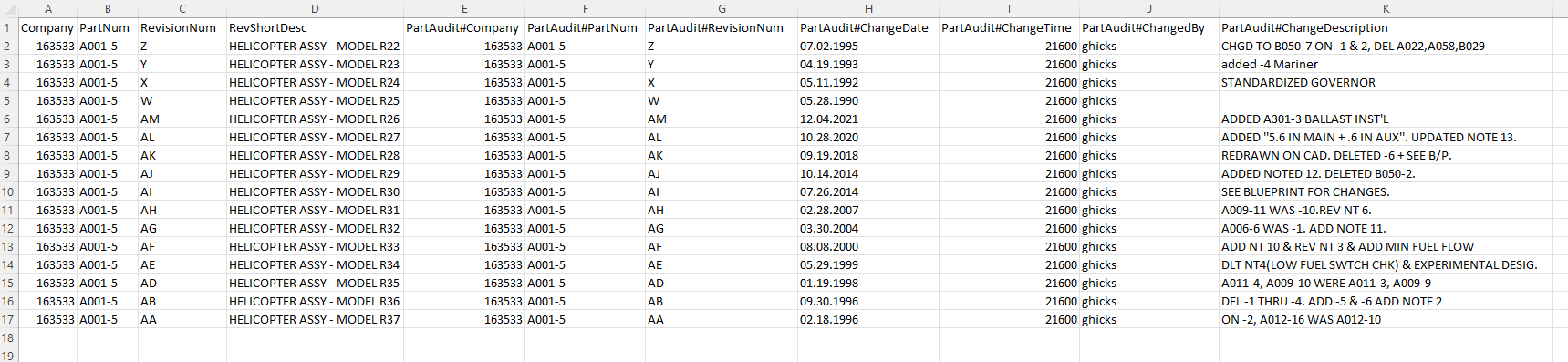
We’ve done PartRevs but that was also in 2022 or previous versions. I’ll try to do a test in our 2023 Pilot DB.
Thank you! Even deleting the Revision, and running it again with the #PartAudit fields, it creates the REV Letter but no Audit data for that Rev.
Appreciate your testing as well.
Interesting that you can Delete a Revision, even if it has Audit information, then re-create it via the DMT and the Audit information still shows.
It appears to me to be a bug where the Audit sub-table is not being updated by DMT or even deleting the main Revision as well.
Interested to see what you find.
Support says the use of the DMT is outside of their scope other than running it and providing “Best Practices” document, i.e. they want us to engage Professional Services for any Data Import that does not work via the DMT using best practices.
I think it’s a bug TBH, but without any support on the topic, it is difficult to get an an answer, unless users here have a clue I am missing. 
When adding - here’s what I just did.
I’m on the cloud at 2023.2
Added the record.
I was also able to create an updatable BAQ that allowed me to edit existing PartAudit records.
| Company | PartNum | RevisionNum | RevShortDesc | RevDescription | Approved | ApprovedDate | ApprovedBy | EffectiveDate | PartAudit#Company | PartAudit#PartNum | PartAudit#RevisionNum | PartAudit#ChangeDate | PartAudit#ChangedBy | PartAudit#ChangeDescription |
|---|---|---|---|---|---|---|---|---|---|---|---|---|---|---|
| Acme | 123 | X | SOLIDWORKS DRW | TRUE | 1/2/2024 | blarson | 5/13/1983 | Acme | 123 | X | 1/2/2024 | blarson | NewECO 1843 from previous system |
2 Likes
@LarsonSolutions beat me to it! I needed all the columns he listed before it’d work.
Yes! It seems the Approved and ApprovedBy are needed to get it to update. You would think those would be marked as “Required” but thanks!
If you could do a test just for my sanity, I notice that the PartAudit#ChangeDate does not get set, it uses Today’s Date instead. Kind of a bummer, but can prepend the Change Date to the ChangeDescription should be a workaround for us.
Tracking the Rev Change Date is important.
Thanks to those who tested! LMK if you can change the date on that field. I notice running it through several times creates another entry in the Audit as well, but can delete with DMT.
1 Like
For DMT changes to Part Rev Audit fields:
• You MUST include the “Approved” field for changes to take effect. It will process like all is fine, but it does not actually update anything. THIS IS THE TRIGGER to updating the Audit fields!
• If you run with “Approved” True, and DMT set to “Add New” and “Update” it will create the entry, however, if running a second time, it will create a second entry for the changed row! But if “Approved” is set to False, then it will not create or update an entry.
• Using only “Update” in the DMT will NOT update any ChangeDescription, regardless of the Approved checkbox or other field. Suggest excluding all the other fields if all you need to update is the Approved Checkbox.
• If you need to update ChangeDescription, you will need to use the “Delete” setting in the DMT, however, this will Delete the Revision, then you can create it again with the correct note using the rules above.
• Note: The PartAdit#ChangeDate is not honored in the DMT, as it is creating a new Audit Record, it defaults that field to Today’s Date. Workaround is to add the Changed Date to the ChangeDescription as well.
2 Likes