I am having issues following at the setup of Capabilities on the resource operations. We have Advanced Planning and scheduling. I have 3 CNC machines that are capable of backing each other up and want it to happen automatically. We have specific parts we run on each one, but based on demand we may have 1 machine with less of a load and we want it to pick up the over flow from the other machine.
We use Capabilities as well, but slightly differently. Based on what I recall from the setup, this is a two-level issue for you (assuming I read your situation correctly). These machines function together as backup for each other, but also independently based on Part being produced.
I think these 3 need to be in a single resource group, listed in the order of use preference (use #1 before 2, before 3), AND each need a unique capability to be used on those unique parts. The schedule makes choices usingCapability preference first, then Group, then Order (based on availability in the schedule). You can use that process to your advantage.
You didn’t mention how the capability, Part, Machine relationship is identified and set inside the Jobs - manually, automatically, Configurator - so that may change my solution a bit.
I’d like to hear @jkane’s take as well.
Going to need more details. Are you looking for a job to be split between the 2 machines? or are these separate jobs?
As long as you have your Capability built and are using it as the Scheduling Resource on the MOM, it should work.
Are you finite scheduling? Epicor will always go to the resource that can complete the operation in the quickest time first, then drop to the 2nd if the first one is already busy. So, if machine 1 (fastest production) is open, it will always schedule to that.
Your other option is to look at level loading once everything is scheduled. That’s done in the resource scheduling board “Load Level”
We largely rely on resource groups for scheduling. However, I’ve defined a handful of capabilities to create another layer for organizing resources alongside the groups.
Some of this is within a resource group, when machines are mostly interchangeable (which is why they’re in the same group) but a couple of units have features (e.g. can run at a higher speed) the others don’t. We don’t usually need this ability, so the machines are kept in one group. When we do need it, the capability is added to the MOM alongside the resource group.
Other capabilities span multiple resource groups. We’ve got a model of CNC machine in 2 buildings. Those buildings are down the street from each other, so it’s not a multi-site situation. There are still times when we want to keep parts in one building vs another. There are other times when we want something on the first machine available regardless of location. So we’ve got 2 resource groups (1 per building) but also a capability that includes all the resources in both groups. Parts that may run in either building have a defined capability, but no defined resource group. Parts that run in a specific building just use the resource group.
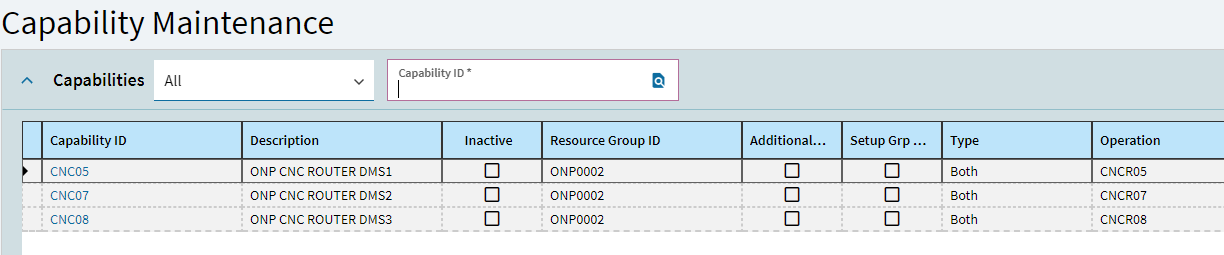
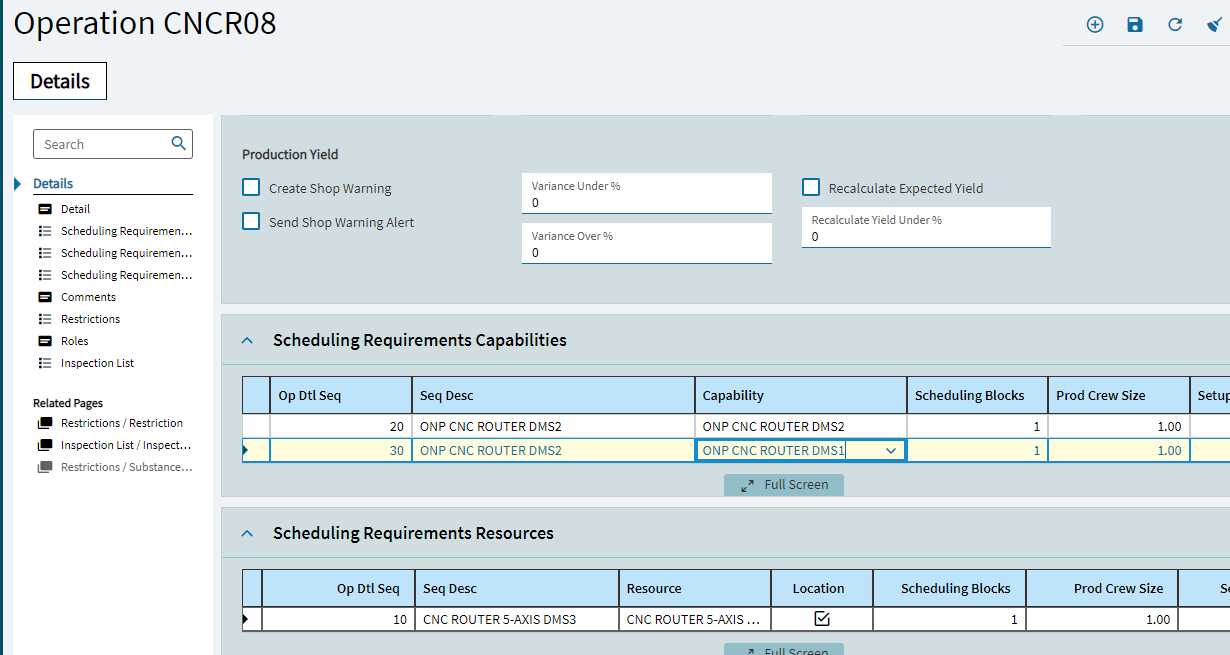
You are almost there! You would put all the resources in Scheduling Requirements Capabilities, nothing in scheduling requirements resources.
If you need to run specific parts on specific resources, then you select the resource in the BOO.
Hey Mike - just as an FYI, with capability scheduling the resources do not need to be in the same resource group. Pretty slick!
Jenn
Jenn,
So the screen shots I provided are correct then. The system will now push the jobs to the backup machines when capacity is exceeded when Global scheduling is run nightly? Right now we have specific parts routed in the BOM to specific machines so them default to the primary machine first. But it shouldn’t stop them from going to a backup machine correct?
Yep, it just seemed logical in this case since it sounded like they were all the same, just preferentially used for certain parts - that way some jobs could spec the group and allow the scheduler to make choices while some jobs could specify Capability. There are a lot of ways to do everything/anything inside Kinetic!
You need to change every MOM that has a Scheduling Resource pointed to a specific resource to the capability instead. Otherwise it won’t work.