As an alternative to OpenXML (if you’re on-prem), I have had a lot of success adding the ExcelDataReader library and using that. There’s a function to pull in an XLSX file in this post
https://www.epiusers.help/t/helper-function-library-to-get-data-from-baqs-excel-files/110864
5 Likes
Well now when I try I get this
System.Drawing.Bitmap CS0012 The type 'Package' is defined in an assembly that is not referenced. You must add a reference to assembly 'WindowsBase, Version=3.0.0.0, Culture=neutral, PublicKeyToken=31bf3856ad364e35'.

6 Likes
Still waiting for all the solutions everyone has promised in this thread . . .

2 Likes
Work happened. You go off too Vegas for a week, and then another trip last week. Somehow the work doesn’t stop while you’re gone 
Update:
On prem. Windowsbase.dll is referenced… sorry, not going to be able to help for all.
2 Likes
Add the ExcelDataReader.dll and ExcelDataReader.DataSet.dll to your server assemblies, and it’s really easy. There’s probably a way to pull in the top row as Field Names, but this will read from an XLS / XLSX file as a dataset with indexing (Sheet1!A1 == xlDataSet.Tables["Sheet1"].Rows[0][0])
EDIT:
WARNING: That indexing can throw you off with row numbers, so remember row 1 is rows[0], etc.
3 Likes
We’re cloud.
2 Likes
Yeah but the person who made the post is on-prem.
2 Likes
The Ice.Lib.Internal one uses openxml in the background, but so far I’ve only figured out how to read sheet names 
1 Like
@Mark_Wonsil will love this one.
I think the easiest way to do this in the cloud is something like an azure function.
I’ll scre with it later.
2 Likes
It’s a holiday today so I decided to write something up for this. Should compile and work on latest cloud version (2025.1) as well. I added some extra explainers for some of the code in hopes that it helps show how that class works too.
You will need the following reference in your library:
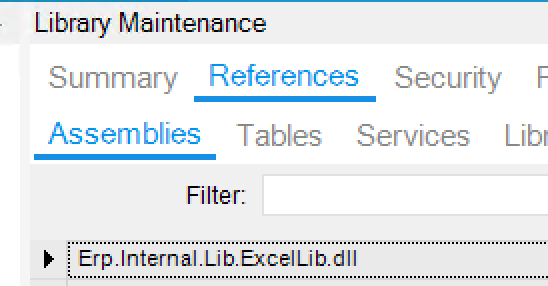
Create a new C# Epicor Function with the following parameters:
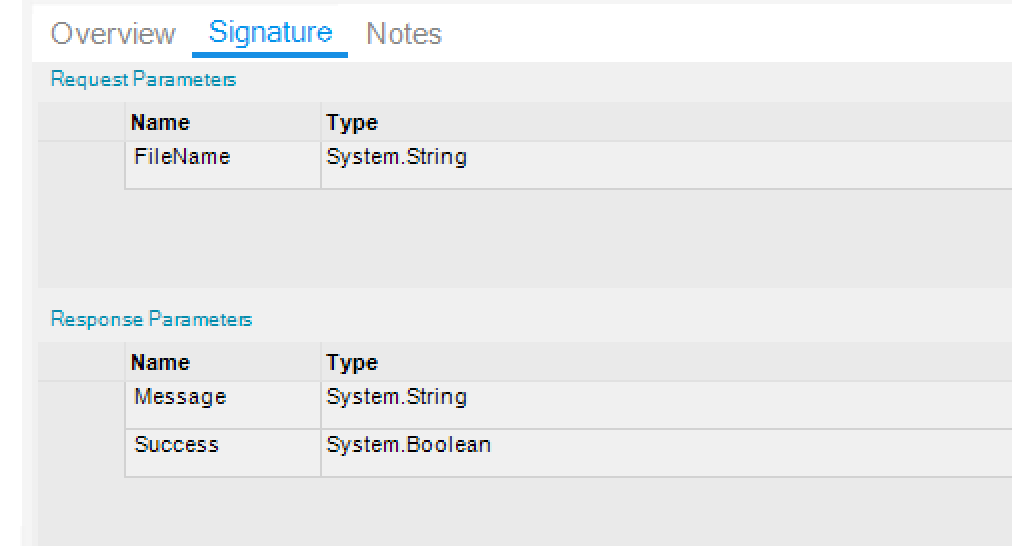
FileName should be the full .xlsx file name (e.g. ExcelFile.xlsx)
And here is the code:
        Success = true;
        var sb = new System.Text.StringBuilder();

        // Create a datatable that will hold the results of the excel file
        var outputDataTable = new DataTable();

        #region Helper Functions

        Func<List<DataColumn>> generateColumns = () =>
        {
            // This is where you should define a list of columns that line up with your excel file
            // Note: The order, number, and name of the columns MUST match exactly what is in the excel file, or you will
            // get errors.
            var columns = new List<DataColumn>();

            columns.Add(new DataColumn("Column1", typeof(string)));
            columns.Add(new DataColumn("Column2", typeof(string)));
            columns.Add(new DataColumn("Column3", typeof(bool)));
            columns.Add(new DataColumn("Column4", typeof(int)));

            return columns;
        };

        Action<DataTable> processExcelData = (excelData) =>
        {

            // This is where you should process the data from your excel file
            foreach (DataRow row in excelData.Rows)
            {
                // Checking if cell values are null
                if (Convert.IsDBNull(row["Column1"]))
                {
                    // Handle your nulls
                }

                // Accessing the value of a cell
                var cellValue = row["Column1"];
            }

        };

        #endregion


        try
        {
            // Set up our excel file folder path
            // Valid Root Paths are:
            // ServerFolder.UserData - Folder specific to the user active in the session
            // ServerFolder.CompanyData - Folder specific to the company in the current session
            // Second argument of FilePath specifies a sub-directory
            var baseFilePath = new FilePath(ServerFolder.CompanyData, "Uploads");
            var excelFilePath = $"{baseFilePath}/{FileName}";


            #region Reading Excel Files

            using (var excelReader = new Erp.Internal.Lib.ExcelReader(excelFilePath))
            {
                #region Reading Worksheets

                // Looping through all sheets
                foreach (var name in excelReader.WorksheetNames)
                {
                    sb.AppendLine($"Worksheet name: {name}");
                }

                // Checking to see if a worksheet exists
                var worksheet = excelReader.WorksheetNames.FirstOrDefault(x => x == "MyFirstSheet");
                if (!string.IsNullOrEmpty(worksheet))
                {
                    sb.AppendLine("Worksheet exists!");
                }
                else
                {
                    throw new Exception("Worksheet does not exist!");
                }

                #endregion

                #region Reading Worksheets
                // Get our list of columns from our helper function that will give us the headers in our excel file
                var worksheetColumns = generateColumns();

                // Add the columns to our datatable
                outputDataTable.Columns.AddRange(worksheetColumns.ToArray());

                // Read in the contents of the specified worksheet
                // Accepts the following arguments:
                // 1. Worksheet name
                // 2. Column Mapping
                // 3. Skip First Row? (ignore headers)
                // 4. Output Data Table
                excelReader.ReadWorksheet(worksheet, worksheetColumns, true, outputDataTable);

                // We should now have all the data from the excel file ready for access
                var data = JsonConvert.SerializeObject(outputDataTable);

                sb.AppendLine($"Data: {data}");

                #endregion

                #region Processing Data From Worksheet

                processExcelData(outputDataTable);

                #endregion

            }

            #endregion
        }
        catch (Exception e)
        {
            Success = false;
            sb.AppendLine($"Encountered an error attempting to read excel file: {e.Message}");
        }
        finally
        {
            Message = sb.ToString();
            outputDataTable.Dispose();
        }
If you do not want to serialize the data, remove the line of code that performs it. Otherwise, you will need to include the Newtsoft.Json reference as well.
Hopefully this helps someone! 
17 Likes
Awesome Eli, I was about a quarter way through deciphering that library.

You rock.
5 Likes
I used that library for ours a few months ago, same error but it works anyway if your run it. I think it’s because their error checker sees the Package as the Epicor class and sees it’s not referenced, rather than the appropriate System IO version that is being used in code. But it still lets you publish and still lets you run it. But since it’s SystemIO I don’t see it holding up in the big sandboxing coming. Glad @AlwaysFocus was able to figure out the built in library, I got to reading the column names but couldn’t get past that before I swapped to OpenXML.
2 Likes
Yeah, I figured that out last night.
Got a complete demo coming later.
2 Likes

I gotta go write it up, but it’s done.
7 Likes
2 Likes