Help with Dashboard triggers Issue

Hello,

I am developing a dashboard that both passes parameters to BAQ and filters the dataview depending on text in text box.

I am also seeing if I can organize the events by creating a couple of reusable events that always test the same logic.

For the textbox called txtCompany, I am triggering it with a ‘DataTable: ColumnChanged’ event.

My problem is that it triggers on screen load and throws the parameters error I have set up for the date fields not being selected.

Is there an easy way to not have this trigger on certain events like Window_OnLoad?

I thought about having a hidden boolean field that bypasses the event if set to 0, else use the event.

I am just not sure how to get that off the ground.

How would I access a boolean field like a BPM would with CallContextField?

Is it possible to have a variable that only exists while the screen is open?

Any help is appreciated!

Add a condition to your event to verify your date fields hold a value. That way, even if your event is triggered earlier than you’d like, it will fail that condition and shouldn’t ask for parameters.

Sorry,

I wasn’t clear.

It isn’t asking for athe parameters on load.

It is throwing the condition alert I created saying the date fields are empty on load.

I am trying to get it to not do that on window load.

How are you populating the BAQ to the Grid?
The only way to supply BAQ Parameters currently is to use a kinetic-baq widget, tied to an event.
If you have the event bound to the same epbinding that txtCompany is epBound to, it will fire any time that DataView.Field changes.
If it’s firing on Window_OnLoad, you are probably changing that field during that event, maybe with a row-update?
If you do a row-add vs. a row-update, it won’t fire the column changed event (assuming you are initializing an empty dataview)
Otherwise, use browser dev tools to find out which specific event is triggering the kinetic-baq call.
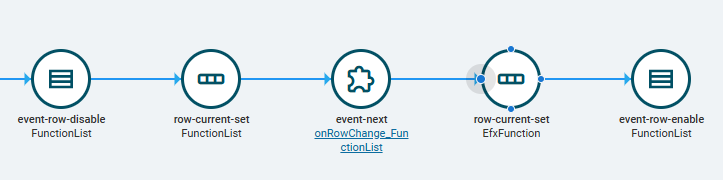
Put a event-column-disable component before your update, input the DataView into “DataTable”, and drop an event-column-enable after.
Something like this, but this is to block a row changed trigger vs. a column changed:

It will stop the onchanged event from triggering.

Let me see if I have this right.

I encase the row-update in the Window_OnLoad with a event-row-disable and an event-row-enable?

Yes, that’s correct. Put a disable just before the row-update, and an enable just after it. Naming the correct DataView/Column in the enable/disable components.

OR, instead of using a row-update, replace that with a row-add.
At Window_OnLoad, that DataView will not have a row in it yet, so your row-update is really doing a row-add anyway. Row-add won’t trigger the “column changed” event.
Row-Add syntax is like this:

{
   "TextFieldName1": "Text1",
   "DateFieldName2": "2025-02-01",
   "NumberFieldName3": 50
}