Many fields seem to be calculated in the background, displaying a value, but there’s no database field associated with it to use in a query. What do my fellow Kinetic sojourners recommend in this case.
2 Likes
The field help usually describes the calculation for those fields. Is there a particular field you’re looking into?
1 Like
Thanks for the suggestion, but we’re using Kinetic 2024.1.13, and the first thing that I noticed when we upgraded from E10 to Kinetic is the vast number of Field Help screens that are undefined. In the example below, the field is is that of the Warehouse Primary Bin, not something like a cost that can be “Calculated” by other means. Also note the lack of any discussion related to the field. Absent the “DB Field”, I can’t return this in a query.
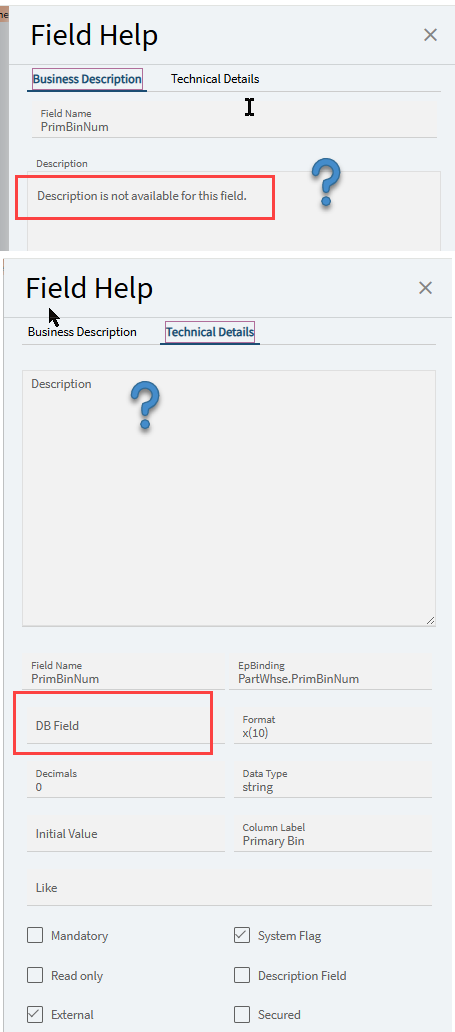
1 Like
Before @aosemwengie1 jumps in…

There is an Epicor Idea on this. This is a known issue by Epicor. The help was stored completely differently in E9-10, and it’s been a slow grind to get this updated.
See this, among MANY, posts:
7 Likes
At some point you just start seeing the Matrix behind all the screens and you develop an instinct for where to look for certain fields…
For a more realistic answer, the Ice.ZDataField table in the database has many of the field descriptions including for calculated fields. This table is available to query in a BAQ as of 10.2.700.40. I haven’t confirmed if it’s still available in Kinetic (but I know the table still exists).
In the case of Primary Bin, that is actually a database field in a different table: Erp.PlantWhse.PrimBin.
2 Likes
In the absence of a clear cut answer in the field help, here are some strategies:
Look up the binding of other fields in the same screen. Once you have the table name, go look in the data dictionary. Sometimes reading through all the fields in the table helps you figure it out.
Write a BAQ pulling the fields you think are behind the screen. Revise the BAQ logic and compare the results to the UI until you can get them to match up.
Read the application help. Sometimes it explains the calculated fields.
Run a report from that screen, if it has one. Sometimes the rdl will shed light on how the data is constructed.
Google seach [field name] + site:epiusers.help
If all else fails start a new epiusers post and somebody will probably tell you the answer.
3 Likes
Classic field help is better at describing the formula. Kinetic field help… not so much. 
The “fix”, thus far at least, is we have to open a support ticket on every single field.
1 Like
I believe Primary Bin is on PartPlant?
Just another example of Epicor rushing to get incomplete updates out there rather than taking the time to provide a complete, well tested program that doesn’t fail around every turn.
3 Likes
It’s in PlantWhse. You can link it in Part => PartPlant => PlantWhse
1 Like
That’s what I get trying to go from memory. Thanks for the correction @kve
1 Like
Like they did with E9 in moving from a Progress to a SQL database, they piecemeal it over the course of about three or four different versions, breaking everything along the way… which is exactly what they have again done with moving from the Smart Client to Kinetic. They finally began restoring the Field Help in 2024.2 - still leaves quite a bit to be desired.
As for your original question, some of those fields are easier to figure out than others. Since most have been figured out through the years the best advice is to ask about a specific field instead of a general inquiry; as every one has a slightly different resolution. Especially when it comes to status displays in various applications.