We have a color/theme document that describes each environment too and use those colors everywhere we can. We set the colors and theme in the DB after a refresh with a script that uses the dbname to determine which colors and themes to apply from an external data source. It’s all automagicated
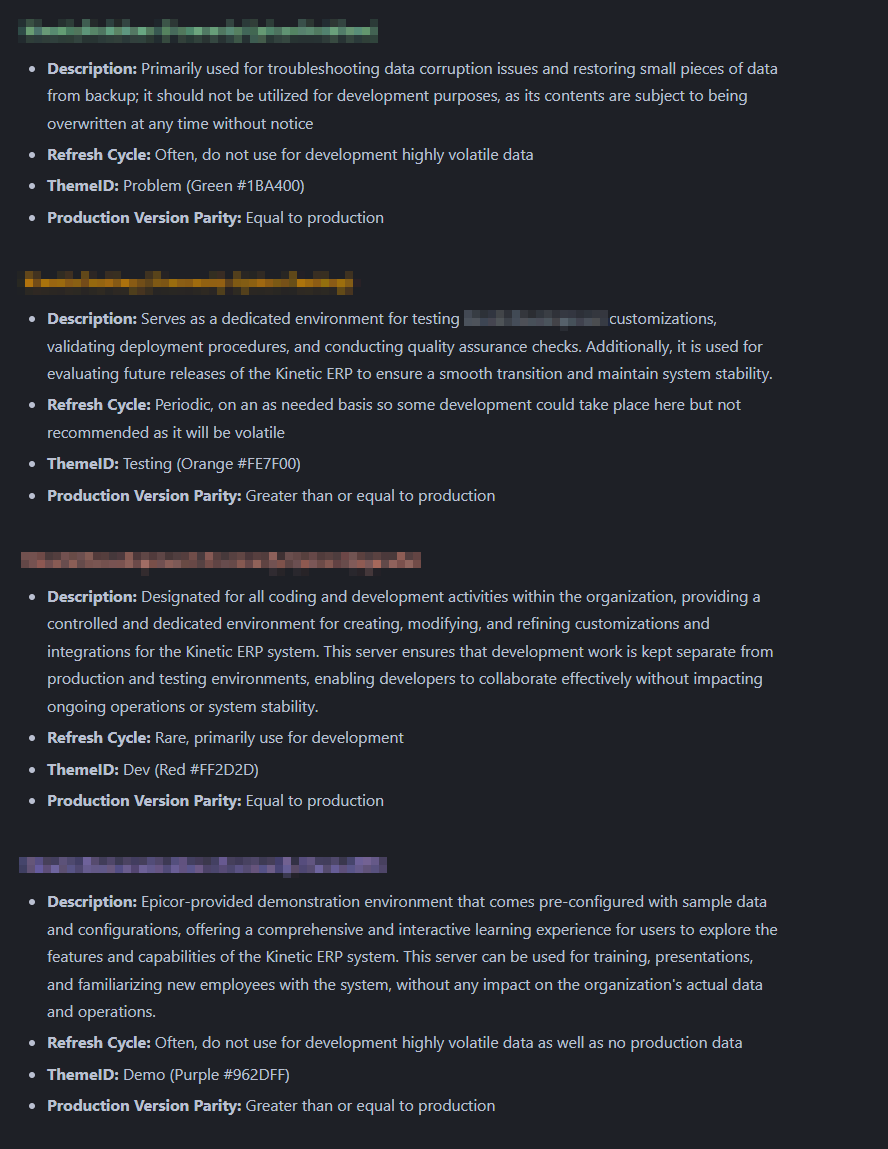
Here is the part of the script I can share that doesn’t contain any urls. I’m too lazy to cleanse the whole thing it’s real long.
ALTER PROCEDURE [dbo].[PostRestoreUpdates] AS
BEGIN
	-- Setup variables for the remainder of the script
	DECLARE @AppServerName NVARCHAR(50) = DB_NAME();
	DECLARE @AppServerTheme NVARCHAR(50);
	DECLARE @AppServerColor NVARCHAR(50);
	DECLARE @Hostname NVARCHAR(50);
	DECLARE @MaxSysDate DATE;
	DECLARE @ddlSql NVARCHAR(MAX);

	-- Store current hostname for later use
	SELECT @Hostname = CAST(SERVERPROPERTY('MachineName') AS NVARCHAR(50))

	-- Check if the @AppServerName is 'Prod', the don't be a dumbass saver
	IF @AppServerName = 'Prod'
	BEGIN
			RAISERROR('The Database cannot be "Prod". Terminating the script.', 16, 1);
			RETURN;
	END

	-- Create appserver reference info
	CREATE TABLE #AppServerInfo (DatabaseName NVARCHAR(50), KineticColor NVARCHAR(10), ThemeID NVARCHAR(50));
	INSERT INTO #AppServerInfo (DatabaseName, KineticColor, ThemeID) VALUES
		('Prod', '#008BD1', 'Live'),
		('Prob', '#1BA400', 'Problem'),
		('Dev', '#FF2D2D', 'Dev'),
		('Test', '#FE7F00', 'Testing'),
		('Demo', '#962DFF', 'Demo');

	-- Get the values from the temp table based on the @AppServerName
	SELECT @AppServerColor = KineticColor, @AppServerTheme = ThemeID FROM #AppServerInfo WHERE DatabaseName = @AppServerName

	-- Drop the temp table
	DROP TABLE #AppServerInfo;

	-- Select the max SysDate from Erp.PartTran and store it in the variable
	SELECT @MaxSysDate = MAX(SysDate) FROM Erp.PartTran;

	-- Set company and environment info
	UPDATE Ice.SysCompany SET Name = CONCAT('**', Company, ' - ', @AppServerName, '|', @MaxSysDate, '**'), KineticColor = @AppServerColor, IsLive = 0
	UPDATE Erp.Company SET Name = CONCAT('**', Company, ' - ', @AppServerName, '|', @MaxSysDate, '**')

	-- Attempt update of Admin Console config settings
	UPDATE Ice.SysConfig SET InstanceDefinition = REPLACE(REPLACE(InstanceDefinition, '"IsProductionInstance":true', '"IsProductionInstance":false'), '"IsLive":true', '"IsLive":false') WHERE InstanceDefinition <> '' AND Key2 NOT LIKE '%PRODUCTION%'
	UPDATE Ice.SysLicense SET IsProductionInstance = 0

	-- Set default ThemeID [Live | Problem | Dev | Testing | Demo]
	UPDATE Ice.Theme SET DefaultFlag = 0
	UPDATE Ice.Theme SET DefaultFlag = 1  WHERE ThemeID = @AppServerTheme
	.
	-- Do Dcheduled Task Deletion
	.
	-- Setup EBIZ Sandbox
	.
	-- Setup PLC Custom Dev Values
	.
	-- Setup 'readonly' User
	.
	-- etc. etc. etc
END