Thanks for the correction. Been a while since I really used them and could not remember.
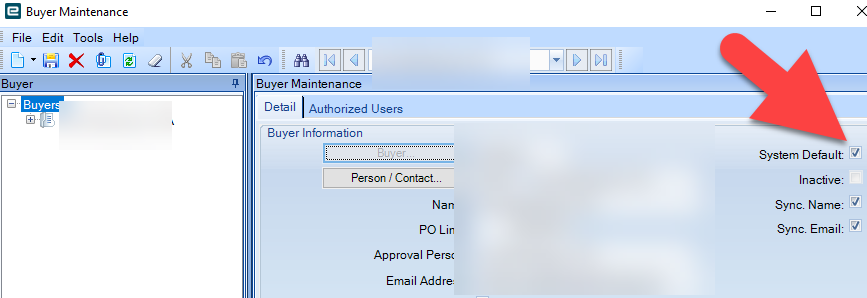
@NateS i think the issues your running into are because of the buyer/authorized user connection. Who is the current default buyer? make your account an authorized user under that name to test this out. once you reload the suggestions you should start seeing reqs come in.
…a little tip i learned from others was to make the buyer a general title, like the company name or employee level like supervisor/manager/owner/etc. This way you just modify the authorized users under that generic name and dont have to adjust each employees authorized users if someone leaves the company.
similar to others in here, we setup our requisitions and purchase orders so that the users can do all the grunt work and if done correctly, the purchaser just needed to combine them into a PO from suggestions and send it on its way.
my favorite thing about reqs is that the part number does not need to exist in your system. whatever the user finds online can be the part number, we instructed them to fill the description field with the url of the product, and then we forced them to select a part class to the best of their ability. (that was a huge push from the acct team but i could understand their resonsings after a few runs)
the also need to enter in qty, price, and the supplier and the supplier is the only annoyance as they need to exist in the system prior to the req.
unlike many, we decided to skip the approval process as we were a small company. and the reqs werent coming from just anyone. only managers could submit reqs and we made it so they went straight to approved after submitting.
7 Likes
Oh man, I have a laundry list of gripes about Reqs. Several new “features” have surfaced over the last month or two. We use Requisitions all the time, but they are rough.
I’ll do a separate post tomorrow maybe. I do want to consolidate all of the pitfalls I have found.
The one - ONE - advantage over a PO? A Requisition can be for many suppiers. But it’s still one document for the whole require-izing.
3 Likes
Hi Nate,
I agree with @Joe_Tahan here, it is a function of buyer setup. The req will go to the default buyer in the system to purchase unless it is for a part setup with another buyer assigned or an associated part class is setup with a buyer.
One other thing to note, once the PO suggestion for the req is made by the system (automatic, no need for MRP run), if you delete it, I believe it is gone and not coming back. We have a bpm that warns users if they delete a PO suggestion for a req that it will not come back. Now it might’ve changed in newer versions, but something to watch out for.
We like reqs because they tell us who and why we needed something purchased. We only rarely use them for inventory purchases, occasionally for long lead items that are in design but have some known needs.
Nancy
4 Likes
Another “feature” of Reqs (which caught us off guard at first… we just kind of stumbled on it)… a part requisitioned referencing a Job will be added as a job material automatically if the requisition is converted to a PO. And this could be a part-on-the-fly.
For example, our final assembly department needs a hose clamp from McMasterCarr… they put in a requisition for a job material. That part (and McMasterCarr P/N) will show up as a material on the job once the PO is created and approved.
That being said, we’ve seen a lot of unexplained behavior with Reqs falling through the cracks in the system (a req with 4 lines… 3 get converted and the other just hangs there like it was never dispatched). You can actually go back into the Req and re-dispatch and then that line comes through. Not sure why that happens, but its difficult to monitor. We always assumed this was probably “a Kinetic thing” (we’ve never used Classic Requisitions). Its hit or miss and hard to reproduce on demand. So, the trust level here for requisition system was in the toilet.
Because the Requisitioner is doing most of the work already… part info, supplier info, demand info… we’ve actually started moving away from Requisitions and started using Tim’s approach in the post below:
“simply create buyers for all employees that make requisitions, and assign those “buyers” a $1 limit. Then have them create their own POs which need to go through the PO approval process, skipping the requisition altogether.”
4 Likes

7 Likes
This is all excellent information! Thank you all! I also pulled that Purchasing Users Guide.
I am attempting to writeup what I see as the basic requisition process so we can decide if we even need it. I think I am missing some parts still.
-
Identify the need. An employee or department needs something ordered.
-
Submit a requisition. Create a new Req, select your name as the requestor.
-
Add a new line to the req, and populate the details you have. This could be part, description, class, quantity, supplier, and cost.
-
Save it. I think this is where the requestor dispatches the req. That will send it along any action path we have defined. As I showed earlier, we don’t have any mandatory actions setup, just the two basic ones. I just choose SEND TO REQ’N FOR PUCHASING.
I setup a new Buyer group. I called it MainBuy (character limit here sucks!). Right below buyer you have to choose a person/contact. I left it blank, then added myself as the only authorized user and system default buyer (and default auth user). When I added myself as the authorized user, it filled in my person/contact info. What have others done here if you use a generic buyer? Do you still have to tie it to a single person, or do you make a generic person/contact?
-
I opened PO Suggestions and click the binoculars to search. I choose Sort By Requisition, and mine came right to the top. Open my Req, and choose a supplier and enter a unit price. Go to the Material List tab and click the Buy check box for this req.
-
Then I think I just click Actions > Generate POs.
-
Open PO Entry, and search for my PO. I assume it was the last one entered, so I sort by PO.
-
Now I have a regular old PO that can be reviewed and approved along the standard process.
I figured out the to do list. You have to set an action to notify a user, then set that user as the notification user when you dispatch the req. Then that user can login under req entry and look at their to do list. This certainly doesn’t seem any easier. I wonder if we really need all this.
Did I miss anything else critical here?
Thank you all!
Nate
Later today…
Good thing you reminded me though. Been one of those mornings.
2 Likes
I just noticed this this morning! This is a genuinely useful feature!
(I know, gotta do that writeup. That’s more of an afternoon slump kind of task.)
2 Likes
this might not work for you guys, especially if youre a larger, stricter company than my previous employer, but as i mentioned:
you can eliminate most of the requisition approval by limiting which users can actually submit. this way only the managers/supervisors/leads/etc can submit a requisition instead of having the employees do it, the managers approving it, and then it gets to PO Suggestions.
When they dispatch the req, they select Approve Req and itll go straight to the PO suggestions tab. Now obviously for some users, or just a global policy for the company, you may want to have spending limits. If you set up the Buyer to have a max purchase of $5,000 or something you can still have some restrictions without muddying the process.
Same scenario here - small company, limited number of users can enter reqs…works well enough…
1 Like
We use advanced requisitions to manage the requisitions, approvals and POs. It has streamlined the process. If you do a lot of requisitions and want to ensure the right person is approving it has been super helpful for us rolling out controls around purchases.
1 Like
Hello,
We are currently transitioning from a Third Party Maintenance solution to Epicor Maintenance and are looking to utilize the requisition functionality.
The issue we are encountering is submitting a requisition associated to a Maintenance job. The constraint we are operating under is that if we need a third party to service the equipment, we want to Purchase Order to be associated to the job.
Creating the requisition works fine, but when we try to process the suggestion in Buyer Workbench we get this error:
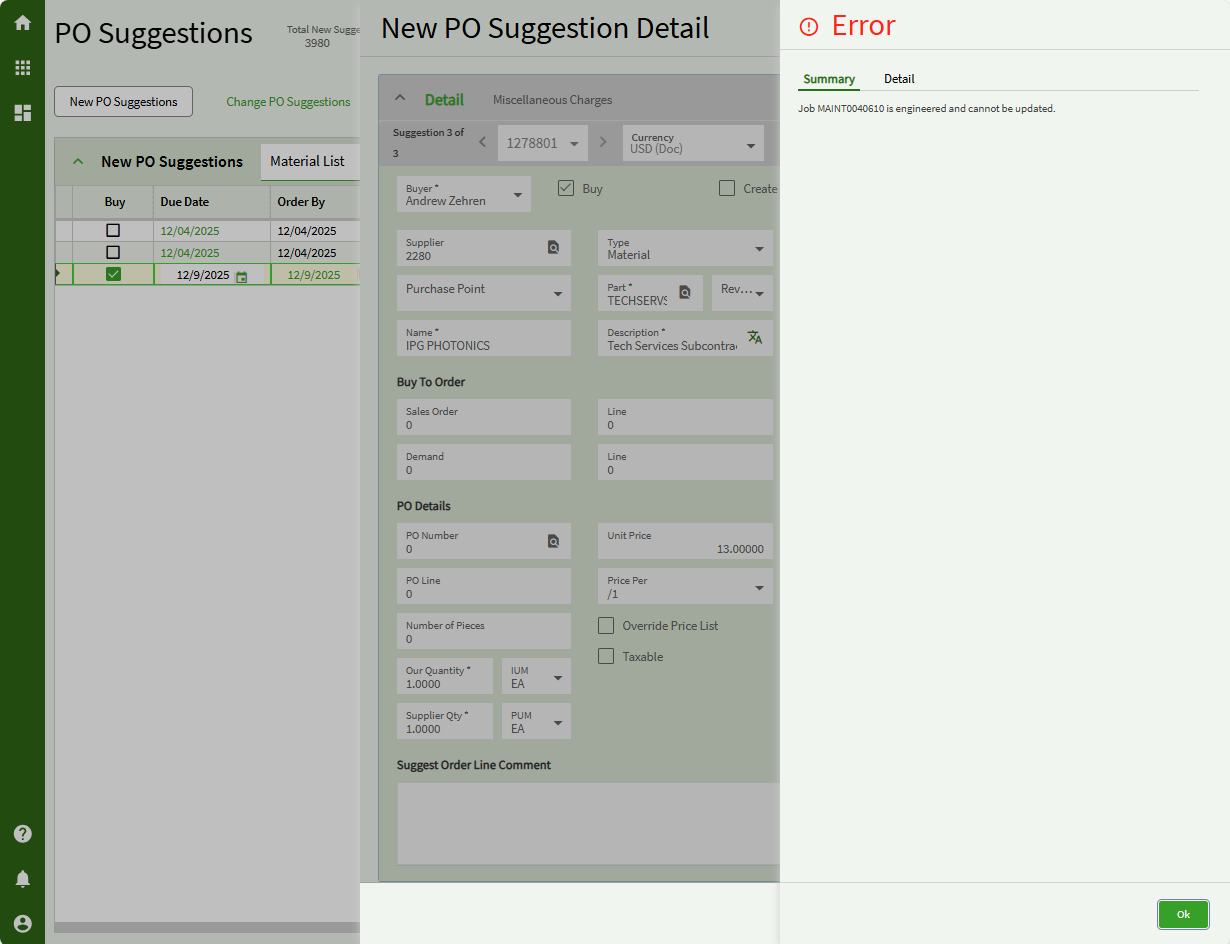
We do not want our Maintenance and Purchasing staff to also have to manage the jobs as well. Does anyone know of a workaround or different solution to this issue?
Welcome @Zachary_Knoll!
In Kinetic, job serves two purposes: to schedule and to collect costs. There are four types of jobs in Kinetic: Production, Project, Field Service, and Maintenance. They all share the same tables. If you want to track costs in Kinetic, you have to use the job. The purchasing module can track purchases to stock, to GL Accounts (Misc), and Jobs (Material and Services). So, I am afraid that if you want to track costs, you must use a job. The job keeps track of time, material, and outside processing.
There are some things that make using jobs easier and one of them is templates. Here you can set up a template instead of engineering each maintenance job manually. You can also copy the engineering from a previous job if it is marked as a template.
I assume the reason your company moved from the 3rd party system was to not have to double enter everything. Your users (probably maintenance staff) need to know that while this is “not the other system”, they are going to get a lot more accurate information than they did before with some extra discipline.
What are they adding to the job? Material or Outside processing? They are treated differently in Kinetic.
1 Like
My assumption here is that this is related to my earlier post on this thread:
The problem is (again, an assumption)… in your Company Configuration (Modules > Production… you probably have this checkbox checked:
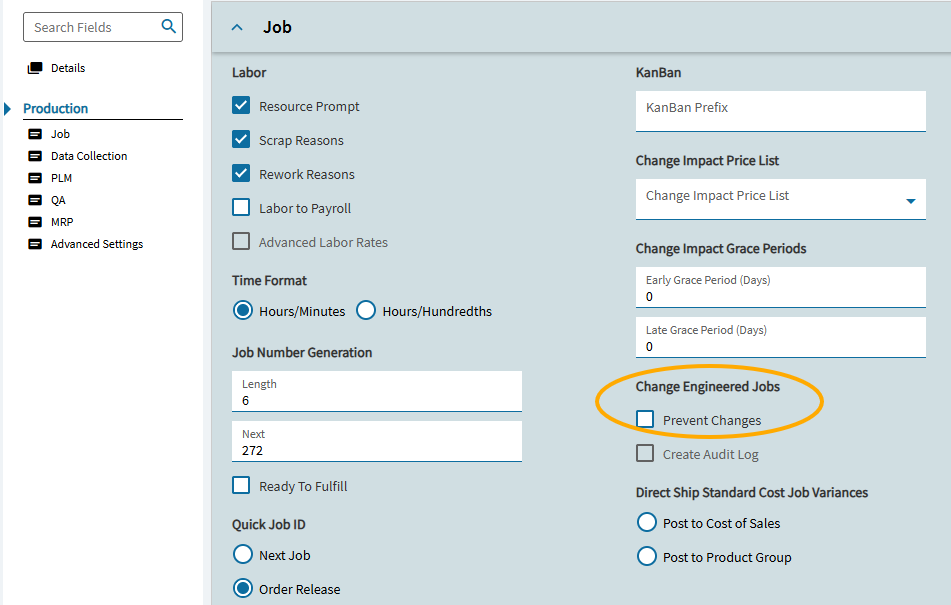
As you can see, this seems to marry up with the error you are getting. Due to the “feature” I described above, when you create a requisition for a Job material, the system will automatically added that part to the job once the PO is created. BUT… since you’re not allowing changes to Engineered jobs… ERROR time.
3 Likes
Thank you for your responses! This was super helpful.
We are new to using requisitions in Kinetic. We are trying to implement this to purchase inventory, job material, and “Other” types.
From my post earlier unselecting the “Prevent Changes” in company configuration did let us process the PO Suggestion without error. This is how we will proceed with POC testing.
Thank you again for your help!
3 Likes
Yes, glad to see that @dcamlin got you past this error.
In your POC, one of the questions I would ask, “How do you want this service to show in the cost?”
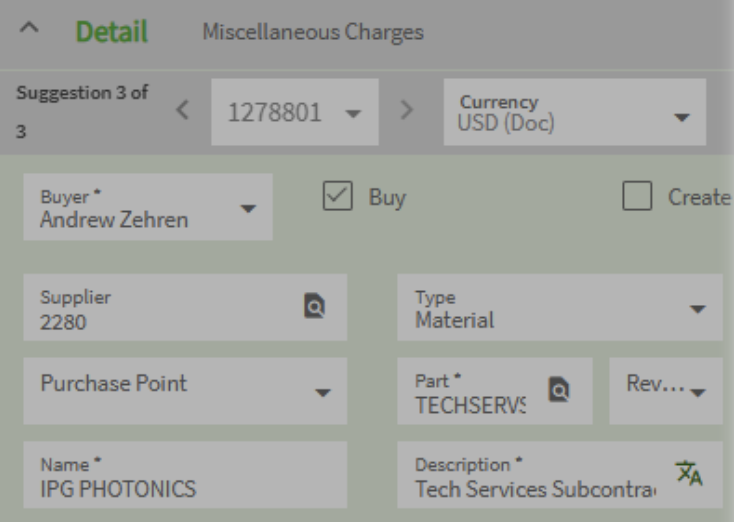
The PO line indicates this is a subcontracted service, but your PO is treating it as material. Is that how you want to see that cost? Is this process happening before you work on this part or do you need to manage the shipment to and from the supplier?
1 Like
Valid question for sure.
Requisitions can be used for Inventory, Job Materials, or Other (PUR-UKN). But @Mark_Wonsil’s question is a good one for this example.
The “subcontracted service” will show as a material on the job… and associated costs will be mixed in with Job Material costs… NOT subcontract costs.
Unfortunately, you can’t requisition subcontract, but perhaps that would be a decent tweak/feature for the future?
In order to get subcontract costs to fall in the right bucket, you need a subcontract operation… a subcontract PO Line… a subcontract shipment… and a receipt.
Its actually clever that you have a part called “TECHSERVS…”… if you think about it as a means of short-cutting the Subcontract Shipment entry portion of the process. May be in the wrong bucket, but at least the costs end up on the job, overall.
2 Likes
3 posts were merged into an existing topic: Bpm for requisition