This field has been there since December, so no, it is not new.
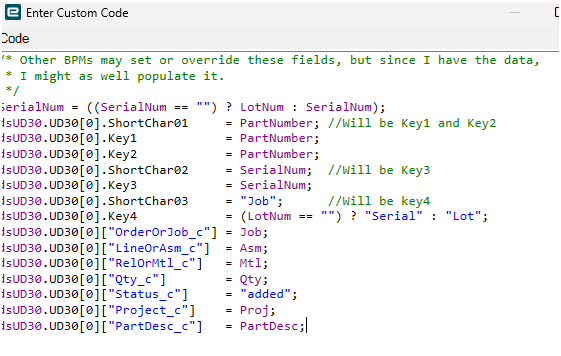
I’ve (re)learned how to reference a UD field of a single row, like so - with no period but with brackets and quotes.
This field has been there since December, so no, it is not new.
I’ve (re)learned how to reference a UD field of a single row, like so - with no period but with brackets and quotes.
Well I didn’t mean to post that so soon - must have uncovered a shortcut.
But I think I can just combine the 2 ideas, right?
EDIT FROM THE FUTURE (July 15):
TL;DR: Don’t do this.
Do this instead:
Read on for long discussion of why not.
I would use:
x.UDField<string>("Status_c")=="Issued"
Lambda vs not lambda doesn’t factor in so much as ds vs a Db. linq query…
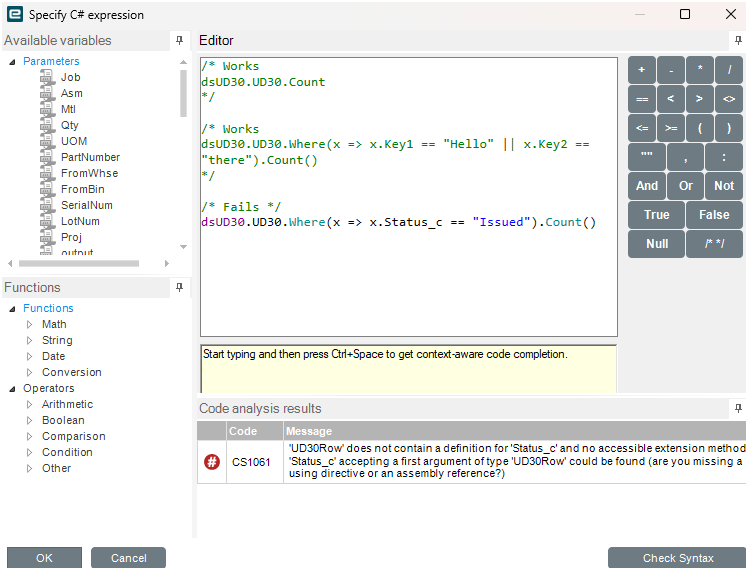
In a BPM like your example with dsUD30, you have to either use your x[“Status_c”], or you can do this:

But if you’re doing Db linq statement you treat it the same as built-in fields: Db.UD30.Where(x => x.Status_c == “Issued”).
OK, did not know that! Thank you both.
I’ve never done LINQ, but if for some reason I do, I hope I will remember this.
If you do a lot of BAQ widgets in BPMs and want to turn that into code someday those are the types of snippets you’d use.
Makes sense.
Some business objects are super bloated (Part, JobEntry), so even a GetByID can slow things down.
But then you hate to have tons of BAQs floating around that BPMs are critically dependent on.
So I can see why you’d want it all inside the BPM.

Until you get to outer joins and group bys
Finally put this to use today.
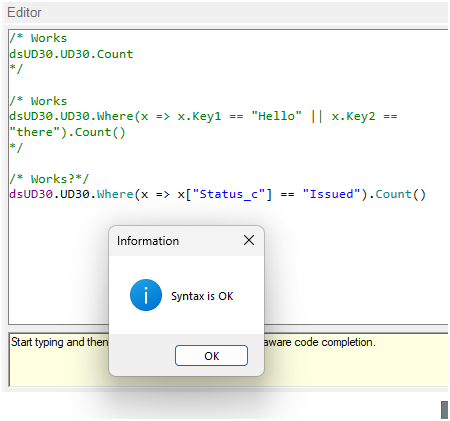
And I think only “this” works - only the longer notation. The shorter notation passes the syntax check but gives me zero rows when I know there are rows that meet the criteria.
So this produced zero rows:
dsUD30.UD30.Where(x => x["Status_c"] == "Issued" || x["Status_c"] == "Shipped").Count()
Whereas this gives me the 59 rows I was expecting:
dsUD30.UD30.Where(x => x.UDField<string>("Status_c") == "Issued" || x.UDField<string>("Status_c") == "Shipped").Count()
@TomAlexander already explained the difference of why one works and why one doesn’t.
The Ds (dataset) doesn’t have the UD fields built in, so you need the method to look them up. A Db (database) context builds the properties from what’s in the database and so the named fields are in the object.
I don’t really see a use for this on server side because if the column is named, then you can just use the name without indexing.
x.Status_c
If the field doesn’t show up (aka doesn’t pass syntax check) then use the x.UDfield() method.
I’m seeing 3 scenarios, though, not just 2.
First there’s the square bracket notation.

Second is the UDField method.
dsUD30.UD30.Where(x => x.UDField<string>("Status_c") == "Issued").Count()
Third is the dot notation
x.Status_c
I’m not trying to be difficult and I am grateful for the advice. But my point is that in this specific scenario, it seems like the square bracket notation is misleading because it passes syntax but does not give accurate results.
I mean I could be missing something there, but I did a find-and-replace on the code snippet, so I don’t think I changed anything else.
That’s my point. Square bracket is indexing into the object. You can do the same thing with a number instead of a name. x[2] is the third field (it’s a 0 index), regardless of the name it has. Using a quoted string, it looks for that column name at run time, so you can type whatever you want in there and the compiler doesn’t yell at you because you essentially told it “I know what I’m doing, just trust me”. This can be useful if you are adding things to the object at runtime so the compiler won’t know about it, but it’s there. (that’s not the case here). So if you aren’t adding it at runtime, then the dot notation should pass the syntax check. If if doesn’t then you need the method x.UDField() to get the UD field because it doesn’t live in the native dataset.
Realize that a dataset and the fields in the database are not the same. It’s easy to think that they are because for the most part, they mirror each other, but there are instances where the fields only live in the dataset (like the dspBuyIt field in the JobMtl dataset for example). UD fields are the opposite, where they live in the database, but aren’t in the dataset, because they weren’t programmed into it initially.
So… this sounds like “Never use the bracket notation - use dot or UDField.”
Which I won’t argue with; I’m just trying to get a rule to follow.
I mean I think you are saying there are uses for the bracket notation, but it seems like it’s more of a gamble than it’s worth (to me).
Basically, yes. Understanding the nuance, so it’s not actually “Never” but in most use cases within Epicor when you aren’t adding your own anonymous objects, it would be recommended to not use [] notation.
And… I know you won’t but I’m gonna put it out there anyways, for god sakes, go take a class on object oriented programming, it will be useful, I PROMISE!
Never!
Also, I took 3 computer science classes in college (a while ago…)
Thank you for the help as always.
Oh and a 1/2 semester in one Mechanical Engineering class was on SQL databases and writing queries.
When would I ever use that?!
Famous last words…
I will say I’ve learned WAY more on the job then I ever learned in college. When you see stuff in practice it sticks a lot better. So I bet if you took those same classes now, after seeing some of it in the real world, a LOT more light bulbs would turn on for you.
Oh no doubt.