Thank you!!
You should do a class at insights next year for this topic!! It would be a good one!!
@jkane John, thanks for this. Doing something very similiar and this has provided a reasonable road map.
Alas, some questions.
- How did you get the system to realize the op has to end before the next op can start? Epicor uses the oven example… but if you need to bake 9 trays and the top trays take 2 hours the bottom take 6… it tells you to unload the oven after 2 hours and put the next bread in for say 5, etc. I may need to work with methods to make them all the same length, but seems like there should be an easier way to say “don’t add anything to that resource until it’s completed all in that run”.
- My resource numbers don’t seem to climb… but it seems to be grabbing the 9 items I’m wanting at once.
- another weird tweak is it doesn’t seem to grab the first of them done… but the first one in the run… Blue are the 9 in the load.. Green at the bottom is starting once the green on top is done… but yellow gets done sooner… (now that i look at it, i realize it’s done .01 sooner… so actually that might make sense).

Thanks!
-Brian
@WarmPepsi , are you at insights?
I wish. Haha. Hopped over to a new company 4 weeks ago and been doing a full schedule redo/implementation non-stop ever since. Have a colleague there, but I’m sitting at home (remote).
That’s too bad, we could have met up to discuss.
What are you trying to do? If you can explain more of your requirements, I will be able to speak more to your situation.
Furnace runs. Not looking to get dead on perfect; however when correcting resource groups and calendars.. lots of discrepancies. Furnaces were set as infinite; obviously not. So flagged them with a realistic schedule and then pushed everything out for 5 years, because they were running once for each job (doh). So now I did my first global schedule run since adding 9 on the resource detail page, and 1 on the job resource page… So setup “as it should be”. Each furnace can take 9 jobs per load, but obviously it runs a set cycle according to the length… Not sure i’ll be able to schedule for that element. (12 vs 15 hrs etc). But I would like to try and schedule for “you don’t open the furnance during a run” aka, these are like 800-1000C furnaces. May not be possible, but it’s my goal as of 8am this morning. 
While this will help bridge the gap between infinite and finite, it would be best to say “here’s 9 jobs; run them. Here’s the next 9; run them”.
I was going to ask that, can the furnace ever be opened during a run. Sounds like no.
Next question, can parts stay in the furnace for longer than needed?
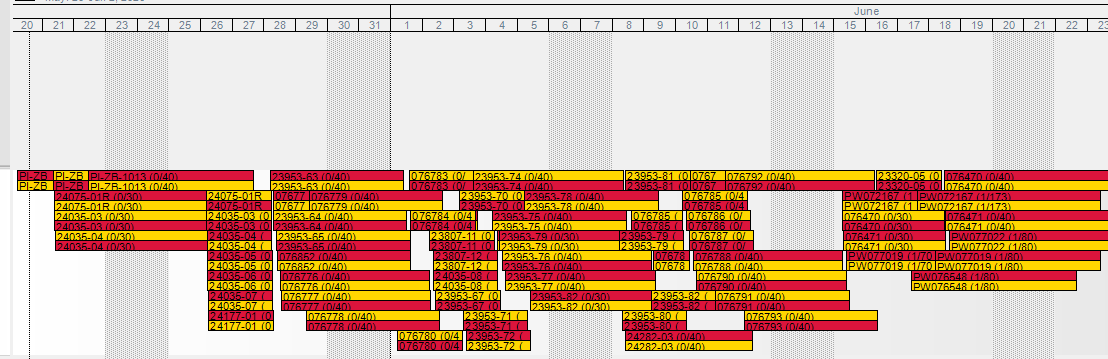
Yeah, I think your best option would be to put how long the part is in the forge in the setup group so you can use that as a filter to batch times together.
I am not sure, but I think you also want to add another scheduling resource that is time based in addition to the non-time based resource
Both solid ideas. Appreciate it. Will try to remember to head back here and update when things are smooth sailing. Thanks!
John, so I went through and adjusted all the resource groups for concurrent capacity… and adjusted the jobs. It works “pretty” well, but scheduling is puking on some jobs once the calendar gets full. If you attempt to manually reschedule them via Job Entry, it gives you a “concurrent capacity error”. Basically, it tries for long enough and then the scheduling engine just gives up and says “you’re on your own”… however… when it does that, it simply just doesn’t reschedule the job.. and you’re left with jobs with the previous schedule.. I’ve found it’s somewhere around the 3000 job number.. which is only half of our current open jobs…
Just posting back up to see if you experienced this. It’s working fine for the first scheduled jobs… but once the calendar is full… it just can’t do it. Also, I took the step of setting the finite horizon for these ops at 120 days… but the scheduler doesn’t take that into account at all, and the resources maintain finite status when it’s using the concurrent capacity. Epicor help wants to try it in 26.1 and see if the errors still exist (we’re in 23.1).
Did not run into that. What you are saying seems right though, concurrent capacity only works in finite. I believe you would have to change all of your finite horizons, not just single ones.
I was actually getting the concurrent error, and THEN put on finite horizons. They were previously set to 0. I did this to try and give the scheduler a window to find an open slot, but no such luck.
And I also need to correct myself, it WAS doing the finite horizon out 120 days as I had setup. I didn’t zoom far enough out to see it.
I can’t find it right now, but I believe Concurrent Capacity only works in a fully finite environment.
Concurrent capacity is a non-time constraint that is inherently finite. If you have resources that are not finite, the system is going to choke. The system will schedule all of the infinite within the finite horizon and the finite will eventually hit the horizon and not know what to do.
From the Scheduling Technical Reference.

I am curious how capabilities work across multiple machining centers that have their own dedicated operators.
For example, we have boring bar machine resources in small, medium, and large. Each machine all have their own dedicated people resources to them. Would I use capabilities to bind machines from a labor pool resource group?
I would assume if I went in that direction, the scheduling logic would go like this:
Scheduled Operation → Capability (choose machine) —> nested capability (choose labor)
The challenge with this, as stated earlier, is that machines have dedicated labor resources to them. Therefore, it would seem that this logic could mismatch an operator to a machine that is not their dedicated one.
Back to the example, I schedule an operation needing small boring bar work. If all of my small boring bar operators are at capacity, but there is a vacant small boring bar machine, I want that machine skipped over and the work moved to the medium or large boring bar machine with their dedicated operators.
Is there a possibility to have the scheduling logic be something like this?
Scheduled Operation → Capability (choose machine & operator(s))
I am not aware of any functionality that “pairs” resources together. Capabilities pool together resources so the system can choose one of them that has availability. So, in your example the system will choose a machine that is open and then choose an employee that is open.
If your machines have dedicated resources, I don’t think I would even add in the employees as resources. Just keep the machines as resources and put the employee’s days off as exceptions on the resource calendar.
Thanks for the reply, John.
That probably makes the most sense to do. Within an operation I have heard that referencing a resource group that has people and a machine would pair them together when work comes through. I was hoping referencing a machine through a capability would pair a labor resource in the same way-- but if you are not referencing the resource group, then it will not work that way.
We do have some machine workcenters that are operated by floaters, so in that case, nesting the capability would work.
Appreciate you helping me comprehend capabilities. We are a shop where operations flex outside of their original routed machines fairly often, and not capturing this flexibility in Epicor vastly hinders our quoting and scheduling abilities. Capabilities I believe can help relieve us in this way.
Well, now that you supplied more info, maybe you could try this.
Create 3 Capabilities
- Small Bore Employees
- Medium Bore Employees
- Large Bore Employees
Then put all of the non-floating operators in the Small Bore that only work on Small Bore and set their priority as 1. Then add in the floating operators as priority 100. Do the same for the other two capabilities. Also note it is fine to have the same employee in all 3 capabilities.
What this will do is look at all of the employees with priority 1 first and schedule them on a small bore. Then it will look at the priority 100 and see if they are available and schedule them if they are.