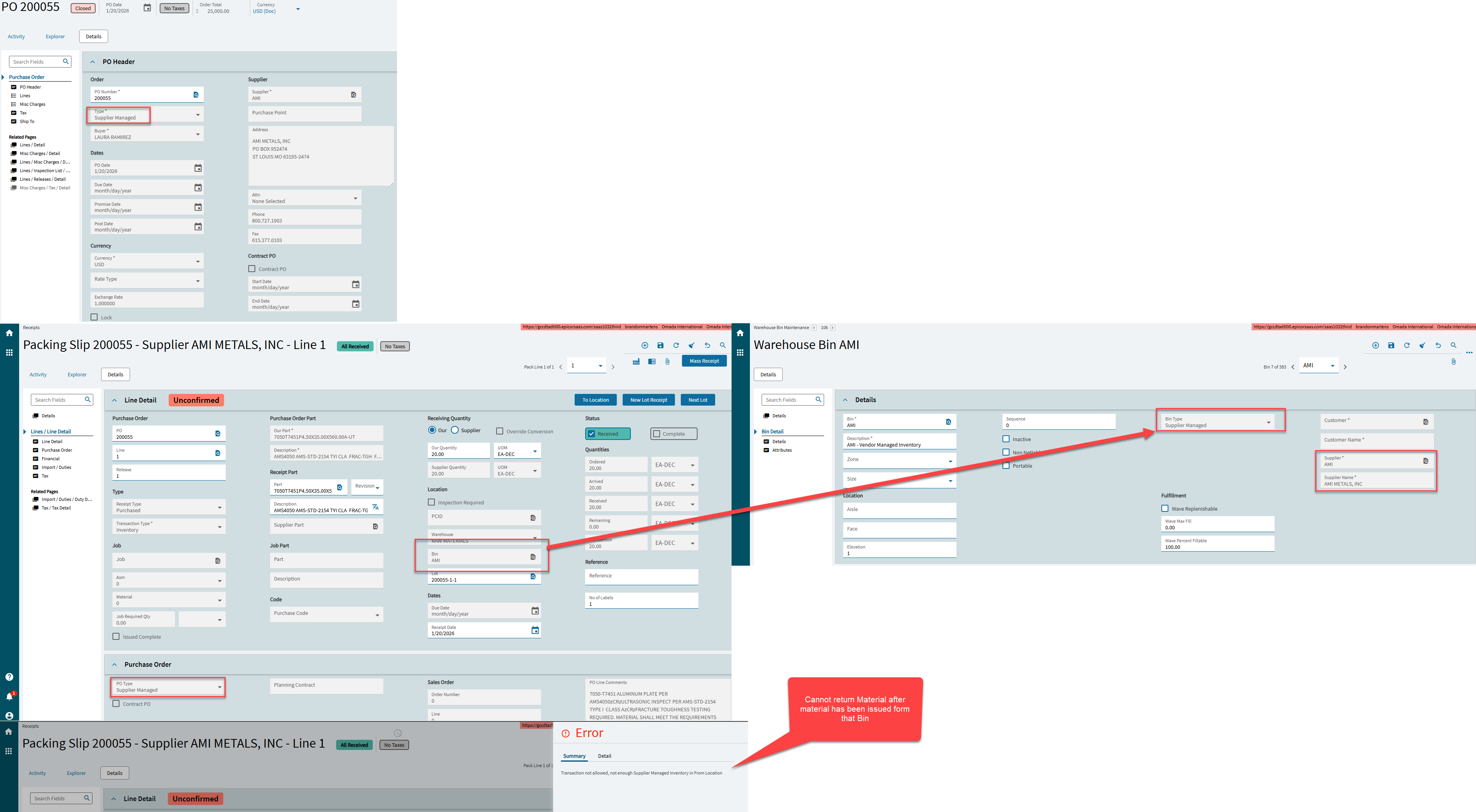
We are in the process of End to End testing and we are trying to utilize the “Supplier Mananged” type in Purchase Order Entry. After placing the PO and receiving it, it get’s receieved into a Supplier Managed Bin.
Our main issue during testing is the return of the Supplier Managed inventory if it’s damaged. During our testing we placed a PO of 20 pieces and we issued 5 to a Job. Once material has been issued, you cannot update the Receipt of the Supplier Manged PO if you realized the material is damaged or defective.
We do not want not want to issue the bad SMI material to a job because a nonconformace through DMR will affect our COGS, which is not ideal.
Epicor will also not let you quantity adjust out of an Supplier Managed Inventory Bin. Same with Cycle Counts.
I find it odd that the only path to get the SMI material out of the system is to issue it to a Job. During that process, we run into issues with RNI of material that we do not want to pay because the material is defective. Using the Nonconformace module will alwasy affect COGS, even if we create a reason code tht points to an Inventory GL.