I discovered today that Method Tracker is not a Context Menu option that you can maintain through Context Menu Maintenance, so if you have a custom layer on your Method Tracker, right-clicking is not opening with your customized Method Tracker.
To fix this, you have to create custom events to override the base events in each of the applications where there is the option to right-click & open with Method Tracker.
Here are all of the applications where I could find that this exists and the events that you will need to copy and setup to open your customized Method Tracker (please edit this wiki to add other ones that exist):
| Application | Base Event to Copy/Modify |
|---|---|
| Erp.UI.JobEntry | Context_MethodTracker |
| Erp.UI.PartEntry | Context_PartRev_RevisionNum |
| Erp.UI.SalesOrderEntry | Context_MethodTracker |
| Erp.UI.QuoteEntry | Context_MethodTracker |
How to modify event to open customized Method Tracker:
- Open application in Application Studio with a custom layer (create one, if needed)
- Search for the base event to modify (use browser debugging to determine which event to use, if not listed in table above; please edit wiki to add missing ones)
- Right-click on that event in the tree
- Select Copy
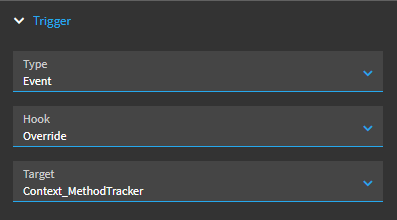
- Click on the trigger and in Properties…
- Set Type to “Event”
- Set Hook to “Override”
- Set Target to the base event that was copied
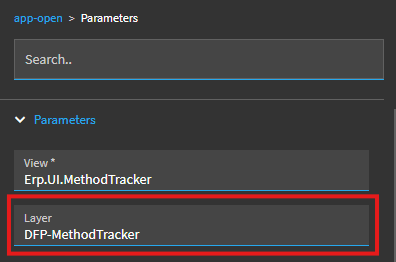
- Click on the “app-open” widget
- In Properties, go to Parameters and enter a Method Tracker custom layer by name in the Layer field
- Save layer, preview, and commit/publish when satisified