we have upgraded Epicor to Kinetic over the weekend, one of important customisation randomly failing.
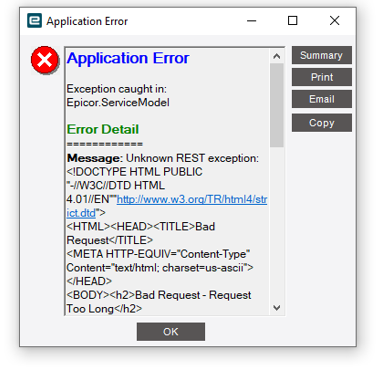
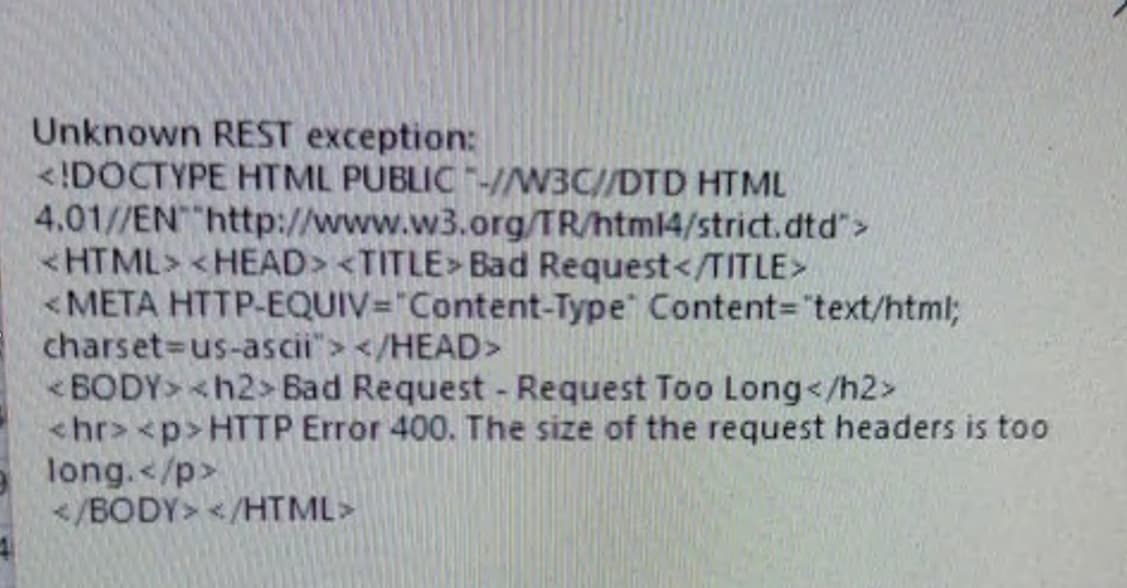
see below images are the exception we receive. the customisation simply calls ud table and update data. this was fine in epicor but only issue in kinetic.
tried clear client cache / regen data model / re-imported from epicor to kinetic. no luck
the issue is this error occurs randomly. not always consistent
IIS won’t care what browser you’re running: Chrome, FireFox, Edge, or the embedded browser in the classic client (EO.WebBrowser which is Chrome-based).
Run fiddler on the client and inspect what is actually being sent. It’s possible that EO (uses chromium) has bad cookie stores causing the issue. Not sure how one might clear that. I know you can get developer console one way or another from the smart client, just can’t recall how.
Is it possible that you’re not resetting the BPM Context fields and keep adding to it until it’s over 16K? What you’re describing doesn’t sound like it should be that much data. Do what Josh suggests and watch what’s going over the wire to shed some light on what’s happening.
Another option is to create an Epicor function that accepts keys of the records you want to release and print material tags for and do the work there. In Kinetic (and even before really), we want to execute things at the server and not the client. Link that button to a function call passing in the items to act on.
Ice.Common.EpicorServerException: Bad tokenToken has expired
—> System.UnauthorizedAccessException: Bad tokenToken has expired
at Ice.Security.Token.JsonWebToken.Parse(String token, Byte[] keyBytes) in C:_releases\ICE\ICE4.2.100.10\Source\Server\Framework\Epicor.Ice\Security\Token\JsonWebToken.cs:line 195
at Ice.Security.Token.TokenValidator.Validate(String token, WebTokenIdentity& webTokenIdentity) in C:_releases\ICE\ICE4.2.100.10\Source\Server\Framework\Epicor.Ice\Security\Token\TokenValidator.cs:line 36
— End of inner exception stack trace —