In Kinetic, how to change JobOper and JobOpDtl records in Job Entry

Hello all,

We are in the throes of converting from classic to Kinetic.

In Job Entry, we have a bunch of custom code.

I am attempting to implement the first portion of it in Application Studio.

Here’s the not-as-brief-as-I’d-like summary:

We have a custom field (Character01) on JobHead, that indicates which production line (A,B,C,D) will be used for the job. Line D handles larger jobs, and has different operations available than Lines A,B,C.

In the legacy code, when the Line changes, we loop through and change the JobOper and JobOpDtl records, adjusting ResourceGroupID, ResourceID, and ProdStandard in the JobOpDtl table, and adjusting the LaborEntryMethod in the JobOper table.

We have created a function that we call from AfterChange on the Line field in Application Studio. The event passes in JobNum and Line to the function. I believe we need to do something to cause the JobOper and JobOpDtl records to get updated. The function is changing the local values, but after the function returns, the values are not updated in the Job.

Maybe we need to pass in a reference to those objects, so that when we update them in the function, they are updated in Kinetic?

Any advice or insults are welcome. :slight_smile:

{

//Value Check to prevent error
if(string.IsNullOrEmpty(this.Line)) return;

var edvJobHead  = Db.JobHead.Where(x => x.JobNum == this.JobNum).FirstOrDefault();
var edvJobOper  = Db.JobOper.Where(x => x.JobNum == this.JobNum);
var edvJobOpDtl = Db.JobOpDtl.Where(x => x.JobNum == this.JobNum);

int jobOpRowCount = edvJobOpDtl.Count();

if(jobOpRowCount <= 0)
{
  this.PublishInfoMessage("No operations found.", Ice.Common.BusinessObjectMessageType.Information, Ice.Bpm.InfoMessageDisplayMode.Individual, "Job Entry", "Change Line");
  return;
}

this.PublishInfoMessage("New Line:" + this.Line, Ice.Common.BusinessObjectMessageType.Information, Ice.Bpm.InfoMessageDisplayMode.Individual, "Job Entry", "Change Line");

if(this.Line == "D")
{
  this.PublishInfoMessage("Line D, before loop", Ice.Common.BusinessObjectMessageType.Information, Ice.Bpm.InfoMessageDisplayMode.Individual, "Job Entry", "Change Line");
  int i = 0;
  foreach(var edvJobOpDtl_row in edvJobOpDtl)
  {
    this.PublishInfoMessage("before switch in Line D logic. i = " + i.ToString() + ", Operation: " + edvJobOpDtl_row.OprSeq.ToString(), Ice.Common.BusinessObjectMessageType.Information, Ice.Bpm.InfoMessageDisplayMode.Individual, "Job Entry", "Change Line");
    
    switch((int)edvJobOpDtl_row.OprSeq)
    {
      case 40:
        this.PublishInfoMessage("case 40", Ice.Common.BusinessObjectMessageType.Information, Ice.Bpm.InfoMessageDisplayMode.Individual, "Job Entry", "Change Line");
        edvJobOpDtl_row.ResourceGrpID = string.Empty;
        edvJobOpDtl_row.ResourceID = "LTD01";
        edvJobOpDtl_row.ProdStandard = 420;
  //      How to reference JobOper for the same operation? How to update it?
  //      edvJobOper[i].LaborEntryMethod = "Q";
      break;

      case 41:
        this.PublishInfoMessage("case 41", Ice.Common.BusinessObjectMessageType.Information, Ice.Bpm.InfoMessageDisplayMode.Individual, "Job Entry", "Change Line");
        edvJobOpDtl_row.ResourceGrpID = string.Empty;
        edvJobOpDtl_row.ResourceID = "LTD02";
        edvJobOpDtl_row.ProdStandard = 0;
//        edvJobOper[i].LaborEntryMethod = "B";
      break;

// Ops 50 through 90 omitted for brevity.
  
      case 100:
        this.PublishInfoMessage("case 100", Ice.Common.BusinessObjectMessageType.Information, Ice.Bpm.InfoMessageDisplayMode.Individual, "Job Entry", "Change Line");
        edvJobOpDtl_row.ResourceGrpID = string.Empty;
        edvJobOpDtl_row.ResourceID = "LTAUDCLD";
        edvJobOpDtl_row.ProdStandard = 30;
//        edvJobOper[i].LaborEntryMethod = "Q";
      break;

    }
  i++;
  }
  // How do we cause the updates from the loop to get written (eventually) to the db?
  // After the loop, edvJobOpDtl_row no longer exists. 

}
}

I’m going to counter with some code that I know functions and updates the tables specified. I’m not a developer just a tinkerer that tends to get the job done.

List<string> newParts = new List<string>();

CallService<Erp.Contracts.QuoteSvcContract>(quoteSvc =>
{
    var quoteTS = quoteSvc.GetByID(iQuoteNum);

    foreach (var qd in quoteTS.QuoteDtl)
    {
        string partNum = qd.PartNum?.Trim();
        if (string.IsNullOrEmpty(partNum))
            continue;

        string classID = qd.UDField<string>("Text")?.Trim();
        classID = string.IsNullOrWhiteSpace(classID) ? "MFG" : classID.Substring(0, Math.Min(4, classID.Length));

        string prodCode = string.IsNullOrWhiteSpace(qd.ProdCode) ? "DEFAULT" : qd.ProdCode.Trim();
        prodCode = prodCode.Substring(0, Math.Min(8, prodCode.Length));

        CallService<Erp.Contracts.PartSvcContract>(partSvc =>
        {
            bool exists = false;
            try
            {
                var check = partSvc.GetByID(partNum);
                exists = true;
            }
            catch
            {
                exists = false;
            }

            if (exists)
                return;

            // -- Skip ProdCode and ClassID validation for now --

            var partTS = new Erp.Tablesets.PartTableset();
            partSvc.GetNewPart(ref partTS);
            var newPart = partTS.Part[0];

            newPart.Company = this.Session.CompanyID;
            newPart.PartNum = partNum;
            newPart.PartDescription = qd.LineDesc ?? "From Quote";
            newPart.TypeCode = "M"; // Manufactured
            newPart.NonStock = true;
            newPart.TrackLots = true;
            newPart.ProdCode = prodCode;
            newPart.ClassID = classID;

            // Set UOM fields - ensure "EA" is configured properly in your system
            newPart.IUM = "EA";      // Inventory UOM
            newPart.PUM = "EA";      // Purchasing UOM
            newPart.SalesUM = "EA";  // Sales UOM

            partSvc.Update(ref partTS);

            newParts.Add(partNum);
        });
    }
});

CreatedPartNums = string.Join(", ", newParts);

I believe the line relevant to this case is… partSvc.Update(ref partTS); I would think you could use job entry service for those tables. Hopefully this is of some use to you. Using REST is also a valid option. I have gone that route when I could get nothing else to take and it works more consistently. It just has more steps.

Thank you for the response.

I was led to believe that actually writing to the database would cause an error in Job Entry if you tried to save the record. It would (or could) be detected that “another user” had updated the database record(s), so it wouldn’t allow the Job record to be saved.

Do you have prevent changes set when engineered/released? If you do this is quite a bit tricker. I have set for logging purposes constants.currentuser for job entry. That can get around some of that. Otherwise you’ll have to add to the code to unengineer and unrelease, make the change, then re-engineer and re-release.

I have to guess that we do not have “prevent changes” set. Because the Classic code that I’m looking at does not do any unengineering, unreleasing, and redoing of that.

I’m really trying to embrace the “Kinetic” way of doing things, and not the “we don’t have time to do it right, just write directly to the da*n db” way of doing it.

[To be clear, this comment is aimed at our way of doing things in the past, not your code.]

I could very well be under informed on the correct kinetic way of doing things as we live by “we don’t have time to do it right, just write directly to the da*n db” way of doing it.” I’ve never had issues with writing to the db. I imagine you could do this by adding rows in such in the kinetic interface but I think you would still require a fair bit of custom code. So why not do it all with custom code? :rofl: Also, this is a bit out of context but might be closer to what you are looking for compared to the other code posted. This was a for an updateable BAQ so I could update multiple fields on the row. Base Processing BPM.
using (var updater = this.getDataUpdater("Erp", "JobEntry"))
{
    var resultQuery = queryResultDataset.Results
        .Where(row => !string.IsNullOrEmpty(row.RowMod) && row.RowMod != "P");

    foreach (var ttResult in resultQuery)
    {
        var ds = new Erp.Tablesets.UpdExtJobEntryTableset();

        // Query to object mapping
        {
            var JobHead = new Erp.Tablesets.JobHeadRow
            {
                ChangeDescription = Constants.UserID,
                Company           = Constants.CurrentCompany,
                DueDate           = ttResult.JobHead_DueDate,
                JobEngineered     = true,
                JobReleased       = true,
                JobNum            = ttResult.JobHead_JobNum,
                ProdCode          = ttResult.JobHead_ProdCode,
                ReqDueDate        = ttResult.JobHead_ReqDueDate,
                SchedLocked       = ttResult.JobHead_SchedLocked,
                SchedStatus       = ttResult.JobHead_SchedStatus,
                RowMod            = "U"    
            };

            ds.JobHead.Add(JobHead);
        }

        BOUpdErrorTableset boUpdateErrors = updater.Update(ref ds);
        if (this.BpmDataFormIsPublished()) return;

        ttResult.RowMod = "P";

        // Object to query mapping
        {
            var JobHead = ds.JobHead.FirstOrDefault(
                tableRow => tableRow.Company == Constants.CurrentCompany
                    && tableRow.JobNum == ttResult.JobHead_JobNum);
            if (JobHead == null)
            {
                JobHead = ds.JobHead.LastOrDefault();
            }

            if (JobHead != null)
            {
                ttResult.JobHead_DueDate        = JobHead.DueDate;
                ttResult.JobHead_JobEngineered  = JobHead.JobEngineered;
                ttResult.JobHead_JobNum         = JobHead.JobNum;
                ttResult.JobHead_JobReleased    = JobHead.JobReleased;
                ttResult.JobHead_ProdCode       = JobHead.ProdCode;
                ttResult.JobHead_ReqDueDate     = JobHead.ReqDueDate;
                ttResult.JobHead_SchedLocked    = JobHead.SchedLocked;
                ttResult.JobHead_SchedStatus    = JobHead.SchedStatus;
            }
        }

        if (boUpdateErrors?.BOUpdError?.Count > 0)
        {
            queryResultDataset.Errors
                .AddRange(
                    boUpdateErrors.BOUpdError
                        .Select(
                            e => new ErrorsUbaqRow
                            {
                                TableName     = e.TableName,
                                ErrorRowIdent = ttResult.RowIdent,
                                ErrorText     = e.ErrorText,
                                ErrorType     = e.ErrorType
                            }));
        }
    }
}

var resultsForDelete = queryResultDataset.Results
    .Where(row => row.RowMod != "P")
    .ToArray();

foreach (var ttResult in resultsForDelete)
{
    queryResultDataset.Results.Remove(ttResult);
}

foreach (var ttResult in queryResultDataset.Results)
{
    ttResult.RowMod = "";
}

I do recall things getting squirrely when you start talking about UD fields. I believe they require a separate call.

I honestly don’t get this mindset. The BO’s are quicker and easier as well as safer. GetNewX methods do most of the work, plus any post-proc BPM’s you’ve added for users will still apply so you don’t have to write twice to do the same thing.

I have. It’s not necessarily in-your-face errors either. It can be subtle stuff that, say, breaks MRP or Capture COS/WIP Activity.

Although, it should be pointed out that both of your examples are editing datasets and not the DB itself. You’re going through BO’s and still have most of the guardrails in place.

Ahhh, I must be misunderstanding what writing directly to the db is then. That’s how I’ve always done it. I’m self-taught so forgive my ignorance.

I wouldn’t even touch App Studio for something like this when you can do a pre-proc BPM on JobEntry.Update or DD on JobHead.

Just to nitpick, but those aren’t "EpiDataViews (they’re actual DB rows), so you shouldn’t use “edv”. It would also be simpler to do this in your function:

//Wrap everything in the service context
 this.CallService<Erp.Contracts.JobEntrySvcContract>(svc =>
{
    //This will create a structured JobEntryTableset object.
    var jets = svc.GetByID(YourJobNumParam);
    //referencing your custom field
    string line = (string)jets.JobHead.FirstOrDefault()["Character01"];
    //Loop through your OpDetails
    foreach (var od in jets.JobOpDtl)
    {
        string YourNewResourceGroup;
        //Add logic for setting YourNewResourceGroup variable here.
        od.ResourceGroupId = YourNewResourceGroup;
        //Always set RowMod or the magic won't happen.
        od.RowMod = "U";
        //Haven't tested this method, but based on experience, it would be a good one to call to pull defaults from your ResGrp change rather than setting them manually.
        svc.ChangeJobOpDtlResourceGrpID(ref jets); 
        //The ChangeX methods don't actually commit chagnes to DB, so you have to call Update.
        //You can try placing this outside the loop, but some BO's get pissy when you try to edit multiple rows in one pass.
        svc.Update(ref Jets); 
    }
}

Yeah, in your first example you’re calling quoteSvc.GetByID() to return a QuoteEntryTableset. That’s some best practice right there. In your 2nd example it looks like you’re constructing a UpdExtJobEntryTableset from a BAQ. A little roundabout, but I’ve done similar stuff when I’m under the gun.

In the OP by @DevGuy, he is directly referencing the database with his Db.Table.Where() calls. If he called the DB update method (the name of which escapes me), it would write his changes back. I’m not going to say I’ve never done such a thing (I am, after all, familiar with the dark arts he is working with), but I try to avoid it.

I think I like this option. I will take a look at trying this tomorrow. Thank you @jtownsend and @Don for the replies.

Greatly appreciated. I’ll follow-up with my results.

I feel like I’m close.

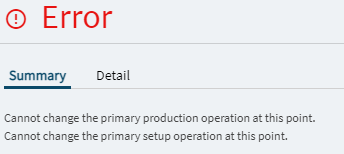
But when it tries to update I get these errors:

FWIW, this job is NOT Engineered and NOT released.

// Params passed in: JobNum, Line

//Wrap everything in the service context
this.CallService<Erp.Contracts.JobEntrySvcContract>
  (svc =>
    {
      //This will create a structured JobEntryTableset object.
      var jets = svc.GetByID(this.JobNum);

      //Loop through your OpDetails
      foreach (var od in jets.JobOpDtl)
      {
        var oprSeq = od.OprSeq;        
        this.PublishInfoMessage("Operation: " + oprSeq.ToString(), Ice.Common.BusinessObjectMessageType.Information, Ice.Bpm.InfoMessageDisplayMode.Individual, "Job Entry", "Change Line");
      
        //Add logic for setting YourNewResourceGroup variable here.
        switch((int)od.OprSeq)
        {
          case 40:
            od.ResourceGrpID = string.Empty;
            od.ResourceID = "LTD01";
            od.ProdStandard = 420;
            od.RowMod = "U";
//          Also need to be able to set LaborEntryMethod on JobOper.
//          jobOper[i].LaborEntryMethod = "Q";
            svc.ChangeJobOpDtlResourceGrpID(od.ResourceGrpID,ref jets); 

// With the svc.Update line uncommented, I get two errors: 
// "Cannot change the primary production operation at this point."
// "Cannot change the primary setup operation at this point."

//          svc.Update(ref jets);   
            break;
          case 100:
            this.PublishInfoMessage("case 100", Ice.Common.BusinessObjectMessageType.Information, Ice.Bpm.InfoMessageDisplayMode.Individual, "Job Entry", "Change Line");
            od.ResourceGrpID = string.Empty;
            od.ResourceID = "LTAUDCLD";
            od.ProdStandard = 30;
            od.RowMod = "U";
            svc.ChangeJobOpDtlResourceGrpID(od.ResourceGrpID,ref jets); 
//          Also need to be able to set LaborEntryMethod on JobOper.
//          jobOper[i].LaborEntryMethod = "Q";

//        jobOper[i].LaborEntryMethod = "Q";
            break;
        }
      }
    }
  )
;
//Also need to be able to set LaborEntryMethod on JobOper.
//          jobOper[i].LaborEntryMethod = "Q";```

You’ll have to rework your loops here since you’re touching the JobOper and JobOpDtl levels. I’m writing this by hand here (no warranty against typos), but you should get the gist of it.

Foreach(var op in jets.JobOpr)
{
    //Got this array of Op#'s from your first post.
    int[] OpsToChange = new[] {40,41} 
    //skip this iteration of loop if outside the scope of your customization
    if(!OpsToChange.Contains(op.OprSeq)) return;

    op.LaborEntryMethod = "Q";
    op.RowMod = "U";
    //Might need to call Update here to save JobOpr before moving to JobOpDtl.

    //Your tableset includes all ops on the job.
    //So you need to select the subset you're working on in this iteration.
    var opDtls = jets.JobOpDtl.Where(x => 
                                     x.JobNum == op.JobNum &&
                                     x.AssemblySeq == op.AssemblySeq &&
                                     x.OprSeq == op.OprSeq)

    Foreach(var od in opDtls)
    {
        //Your OpDtl level code.
    }
}

For your other error, change an operation in the UI while running a trace. See what methods it’s calling and what it’s doing to the dataset at each step.

Personally, I’d avoid a lot of the hardcoding here, like calling out specific OprSeq’s and using switch statements. I’d go to the OpMaster table and add some UD fields. Then reference those fields generically in the customization here. That results in less code for your to write and maintain, plus users can change their own ops.

Were you able to break this loose? I’m getting the same PrimaryProdOp and PrimarySetupOp errors.

I’ve reviewed the trace pretty thoroughly, it really only appears to be updating a few columns.

Here’s my code:

foreach (var od in jeTS.JobOpDtl.Where(x => x.JobNum == opdtl.JobNum && x.ResourceGrpID == opdtl.ResourceGrpID))
{
od.ResourceDesc = “Trims FLX Rsrc”;
od.RowMod = “U”;
je.ChangeJobOpDtlResourceID(flxRes.ResourceID, ref jeTS);
od.ResourceID = flxRes.ResourceID;
od.ResourceDesc = flxRes.Description;
od.OpDtlDesc = flxRes.Description;
od.RowMod = “U”;
op.PrimaryProdOpDtlDesc = flxRes.Description;
op.PrimarySetupOpDtlDesc = flxRes.Description;
je.Update(ref jeTS);
}

This matches what is happening in the trace field for field.