In the SSRS PO form is it possible to display Line Number as 1/3, 2/3, etc

I have had comments from our Purchasing dept about multi-page PO’s having Line 1 taking up all of Page one and Suppliers not noticing Line2,3,etc on subsequent pages.

Is it possible to code TxtPOLine to show 1/3 or 2/3 etc instead of just Line1, Line2
image

The expression at the moment is “=format(Fields!POLine.Value,”#,###“)”

Thanks.

I imagine it would be possible, apologies for not having tried this specifically, but I think you will need to create a parameter to grab the max (or count) line number so that you can reference that in the line level, because of the grouping the line will not likely have access to how many lines are on the order.

1 Like

Another possible option would be to add a subquery in the select statement in SSRS to “Count” the records. That way you would have a field for every record that will show the total record count.

Then it is fairly straight forward to create a text field to show the 1/3, 2/3, 3/3 etc.

Something like: (SELECT Count(Company) FROM PODetail_" + Parameters!TableGuid.Value + ") AS POLineCount

Then your string would be: Fields!POLine.Value & “/” & Fields!POLineCount

DaveO

2 Likes

Do a lookup for row number() over, or window functions on sql. You may also be able to use some of the in but in functions for SSRS. Sorry for being so vauge…

To add, I asked a friend of mine (LOL) and they gave recited a small poem to me.

use
=RowNumber("YourDataSetName") & "/" & CountRows("YourDataSetName")
in an expression

or

use something similar to this in the query

    ROW_NUMBER() OVER (PARTITION BY po.PONumber ORDER BY pol.LineNumber) AS LineNum,
    COUNT(*)     OVER (PARTITION BY po.PONumber)                         AS TotalLines,
    -- ... rest of your columns
FROM PurchaseOrderLines pol
JOIN PurchaseOrders po ON po.PONumber = pol.PONumber
WHERE po.PONumber = @PONumber

Then use
=Fields!LineNum.Value & "/" & Fields!TotalLines.Value
In a text box

no guarantees I have not tested

hope you get the idea.

1 Like

Thanks Dave, am trying adding the below but it fails printing with a syntax error

“Something like: (SELECT Count(Company) FROM PODetail_” + Parameters!TableGuid.Value + “) AS POLineCount”

Mr. Brian: Could you copy and paste the last 10 lines of your select statement?
SSRS is VERY fussy about syntax. Let’s see what you have.

DaveO

      T4.RptLiteralsLTaxSubtotal,
      T4.RptLiteralsLYes,
      T4.RptLiteralsLNo,
      T4.RptLiteralsLBuyer,
      T4.RptLiteralsLEORINumber
      FROM POHeader_" + Parameters!TableGuid.Value + " T1
      LEFT OUTER JOIN PODetail_" + Parameters!TableGuid.Value + " T2
      ON T1.Company = T2.Company AND T1.PONum = T2.PONUM
      LEFT OUTER JOIN RptLabels_" + Parameters!TableGuid.Value + " T4
      ON T1.RptLanguageID = T4.RptLanguageID
     (SELECT Count(Company) FROM PODetail_" + Parameters!TableGuid.Value + ") AS POLineCount"

Please try this:

T4.RptLiteralsLTaxSubtotal,
T4.RptLiteralsLYes,
T4.RptLiteralsLNo,
T4.RptLiteralsLBuyer,
T4.RptLiteralsLEORINumber,
(SELECT Count(Company) FROM PODetail_" + Parameters!TableGuid.Value + “) AS POLineCount
FROM POHeader_” + Parameters!TableGuid.Value + " T1
LEFT OUTER JOIN PODetail_" + Parameters!TableGuid.Value + " T2
ON T1.Company = T2.Company AND T1.PONum = T2.PONUM
LEFT OUTER JOIN RptLabels_" + Parameters!TableGuid.Value + " T4
ON T1.RptLanguageID = T4.RptLanguageID"

1 Like

Please note: add a space after the POLineCount and before the “FROM” - we cannot see that in the text.

Cheers Dave, now it prints so I can move on to the next bit which is the fx code
=Fields!POLine.Value & “/” & Fields!POLineCount)

This shows on the print as
image

Previous code was “=format(Fields!POLine.Value,”#,###“)”

Are you including that closing parenthesis? in your new expression there is no opening parenthesis?

You shouldn’t need them at all.

Mr. Brian: Sorry - I got sloppy.

Please change to
=Fields!POLine.Value & “/” & Fields!POLineCount.Value

Parenthesis not needed for the field expression.
DaveO

It shouldn’t allow him to save the RDL though with that error?

Ok now I get
image
So I am assuming it is trying to insert the word POLineCount.Value as txt instead of the result?

Could you show us the formula for the that field?

It is your formula as above
i.e. =Fields!POLine.Value & “/” & Fields!POLineCount.Value

maybe try a space before and after the “/” like Fields!POLine.Value & “ / ” & Fields!POLineCount.Value

Tried it but it is just that it is not converting POLineCount.Value to a number, it is displaying it literally
image

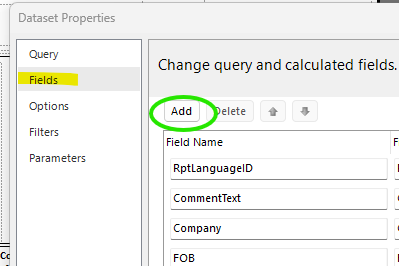
Did you add POLineCount to your Dataset Fields?

You added it to your query… but you need the Field in the dataset to hold the returned value.