We had an unusual issue recently, a Sales admin created shipping for a set of Manufactured parts which we then shipped to a Depot to build the final product which they delivered to the customer.
However, there was a delay to the completion so that the Invoicing to the Depot for the shipped parts was 6 weeks after the shipping was created.
These invoices would not print, giving an odd error message:
Program Ice.Services.Lib.RunTask when executing task 1621606 raised an unexpected exception with the following message: RunTask:
System.Data.SqlTypes.SqlTypeException: SqlDateTime overflow. Must be between 1/1/1753 12:00:00 AM and 12/31/9999 11:59:59 PM.
I logged this with Epicor but the outcome was to print it on the standard arform (which worked) as they do not support custom report styles.
I hunted through all my custom Report Styles but could not see anything I had added which had a date in it so drew a blank.
At first I assumed this was something to do with the period where the shipping was originally done being closed but it occurred to me that I can pick any old Invoice from a test environment and print it, even many months old so it couldn’t be that.
Not a style issue but a data issue. Take a look at a baq of the invhead, detail tax and misc tables and check related to the transaction. I think you will find that is the issue. I have previously dates being entered in incorrectly for example the ship by date.
Why it prints on std and not custom I’ll admit is an interesting one. My thought on that is there is a field in the std rdl that is not on the custom.
You could do a diff on the rdls to narrow down those fields.
I was convinced it was something in the Shipping note that the Sales Admin (new start) had put in, so I hunted through it but could not find the issue.
I even wondered if there was a date being read in US format (the Shipping was 20/05/2026) but I could not find it.
The main thing on the Custom forms are serial number info and Bank details but not much else was added to make it different from the std epicor form.
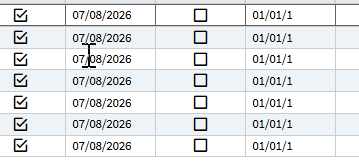
Now she has just sent me a new issue, two new Invoices, one has shipping date showing on the print and the other does not so I am thinking this is a clue to the original problem, i.e. the Shipping Date field.
Then stick with BAQs the tables you need to look at are all available in BAQ designer. Look at InvcHead, InvcDtl, etc tables for the problem invoices and compare to working ones.
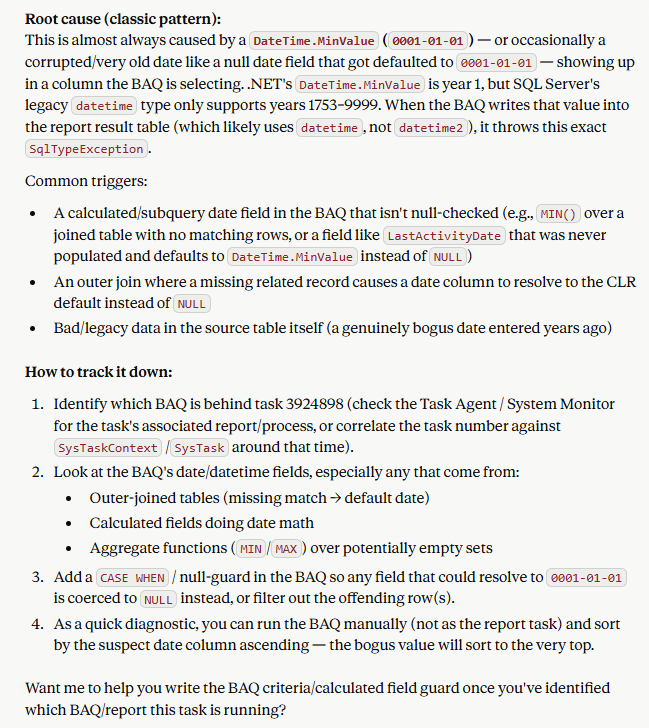
Ran into this with one of our reports too and asked AI to review it (below) and sure enough null date fields are now showing as 01/01/1. Looks like Epicor changed how null dates are displayed.
In my case it was a BAQ report so was able to add a calculated field to overcome it and modify the SSRS report. Total unneeded PITA but
CASE
    WHEN Table.FieldName <= '0001-01-01' THEN NULL
    WHEN Table.FieldName <= '1753-01-01' THEN NULL
    ELSE Table.FieldName
END
I did log it but they closed the call when they confirmed it only fails on custom report styles - they do not support these.
“We don’t support the custom reports. You should contact person who developed one.
Since the standard AR Invoice report generates successfully, the issue appears to be specific to the custom report definition. We recommend reviewing any custom datasets, RDD relationships, BAQs, calculated fields, BPMs, and SSRS expressions used by the custom report for date values outside SQL Server’s valid datetime range (01/01/1753–12/31/9999). Particular attention should be given to any fields defaulting to 01/01/0001 (DateTime.MinValue) or custom date conversions.
Please check the UD fields/tables to ensure that any date fields used by the custom report contain valid and correct dates.”
Open it as a data issue. Make a BAQ and show how it displays the 01/01/001 date instead of a null. Reverence our case on this issue if you’d like CS0005553556