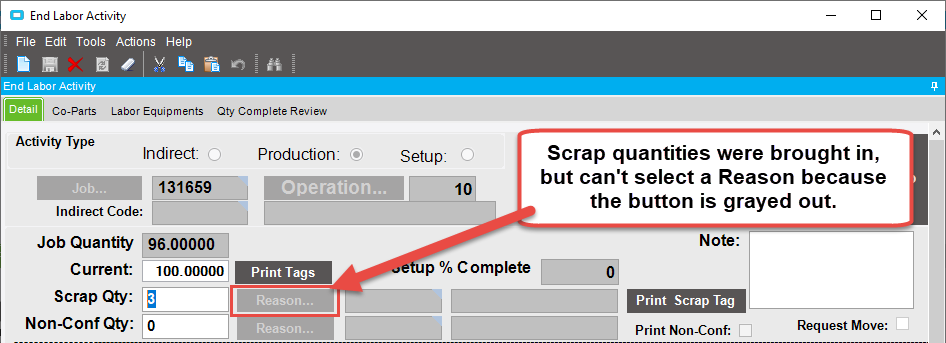
When the End Activity form loads, I have code that brings in labor and scrap quantities from an external production monitoring system if those quantities are available. That works fine. The problem is when scrap quantities are brought in, the scrap Reason button remains grayed out and the user cannot select a scrap reason.
If the user changes the scrap quantity and presses tab then the Reason button becomes active but then the user needs to change the scrap quantity back to the correct value. This defeats the purpose of bringing the quantity in automatically.
I’ve tried setting the ReadOnly and Enabled properties of the scrap reason button but neither seem to work.
I’ve found that if I populate the scrap reason code with a value, the reason button will become active. The user then needs to select the correct reason code but there’s nothing stopping them from just leaving the [wrong] reason code there and clicking OK. This is what I’m doing now with a pop-up message telling them to select the correct reason code but this is not ideal.
Does anyone know how I can get the scrap reason button to become active when a scrap quantity is brought in without populating the reason code with a value?
How are you setting the scrap qty value? If you’re just updating the field value in the data set, you may need to notify the form that you’ve updated a field by calling oTrans.NotifyAll() after your update.
I was indeed updating the field in the active row. When I added oTrans.NotifyAll(), the Reason button becomes active.
Here’s the working code:
' NOTE: This code is in the EndActForm_Load() method

' Do stuff to retrieve scrap quantity

edvEnd = CType(oTrans.EpiDataViews("End"), EpiDataView)
edvEnd.dataView(edvEnd.Row)("ScrapQty") = extScrapQty
oTrans.NotifyAll()  ' Adding this line makes the Reason button active!!
I didn’t know it was this simple. Thanks for your help!
I did find another way to get this to work by focusing the Scrap Qty textbox and sending a tab key press. I can share that code if anyone is interested.
Jason, I tried the code you suggested but the scrap qty didn’t update.
This End Activity customization has been around since 2009 and when it was first created, it was written in VB. There has been a lot of functionality added to it over the years so now it’s around 1200 lines. We do plan to convert it to C# - I’m just not sure when we’ll have the time to do so.
Jason, that code works to populate the scrap qty field but the Reason button doesn’t become enabled.
Currently I’m using the NotifyAll() method after populating the scrap qty which does enable the Reason button. There’s another way to enable the Reason button after populating the quantity by setting focus on the Scrap Qty field, then using the SendKeys.Send() method to tab to the next field.