I have successfully created a dropdown for reason codes. For example, when an employee selects “3 - Set-up Issues” from the dropdown, I want a second dropdown to display additional options related to that choice
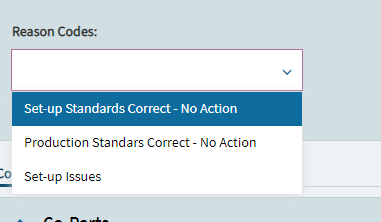
I have successfully created a dropdown for reason codes. For example, when an employee selects “3 - Set-up Issues” from the dropdown, I want a second dropdown to display additional options related to that choice
Could you please explain how you created the User Codes? For example, I was able to create a Source Type called “Set-up Issue,” but my second combo box does not show options related to that choice.
My UserCodes:
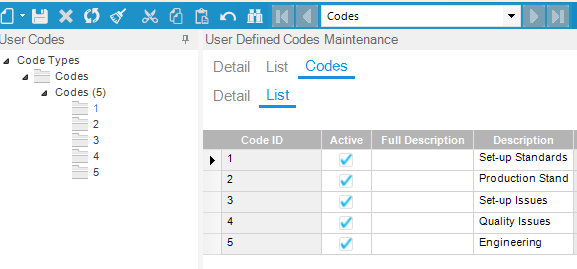
I think you have yours set-up one level down from where I have mine.
So, the first thing you create is “Code Type”. In my below example, I have a Code Type of “DWG_Size”.
Underneath that, I have “Codes”, or sizes 1 thru 6.
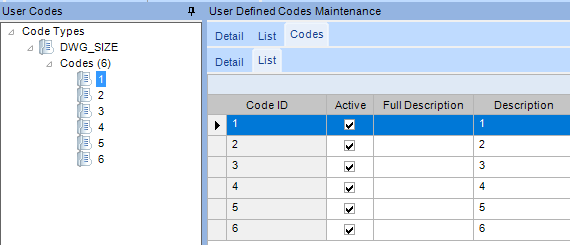
In your case, it looks like you created a Code Type called “Codes” and then created “Codes” underneath that. So, you kinda have two layers called “Codes”. If that makes sense.
Thank you for your quick reply. I have changed the Code Type. Now, I have a Code Type of “R_Source” and, underneath that, I have 10 sources.
What I would like to achieve is that when a user selects the source “SI (Set-up Issue),” 6 specific codes appear in the second combo box.
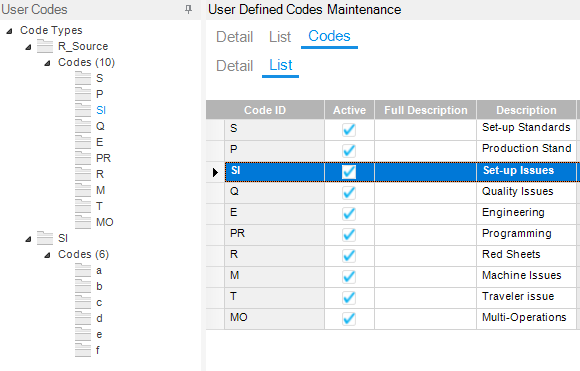
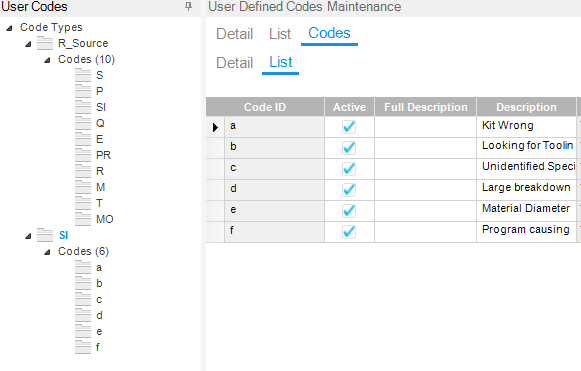
So, you first dropdown (Combobox) will be set up as a standard UserCodesCombo (default).
Scroll down until you see Filter Params and set it to:
CodeTypeParam=R_Source
The User is going to make a selection from that ComboBox, in your example, you choose “SI” or “Set-Up Issues” assuming your displaying the descriptions.
The value of your selection in that combobox is going to be stored where ever you have that Combobox’s ep binding set. For an example, TransView.Combobox1Value
Your second combobox is going to be set up exactly like the first, but this time you’ll have a Filter Params:
CodeTypeParam=?[TransView.Combobox1Value]
So whatever the User selects in combobox 1, is going to become the filter value for combobox 2.
I guess in your case, you want to keep a record of their selections, correct? Where are the values of ComboBox 1 and ComboBox2 going to be saved?
Since you’re doing this in MES, are you trying to record these “reasons” in a time entry record? Do you have UD fields set-up there in order to save this new data?
If so, those will be your epbindings for the ComboBox 1 & 2.
Yes, I do want to keep a record of user’s selections. When I run the query, I can see the user’s selection. Here is my customization and query results:

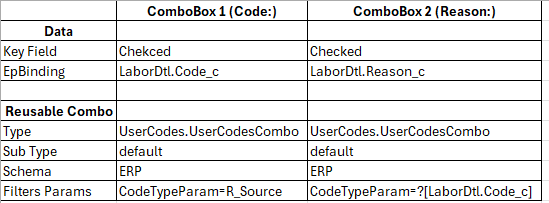
@dcamlin Does my customization look alright?
yeah, sorry, I wasn’t sure on your last post where you were showing your results whether you were happy with them or not. It looks like you’re getting values in your query. is that what you want? Or perhaps you want to see the “description” of the Reason_c and Code_c to show in your final results?
If that is what you want (which makes sense, and sorry, we should’ve looked into this sooner)… you’re going to have to rebuild your comboboxes a bit.
When you use the UserCodes combo, and select “default” as the SubType, you’ll notice a lot of other settings are greyed-out (read-only).
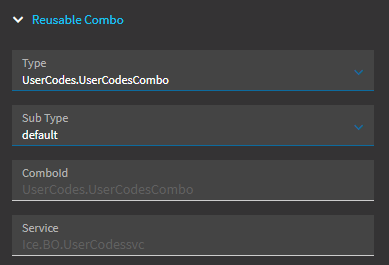
If you scroll all the way down to the “Advanced” area, you’ll see two of these read-only settings:
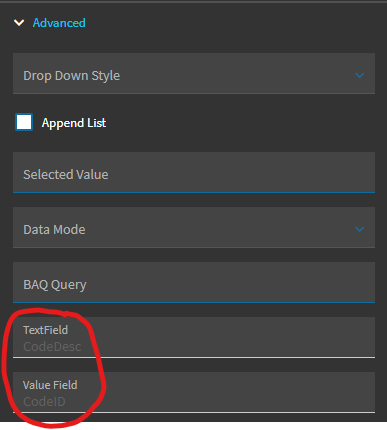
TextField is what the ComboBox is going to DISPLAY… but the Value Field is what the combobox is going to RETURN and SAVE. So in your case, you’re seeing “Set-up Issues” (the CodeDesc) on the screen, but the record should be saving with a value of “SI” (the CodeID).
I’m confused why your query is returning “2” and “1”. I’m not sure where those values coming from? We’ll continue on and see if this change fixes that…
What you need to do is clear that “default” sub type. We need to build these from scratch. BUT FIRST… take screen shots of your entire Combobox settings. You’re going to need to type in every single setting manually.
So, when you’re ready, clear the sub type, and then type all the settings back in like they were:
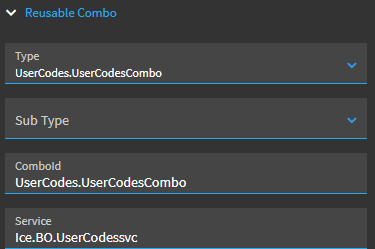
The only change we really need to make is to that last setting “Value Field”. We want that to also be “CodeDesc”. All other settings are the same as the default, but you have to manually put them all back in.
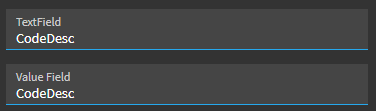
So, now, your combobox will show the CodeDesc in the display, and save the CodeDesc in the results.
Do we really have to do this workaround?
Yes, I guess so, this is the only workaround available to play with customizations…