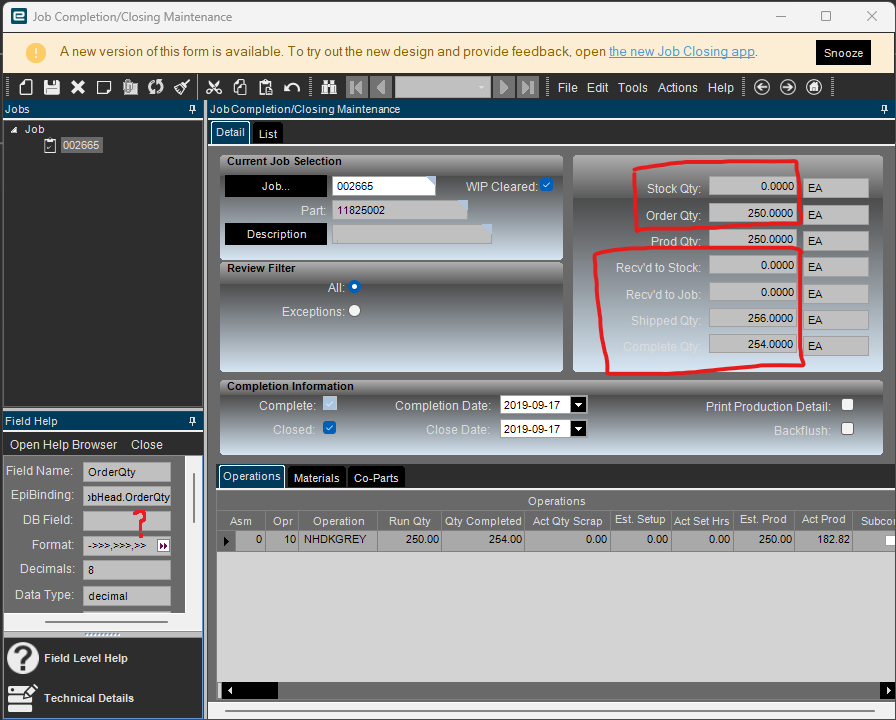
I’m fairly new to Epicor, but have been working primarily with BAQs and Dashboards. I am trying to create a BAQ that uses data from the Job Closing (Job Completion/Closing Maintenance) window. Using Field Help I was able to find only “Prod Qty” as Field Help states a valid DB Field. I am also fairly confident that “Stock Qty” is JobPart.StockQty since all of the numbers seem to match.
However, I am not able to find all the matching DB fields for “Order Qty”, “Recv’d to Stock”, “Recv’d to Job”, “Shipped Qty”, and “Complete Qty”.
I realize these fields may be calculated fields as well. However, I am not able to find any information anywhere that talks about the logic of how these are determined or which DB tables/fields they refer to.
I tried to use Tracing options, but as far as I know they don’t display this sort of information…
Does anyone have any tips on how I can determine the logic for these fields? If I knew a technique on how to determine them, it would have help me throughout Epicor, so that would be ideal.
IIRC, Job Closing pulls from JobHead, JobOper, JobMtl, JobPart and JobProd tables. JobProd should have the demand links for Stock, Order Qty. If you can’t find the fields you’re looking for in there, you’ll have to join PartTran and sum up the related MFG-STK, MFG-CUST, etc. transactions.
I’m afraid there is a bit of a knowledge gap on my end. Would you mind explaining why I need to join PartTran (what is it and why PartTran?) and what MFG-STK, MFG-CUST, etc. transactions is referring to?
PartTran is the table containing all inventory transactions. It is one of the largest tables in the system and one should filter it carefully in any production BAQ or report. MFG-STK and MFG-CUS are the transaction types related to receiving jobs to stock and shipping from job to customer, respectively. There is a transaction guide on EpicWeb and/or EpicCare that lists everything. I suggest you get familiar with it.
I think everything you need is in JobHead, JobPart and JobProd. Depending on how your jobs are made and how many JobProd links you have you may have to use OrderNum = 0 as make to stock and <> 0 as make to order. Not sure what make to job would be.
Are you thinking something along the lines of sum(some quantity) From JobProd Where OrderNum = 0 Group By JobNum
?
I think most of our jobs are Make-To-Stock, so that is definitely useful. Thanks!
I was able to figure this out. JobProd.ProdQty has multiple entries per JobNum (depending on operations, materials, and co-parts(?)) and therefore has to be summed to get the full ProdQty. JobProd.ProdQty = StockQty + OrderQty + JobQty where the Quantities on the right aren’t from tables, yet appear the Job Closing Maintenance screen. Each has its own entry in JobProd.ProdQty.
To get the right value for Order Qty, we have to mention that Job Qty also exists and is only present when JobProd.TargetJobNum is populated. Therefore, Prod Qty = Stock Qty + Order Qty + Job Qty.
StockQty = JobPart.StockQty - I found that this is always true.
OrderQty = JobProd.ProdQty - StockQty - JobQty
JobQty = JobProd.ProdQty - StockQty - OrderQty
ProdQty = StockQty + OrderQty + JobQty
Note that JobQty is only present when JobProd.TargetJobNum is populated and, if that’s the case, OrderQty will be 0.
For Recv’d to Stock, Recv’d to Job, Shipped Qty, and Complete Qty, I found that Recv’d to Stock and Recv’d to Job are never both greater than zero, one of them is always zero if the other one is not zero.
Therefore:
When JobProd.TargetJobNum is populated: RecvdToStockQty = 0.0 and RecvdToJobQty = JobPart.ReceivedQty
When JobProd.TargetJobNum is not populated: RecvdToStockQty = JobPart.ReceivedQty and RecvdToJobQty = 0.0
ShippedQty = JobPart.ShippedQty
CompleteQty = JobHead.QtyCompleted
This logic has been working out for me and seems to work for every job I checked.