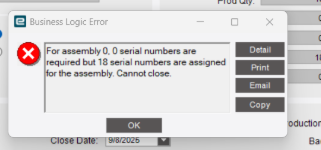
We have a job that was created, and then serial number tracking added in part entry after the fact… Quantities were completed against the job and we went to close the job and it is telling us 18 assigned and 0 required.
Anyone have this pop up before and potential solutions? Turns out we’ve already shipped the parts as well. They etched the parts with the accurate serial numbers since they were assigned after serial tracking was checked.
Without more details (like what does the job & its operations look like now, what’s the status of those serials, etc.) I would try a couple of quick things (try it in Pilot/Test first):
uncheck the SN tracked on that part and try to close the job again. You may need to adjust the serial statuses manually after this
make sure that, on your last operation, you have the ‘Serial Numbers Required From This Operation’ option checked. Again, you may need to tweak the SN statuses for this
We have this from time to time… usually when requirements change mid-project to require serialization. Quickest solution is to open Job Adjustment, go to the “final op” in the job and change the qty to whatever the error message wants (zero in this case). Then you can close the job.
@Dragos correctly goes into several fixes that are more thorough, but since this doesn’t affect costing/inventory/profitability and the job is already done (and likely shipped out), my MO is to just make it go away with absolute minimal effort.