Kinetic, App Studio, Missing "New" button, Order Header

I’m not sure this is upgrade related (recent Pilot upgrade) or application studio result of copying a layer, but…

Somehow, both the “New” and “Attachments” buttons have disappeared from our Order Header page toolbars, they don’t show up on the action menu either.

I’m trying to resurrect, but after making a base layer, which does have them on the primary (New) and secondary (Attachments), I cannot seem to find how/where they are defined in application studio.

I’ve looked at both “Orders” and “Sales Order” pages in application studio (base layer):

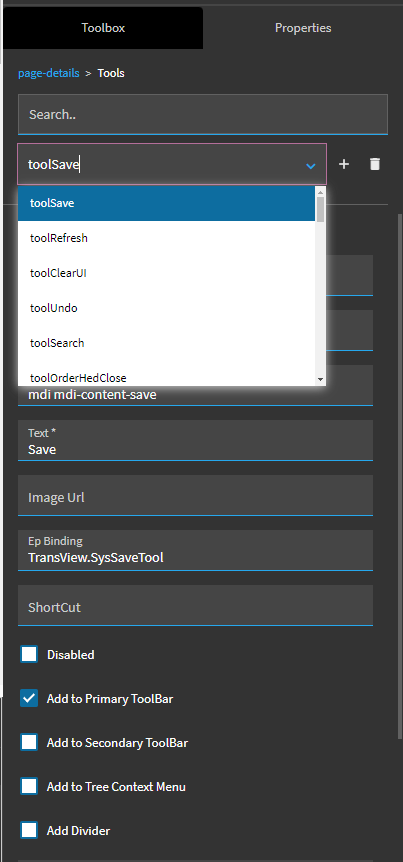
The list of tools under “page-details → tools” does not show them in the list:

Does anyone now where/how these are defined ?

Thanks

I think ‘New’ is in Tools section of the OrderHed Data View

1 Like

Looks like there’s a “disable attachments” checkbox on the top landing page properties you could poke at. Is yours checked? Perhaps that’s why your button is missing?

I’m afraid to poke at it myself and break mine, hahah.

1 Like

Ah, ok, thanks, I did not think to look at DataView/Tools (totally forgot about that section). It did feel like it was in a different, more general location, that may help, I’ll check it.

“Attachments” is not listed there, that one still is a little mysterious.

Thanks

@dcamlin

Good find, mine is not marked but…I’m thinking something else might be going on with that button now, we had a consulting company doing a proof of concept related to attachments and I’m need to find out what changes they made

thanks

1 Like

Hi Scott,

I am running into ALMOST exact this situation. The new and attachments icon are missing from my Supplier Application Studio published layer. I also created a menu item for the base layer and they are there. Do you have any advice for me?
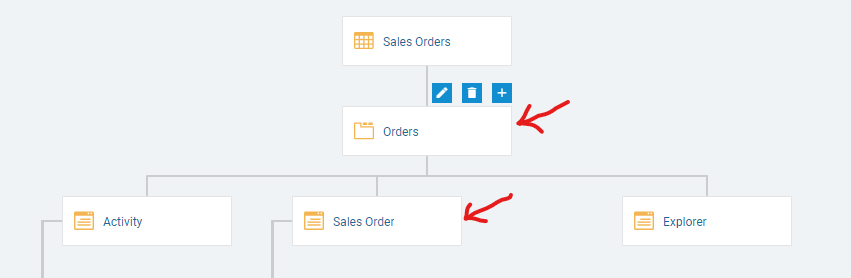
The issue was the details card in the application map was missing an EP binding

8 Likes

This fixed it for our problem that we just now noticed! Thanks for sharing!

1 Like

Fantastic you are! :wink:

1 Like

We are encountering this issue today after a quick layer update to quotes (not involving anything to do with these icons or functions), dozens of dot updates later… and the Bugginess indicator of the App Studio Needle is slowly shifting from Legendary to Mythical… :slight_smile: I’ll let you all know if any of these solutions are our solution. TIA and TGFTEF (Thank God For the Epiusers Forum)!

The EpBinding was the issue on the Quote Details Card: QuoteHed.QuoteNum

That was it! Thank all. Epiusers for the Win!

I was having an issue where Part wasn’t showing the New and Save button. Turns out when I would use the DMT for Menu my Part form was marked as read only but the Arguments column didn’t. I had to update my DMT to include the ReadOnly column to correct the issue.

Update

  • Turns out I had the same Menu ID for my Tracker and Data Entry forms.

Hello Mackenzie, I have this issue too. I’m still new and wanted to ask what is the EP binding? can you show me how? I’m missing the New and Attachment button

Yeah, I can send some screen shots to help. Which screen are you having issues with?

Thank you Mac! Sales Order > Order Entry

Okay, first go to the overflow menu and enter application studio. I am assuming that you have a customized layer applied. In the top right, change the layer to the applied layer.
It should load with the application map already on your screen. Click the ‘Detail’ block and then expand the Data section and then make sure the EpBinding has the correct setting

Let me know if that helped you

4 Likes

It is almost the same


But whenever I type the Data Set there was nor SalesOrder

What do you mean about this part?

Also the way I found out mine was missing the Ep binding was I had to click in all of the boxes on that screen and make sure they all had Ep bindings.

1 Like

Below the EP Bindings there was Data Set I tried to see what was there when typing SalesOrder is not showing. I will check all fields

I have checked every Detail and it has an Ep bindings set