There’s another level here that I’ve been wanting to explore.
In our old Data Collection stations, we had a Windows Login and then and Kinetic Login. The Windows login was set up to autologin (like Kiosk mode). The Kinetic login was a shared username/password for that workstation. Not ideal.
It is possible to log into Windows using a local certificate. What would be better identity control is having users log into a browser profile on that machine using Entra. Now each user’s work is recorded under their ID.
The tough part is teaching the operators to switch to their profile. Will they time out if they walk away, etc.
Is it possible for you to share some more insight on how this all functions? What the users see, what stations you have this setup on and so on.
I’m finding it difficult to get the Office or Entra login to work smoothly with a YubiKey and as noted above I’m finding that you need some sort of 2FA already setup on the account before you can enroll a YubiKey. It will not let you register that as the initial 2FA method. It’s a pain in the ass but I can work around that with using a temporary passcode as the first login type.
I guess the best thing is to explain my environment more. We have a large manufacturing floor with multiple PC’s on it that will auto login to our local domain, and now they auto launch Epicor MES and login as the same user in every location (approx 32 machines). We have only one user ID that is assigned as a MES user. The employees who are 100% assembly personnel will walk over to those machines and just use the MES screen to clock in, and log into and off jobs. They have absolutely no other responsibilities in Epicor which is why they are never issued a login. In addition to that we have what we call Group Leads, and Department Supervisors. The Group Leads are probably 75/25 when it comes to assembly vs Epicor usage so they are given unique network logins to access network resources, as well as they are given an Epicor user ID as well so they can interact with production responsibilities on the floor. The supervisors are more of a 50/50 split, yeah they still spend time in the production area assisting in assembly but they are also responsible for the department scheduling and material supply for jobs running through. Those users also have network login’s/email and Epicor ID’s. Currently any user who has access to CUI or is involved in any of our government contracts is issued a YubiKey for network access, so that is already deployed, and currently any user who has OWA or access to email on their Mobile device is setup with O365 MFA utilizing Microsoft Authenticator or TXT codes. In addition to the production area we have an office administrative/engineering/R&D area where those users all have network login’s, most already MFA, and they all have Epicor ID’s as well.
I know adding additional YubiKey’s is possible for local AD users on my AuthLite install here, but I’m guessing Microsoft isn’t going to allow 32 different YubiKeys to be assigned to one MES user ID to be used on those ~32 machines.
This is one scenario that we use in maybe 2-3 locations. There are some departments where multiple users are trained to do one task in Epicor and the single PC that logs in to Epicor in that area uses a stored auto login process. So they don’t even know the User ID or Password, but it is a shared account.
Those are the main areas that I don’t know what we are going to do with yet, and those are pretty frequently used areas too.
The data collection clients really have me bothered though since they so widespread and I have production users who are not computer literate at all, so expecting them to login to a web browser client and utilize password less login with a YubiKey and Pin is a bit concerning.
This is for floor workstations. The plan (no cloud yet) is IT guy does all this work beforehand and the yubikeys stay in the PCs. We use yubikey currently to login Floor PCs to the domain by tapping for passwords.
Window 11 PCs for Data Collections on the floor. User logs on say with datacollector1 username and taps YubiKey 5 Nano USB-A to enter the password. This is to login to the AD domain machine. Yubico Support Guest Portal
User launches web page to Epicor cloud: username datacollector1@company.com. Requires at least an Entra ID P1 $6.00/user account per month. Already setup MFA for all accounts in Entra ID. Conditional Access requirements that the IP address for the Enntra ID user has to be the ones used by my WAN IP addresses. Main and backups for each site.
Enters the Epicor password by tapping the one setup beforehand on the usb key. A long press on usb can be setup to use a different password. Yubico Support Guest Portal
Entra ID login requires MFA. So the workstation has YubiKey Authenticator app tied to usbkey on it. That is the MFA requirement for my Data collection user from above datacollector1@company.com. This is like having Microsoft Authenticator on a phone but it is tied to the PC and usb. Yubico Support Guest Portal
Remove any smsphone or Microsoft authentication existing in MFA for that Entra ID account. Maybe set another secondary YubiKey that the IT administrator stores as backup? Initially it will want another authentication type setup.
We currently use AuthLite in conjunction with YubiKey’s since it’s a permanent license for OTP type MFA on a local Active Directory. We don’t use the YubiKey’s internally as a password less solution.
This is what has me confused/pissed off to be honest.
We have O365 which syncs with our internal AD. This means all users are present in our O365 Admin Center, and Entra user list. I’m able to take a user who has an AD account without a O365 license and login to office.com with their credentials and I can from there setup a one time code for MFA, and then tie a YubiKey to that user for Password less O365 login, all while not having/needing a license for O365 or Entra…
Now the Question that I have that no one has been able to answer is, can I setup a SSO app link with Epicor and my Entra environment without having to license users for Entra?
With the above scenario I described being possible on just a sync’d AD account, I feel like SSO Epicor login with Entra Free should be possible, Unless the Epicor SSO app requires specific Microsoft licensing.
So it is enforced by Microsoft checking via audits? rather than say like you can’t use Microsoft Office unless you have a purchased license on that account.
AI:
Microsoft Entra ID P1 licenses are enforced primarily via compliance auditing rather than strict technical blocking of features. While P1 features (like Conditional Access) may technically function for unlicensed users, Microsoft requires licensing for all active users benefiting from these features, with enforcement managed through license utilization audits and potential true-up requirements.
Well I can’t use office on those accounts, it only allows me to login to a blank dashboard with access to basically nothing but the user profile.
Interesting that AI states the conditional access may work even if not licensed but they may audit you and require you to get licensing… I feel like in this day and age they should be able to restrict things based on licenses applied to specific users and not rely on spot auditing to then force you to buy something after they find out you’re using that feature…
That reminds me of the days of using Windows 7 and it not being internet validated and getting random emails from someone @microsoft asking for your licensed machine count and proof of all of your product keys… God talk about a phishing looking email these days.
We just signed our Cloud Kinetic contract two days ago… a bunch of these scenarios are going to be questions for our Project Manager and I’m curious to see how they solve these problems.
Should be able to get an app registered and working in Entra ID. No Entra ID $ license means no Conditional Access rules will be properly licensed according to MS. But it should work. Security Defaults vs having Conditional Access is the catch here.
Microsoft Entra ID Free provides essential cloud-based identity and access management, including user/group management, self-service password changes, and basic security for up to 500,000 objects. It enables single sign-on (SSO) for Azure and SaaS apps, on-premises synchronization via Entra Connect, and mandatory Multi-Factor Authentication (MFA) via security defaults.
With the above scenario I described being possible on just a sync’d AD account, I feel like SSO Epicor login with Entra Free should be possible, Unless the Epicor SSO app requires specific Microsoft licensing.
[/quote]
Well, if there was a lightbulb emoji () that says, “now that’s insightful”, I would have chosen that, but this was the best I could to for “you got me thinking”
I think it’s a clever solution. YubiKeys are more than $55 USD, so the startup cost might be too much for some companies, especially if one needs replacements for reasons.
I’m still reaching for the golden ring hoping to log people in as themselves in a browser profile instead of a shared login per workstation.
I think the pieces are there but not put together. Office365 F1 users are $2.25/Mon/user but doesn’t include conditional access (Entra P1 - $6/Mon/User).
I’ve been using conditional access since they sunset the MFA option in the Exchange admin center. I used the Exchange center to mandate MFA for users who had OWA, but I was forced by Microsoft to start to use Conditional access rules in Entra to manage MFA. So now I use that for OWA MFA enforcement and I also use it for GEO IP filtering to restrict it down to US access only. I mean no one has called my extension yet saying “HEY, you need Entra licensing for that!” Easier to ask for forgiveness? I will basically just change my MFA for Web users policy to All users… I only see my user (system admin) licensed for Entra ID P2
I would be happy if I had people here who understood what a browser profile was, or how to switch between them. Right now I’m going to struggle with people not understanding how browser tabs work and how they can get the Kinetic home screen to stay open when they click on Order Entry
We already utilize YukiKeys for AD login so yeah I’m familiar with the cost, and at most we have 65 Epicor users and I believe I only need to get 16 of those new keys. A majority of them already have keys since they are required to have MFA for what network resources they have access to.
And damn… I swear those things were $45 the last time I checked like 2 weeks ago.
Now there is a lightbulb emoji! . The thinking face always looked so critical to me, like disapproving, that’s why I always asked @klincecum to clarify whenever he left that emoji on something… the same reason I asked you to expand on it. Now that we have a lightbulb, that’s a much brighter, lighter, feeling when I see that haha. Thanks for sharing Mark!
This is not getting any easier… We have an empty cloud environment setup and I’m trying to enable Azure/Entra logins for that instance, just for testing. Of course this requires opening a ticket… and they can’t enable that unless you have AAD setup in the DB, so that’s two things that will need to be done after each conversion pass during our upgrade process, AAD setup and ticket for Azure enablement. And now I’m being told that in order to login, users will need to enter your site ID first, then pick from a drop down if they are using Azure, or Basic login.
UGH… No one but me knows our site ID so now every person who has to login to Epicor somewhere, including plant floor users since someone will have to login the MES machines, will need to be notified of our Site ID and it will be required for them to enter ever time they login.
Come on, there has to be an easier more streamlined way to do this.
It’s all configured on my blank live environment and yes the login function worked when I tested it, I setup the Manager account to be tied to my external Microsoft ID, so when I went to login to Manager it logged in with my O365 credentials and MFA option. So YES it works, but it’s so clunky and NOT user friendly at all for a MES station.
For reference, I went to my web instance URL, had to enter the site ID, then had to pick Azure or Basic, Picked Azure, then entered my email address at the Microsoft login prompt, I picked security key as the login option, had to insert FIDO2 key, (YubiKey) enter my pin for said key, then touch the key and it logged in. Yikes.
It’s a hard change for sure. I wasn’t thrilled with it, but I have tested using yubikeys for shared stations since you don’t want people walking away with a username and password to an O365 account if they depart.
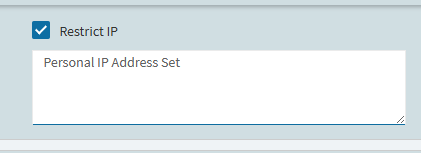
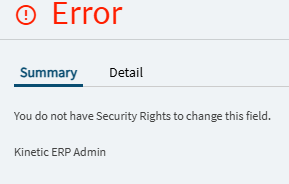
The shared stations don’t have access to O365 though, they are just accounts in Azure that can utilize the login process. They are also locked down from Azure Conditional access to only be able to login from this IP address. I set that up since the “IP restriction” option in Epicor can only be enabled by a Kinetic Admin (assuming that means another ticket) and the consultant I spoke with about these login options didn’t even know that checkbox/option existed or how it worked.
Also to add to that… our shared MES login is active on 32 machines… I don’t think it’s going to allow me to assign 32 YubiKeys to one Azure account for MFA options.
Makes sense, I wasn’t sure if that conditional access policy required a certain license in office 365 whereas a yubikey is just the cost of a key. That means you don’t enforce MFA on that azure account you made?
Yeah this is accurate, it kind of sucks. The only comment I would make is they don’t have to enter the site ID every time. The browser does remember it for awhile. Just tell them they need to memorize it and always include it when you send an email reminding them of an upcoming upgrade or whatever.
Not all users who would be entering this have an email address, unfortunately this process will be required by even an assembly user just trying to get a MES instance open.
 ) that says, “now that’s insightful”, I would have chosen that, but this was the best I could to for “you got me thinking”
 I will basically just change my MFA for Web users policy to All users… I only see my user (system admin) licensed for Entra ID P2