Another helpful tip, I personally put this as a .5 or maybe a 1.5.
Ctrl + Alt + I while on the app.
I’ve failed to find exactly what this does, but it appears to either clear server cache of the app or tell the server to rebuild the app.
You’ll notice that you get that same greyed out screen and a longer load just like open and close app studio causes.
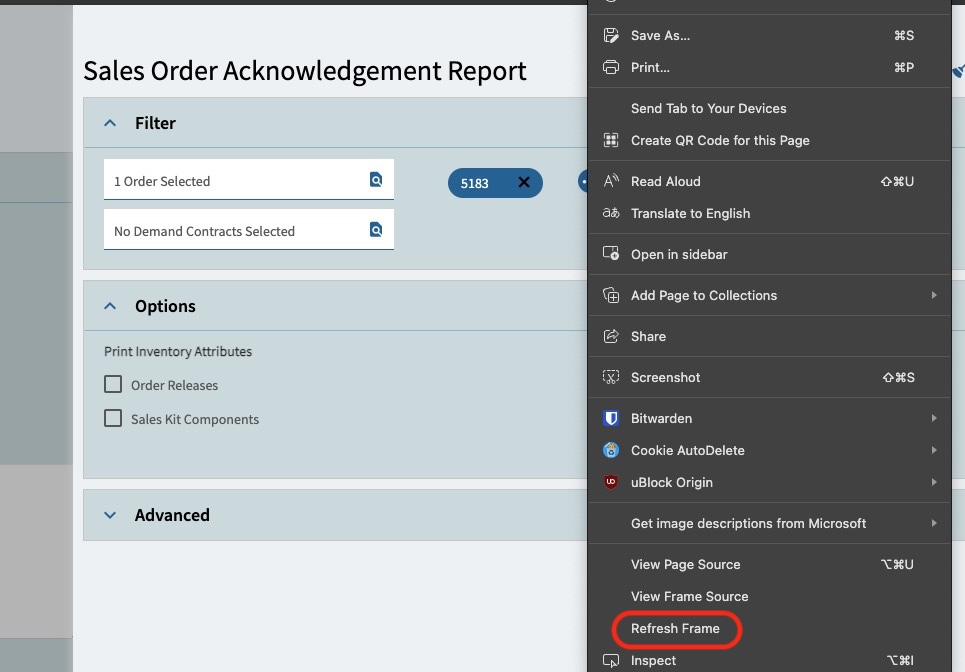
We just had a college intern figure this out for us. He right-clicked in the slideout panel and near the bottom it said “Refresh Frame”. He clicked that, and it has loaded for the user ever since. The user had the issue with Microsoft Edge, but it worked fine with Chrome. After the “Refresh Frame”, it is no longer an issue in Edge. I just wanted to provide an additional troubleshooting option…especially since it is so easy! I hope this helps someone else out.
I’m using Edge and it doesn’t appear everywhere. For example, I was in Order Tracker and it didn’t show for memo, change log, call log or attachments. But I was in the slide out to print a Sales Order Acknowledgement Report and got the option.
Sorry @JasonMcD ! I was still in chaos mode from the weekend upgrade, so I didn’t have time to grab a screenshot.
@spencer is 100% correct in what he stated. It isn’t every screen or even slide-out, but where we were having the issue was on a specific slide-out and it resolved the issue. This issue was only happening in Edge as Chrome was the temporary workaround until he found this right-click > Refresh Frame.
… but nothing actually happened- not even a blank slider. Worked in the smart client but not in anyone’s browser.
your step 1) open base layer in application studio did the trick for us.
Prior to this I had tried: cache refreshes, browser changes, removing our custom layer, disabling all BPMs, app server retstarts, shrinking DB log files, trawling app server event log… So a) phew and b) thanks.
@klincecum you created a wiki? Thats sounds awesome, where can I find it?
Thanks - it’s just others’ knowledge that I get credit for!
I was on baby leave when you posted this and I just stumbled across it today.
As an update for everyone, I personally only ever need to do steps 1 and 3 anymore - meaning (1) App Studio like you said, or (3) the personalization deleting. But I can certainly understand there may be others with complex layers or something that may need other tools.
Ctrl + Alt + H will bring up the help commands for Kinetic. in that list Ctrl + Alt + I is listed as invalidate App. In my experience this clears the MetaUI server side cache… which seems to be different than the browser cache and also different than the Epicor BO session. The Meta UI seems to have to cache menu ID specific merging it does between the BASE JSON for an App and the additional changes to the JSON which are stored in the DB, including customizations and personalization which seem to be on a per App and per Menu basis.
if you want to see what is sent to and returned from this merge process, you can put a BPM on the MetaUI simple service. A Pre method on the GETAPP call will let you view the input to the metaUI process, a Post method on the GETAPP call will let you see the output of the metaUI merge process. Hope this helps with understanding of some weird epicor customization bugs.