We have a request to add the ApprovedBy (not the Pending Approval, but who actually did it) to a Time Compliance report (not standard Epicor) and I do not know how to find that information. I have figured out how to do Pending, but not actual. Is that information even in the system? (and no, ChangedBy does not work, it doesn’t seem to get updated when Time is Approved)
The field you are looking for is SubmittedBy
3 Likes
That field is the person who Submitted it, not who Approved it. We are receiving records from an automated process, so the SubmittedBy is always something like ‘API.User’. That’s not who Approves it 
Hi Marjorie,
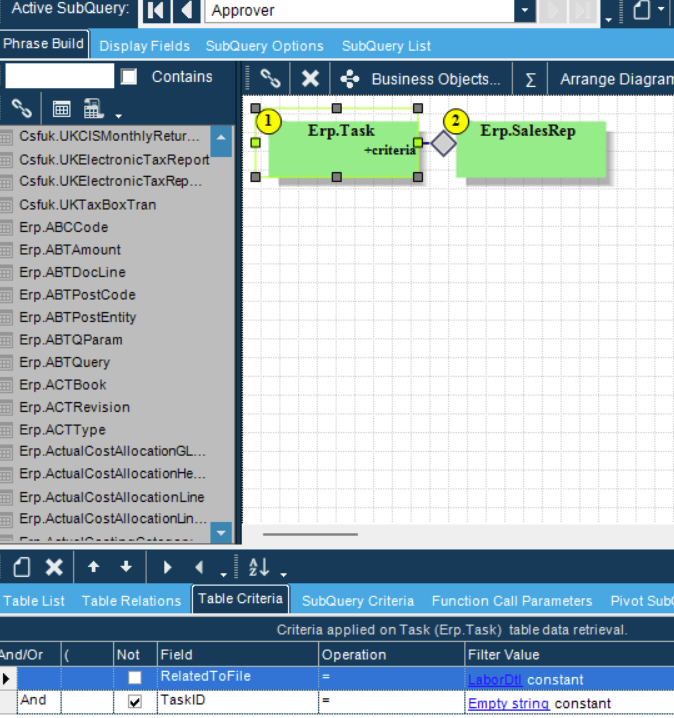
Time Approval is treated as a Task, similar to a Task you might find in Engineering Workbench or Quote Entry.
This should get you started:
SELECT *
FROM MyEpicorDb.erp.Task
WHERE RelatedToFile = 'LaborDtl'
Can confirm, LaborDtl.SubmittedBy is the right place. There’s a LaborDtl.ChangedBy as well. If labor entry is configured to auto approve, the SubmittedBy and ChangedBy values will match the CreatedBy value. If someone stepped in and manually approved in Epicor and the SubmittedBy value still matches the CreatedBy value, that person is logged in on the CreatedBy user account.
‘Task’ isn’t related to labor entry though, it’s nominally related to workflows. Sometimes things get used by the software for things outside their job description, but even then I’ve never seen any labor detail records in this data.
1 Like
I can confirm that LaborDtl.SubmittedBy does NOT contain the approverID. That will never be true in our system. The Task seems promising though, when TaskID != ‘’ it seems to grab the PM approval and Supervisor approval records. The person that Submits the time is never the one that Approves it. I will see how the Task lines up.
Why don’t you do a trace while somebody is approving a labor record to see where the data goes?