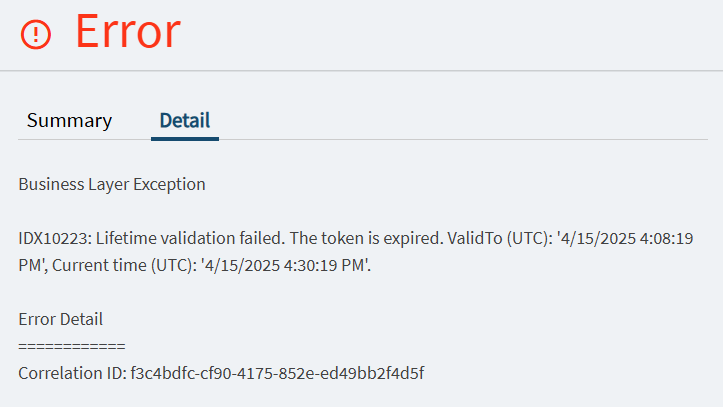
When using the browser, we are seeing an error popup for users using the browser or when they log off the smart client. We have our environment using azure authentication and was wondering if that is causing it. Can anyone help with this issue. We do have all workstation connected to a domain controller and time is accurate to domain controller and the Domain controller is accurate to public ntp server.
e.Common.InvalidTokenException: IDX10223: Lifetime validation failed. The token is expired. ValidTo: ‘1/10/2024 10:05:49 PM’, Current time: ‘1/10/2024 10:11:22 PM’.
—> Microsoft.IdentityModel.Tokens.SecurityTokenExpiredException: IDX10223: Lifetime validation failed. The token is expired. ValidTo: ‘1/10/2024 10:05:49 PM’, Current time: ‘1/10/2024 10:11:22 PM’.
at Microsoft.IdentityModel.Tokens.Validators.ValidateLifetime(Nullable1 notBefore, Nullable1 expires, SecurityToken securityToken, TokenValidationParameters validationParameters)
at System.IdentityModel.Tokens.Jwt.JwtSecurityTokenHandler.ValidateTokenPayload(JwtSecurityToken jwtToken, TokenValidationParameters validationParameters, BaseConfiguration configuration)
at System.IdentityModel.Tokens.Jwt.JwtSecurityTokenHandler.ValidateJWS(String token, TokenValidationParameters validationParameters, BaseConfiguration currentConfiguration, SecurityToken& signatureValidatedToken, ExceptionDispatchInfo& exceptionThrown)
— End of stack trace from previous location —
at System.IdentityModel.Tokens.Jwt.JwtSecurityTokenHandler.ValidateToken(String token, JwtSecurityToken outerToken, TokenValidationParameters validationParameters, SecurityToken& signatureValidatedToken)
at System.IdentityModel.Tokens.Jwt.JwtSecurityTokenHandler.ValidateToken(String token, TokenValidationParameters validationParameters, SecurityToken& validatedToken)
at Ice.Security.OpenIdConnect.TokenValidator.ValidateToken(String token, TokenValidationParameters validationParameters, ISecurityTokenValidator tokenValidator) in C:_releases\ICE\ICE4.2.400.7\Source\Server\Framework\Epicor.Ice\Security\OpenIdConnect\TokenValidator.cs:line 131
at Ice.Security.OpenIdConnect.TokenValidator.ValidateWithKeyRefresh(String token, TokenValidationParameters validationParameters, ISecurityTokenValidator tokenValidator, ITokenValidationFunctions originValidator) in C:_releases\ICE\ICE4.2.400.7\Source\Server\Framework\Epicor.Ice\Security\OpenIdConnect\TokenValidator.cs:line 119
at Ice.Security.OpenIdConnect.TokenValidator.Validate(String token, TokenValidationParameters validationParameters, ISecurityTokenValidator tokenValidator, ITokenValidationFunctions validationFunctions) in C:_releases\ICE\ICE4.2.400.7\Source\Server\Framework\Epicor.Ice\Security\OpenIdConnect\TokenValidator.cs:line 96
— End of inner exception stack trace —
at Ice.Security.OpenIdConnect.TokenValidator.Validate(String token, TokenValidationParameters validationParameters, ISecurityTokenValidator tokenValidator, ITokenValidationFunctions validationFunctions) in C:_releases\ICE\ICE4.2.400.7\Source\Server\Framework\Epicor.Ice\Security\OpenIdConnect\TokenValidator.cs:line 96
at Ice.Security.OpenIdConnect.TokenValidator.Validate(String token, String& alternateIdentityFieldToUse) in C:_releases\ICE\ICE4.2.400.7\Source\Server\Framework\Epicor.Ice\Security\OpenIdConnect\TokenValidator.cs:line 57
at Ice.Security.AuthenticationHelper.TokenAuthCheck(String token, Boolean isRpcCall) in C:_releases\ICE\ICE4.2.400.7\Source\Server\Framework\Epicor.Ice\Security\AuthenticationHelper.cs:line 220
at Ice.Security.AuthenticationHelper.GetUserId(String authorizationScheme, String authorizationValue, Boolean isRpcCall, HeaderCollection headers) in C:_releases\ICE\ICE4.2.400.7\Source\Server\Framework\Epicor.Ice\Security\AuthenticationHelper.cs:line 89
at Ice.Hosting.AspNetCore.Middleware.AuthenticationMiddleware.CheckAccess(HeaderCollection headers, Boolean isRpcCall, StringValues authorizationHeader) in C:_releases\ICE\ICE4.2.400.7\Source\Server\Hosting\AspNetCore\Ice.Hosting.AspNetCore\Middleware\AuthenticationMiddleware.cs:line 127
at Ice.Hosting.AspNetCore.Middleware.AuthenticationMiddleware.InvokeAsync(HttpContext httpContext, CurrentCallInformationService callInformation) in C:_releases\ICE\ICE4.2.400.7\Source\Server\Hosting\AspNetCore\Ice.Hosting.AspNetCore\Middleware\AuthenticationMiddleware.cs:line 83
at Ice.Hosting.AspNetCore.Middleware.CallHeaderMiddleware.InvokeAsync(HttpContext httpContext) in C:_releases\ICE\ICE4.2.400.7\Source\Server\Hosting\AspNetCore\Ice.Hosting.AspNetCore\Middleware\CallHeaderMiddleware.cs:line 52
at Ice.Hosting.AspNetCore.Middleware.OperationDisposerMiddleware.InvokeAsync(HttpContext httpContext) in C:_releases\ICE\ICE4.2.400.7\Source\Server\Hosting\AspNetCore\Ice.Hosting.AspNetCore\Middleware\OperationDisposerMiddleware.cs:line 34
at Epicor.RESTApi.Middleware.ApiKeyEnforcerMiddleware.Invoke(HttpContext context) in C:_releases\ICE\ICE4.2.400.7\Source\Server\Hosting\AspNetCore\Ice.Hosting.AspNetCore\Middleware\ApiKeyEnforcerMiddleware.cs:line 79
at Microsoft.AspNetCore.Diagnostics.ExceptionHandlerMiddleware.g__Awaited|6_0(ExceptionHandlerMiddleware middleware, HttpContext context, Task task)
CorrelationId: ba539170-234b-4c26-8043-0342c9fcbc7a
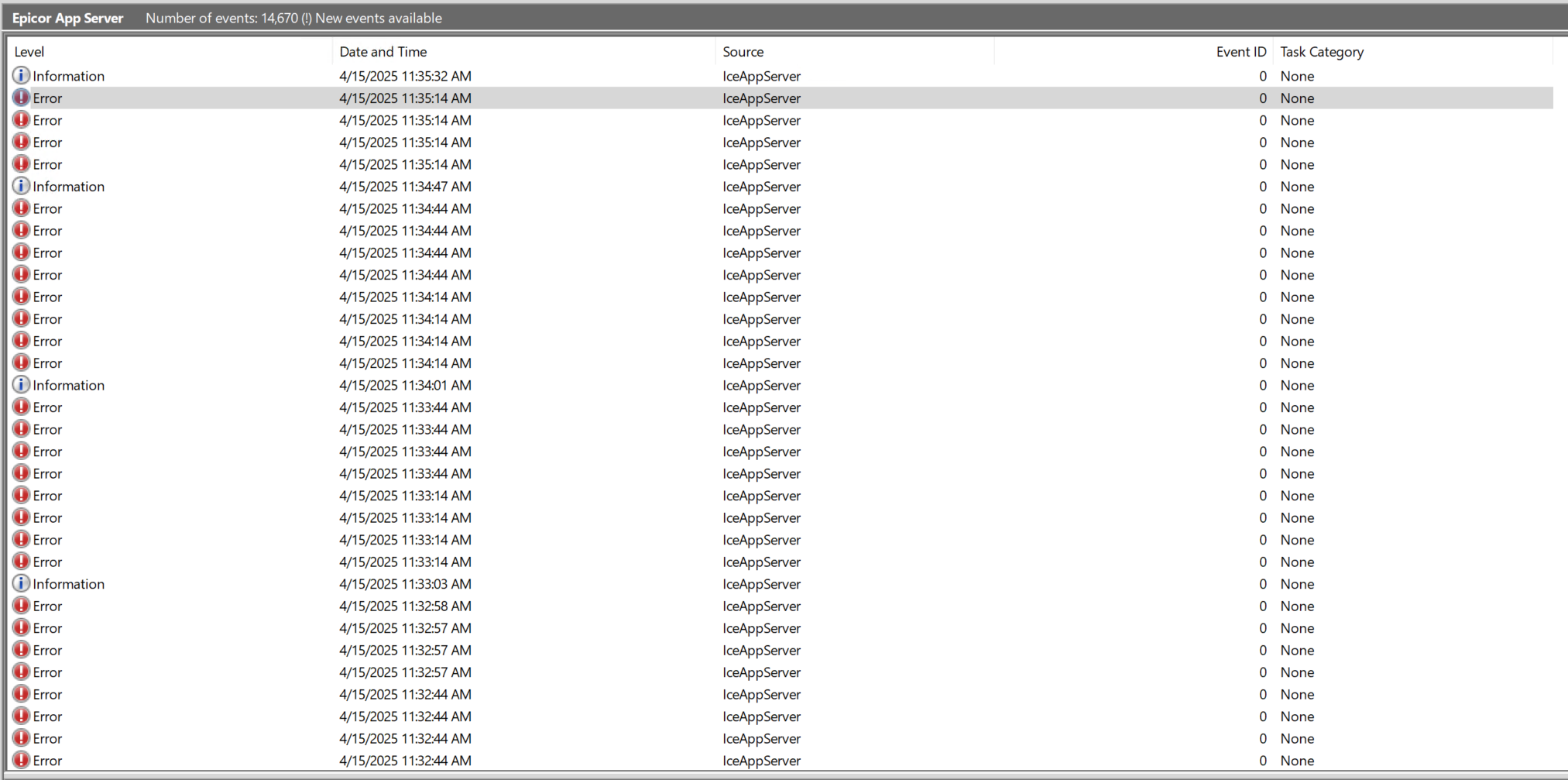
the current time shown is in UTC but it matches with time zone offset. But that could be the issue. My App server log in event viewer is what is showing this error.
Hi, I got the exact same token error randomly. We are using Azure AD SSO as well. We check NTP on the app server and it’s good. The expiration is the token from AzureAD. On the events logs on the epicor app server, we can see lots of these error, but without the browser popup. I think, what happen here is sometime Epicor failed to renew the Azure token before expiration?
We still have the issue, but if the user click cancel on the popup and refreh(F5), it reload the page sucessfully.
We have this issue, also Azure SSO. It can be a somewhat short window and can effect the “handoff” of the authentication to the client with the new method of launching classic UI from the web interface which makes for a really frustrating interaction because that you can’t just refresh.
Did you have any luck figuring anything out besides refreshing when you hit the error?
The PRB has been around for a hot minute… but I’ve been tracking it for awhile.
It states it’s for this issue and is now in “Testing” But it’s been in and out of testing many times. I’m not overly hopeful.
We received new advice from EpicCare on this recently. In Microsoft Entra ID (Azure AD) they had us make additional entries for all of the “redirect” URLs for kinetic. For each of our kinetic URLs we now have three entries in Entra ID: one where the letters “ERP” in the URL are all uppercase, one where they are all lower case (“erp”), and one where just “E” is capitalized (“Erp”).
That makes it sound like some part of Kinetic might be inconsistent in the capitalization of URLs. Entra ID is case-sensitive in how it treats redirect URLs.
This has been an issue off and on for years (at least since Vantage 8)… most commonly with the default Site ID (MfgSys vs MFGSYS). MOST of the inconsistencies have been ironed out, but I guess now they’re introducing some new ones (or finding ones that always existed but didn’t matter).
Very much, and reasonable so. In Windows, yeah, doesn’t make a difference, but in *nix systems, if a web server was hacked, it would be easy to setup another URL with the same letters and spoof people. So, it really needs need to match ExAcTlY.
Our app server event viewer is full of these errors. There is at least one error per minute, and it always seems to be triggered by the SysMonitor.
RequestPath: /erp10prod/api/v1/Ice.BO.SysMonitorTasksSvc/GetBallonRowsKeepIdleTime
An unhandled exception has occurred while executing the request.
Exception:
Ice.Common.InvalidTokenException: IDX10223: Lifetime validation failed. The token is expired. ValidTo: ‘9/13/2024 4:36:27 PM’, Current time: ‘9/13/2024 8:03:55 PM’.
Anyone have any news on this since last September? This is such a pain… I’ve found that if I have more than one Epicor tab open in the browser, and one of those tabs goes inactive for period of time, it triggers this issue and kills my active tab/session.
Yes, this happens quite frequently for us if a browser tab goes to sleep or a user shuts the lid on their laptop and leaves for the day.
There is a reoccurring AJAX request that is supposed to silently refresh the auth token, but if the browser isn’t active, it can’t do this. This message is what it falls back to if it can’t get the new token.
Remedy this by creating a policy to prevent browser tabs from going to sleep (see this if you use Edge). Also train your users to sign out at the end of the day, even though that may seem to be impossible.
On our Kinetic test user, I’ve disabled tab sleeping in Edge (tab icons no longer go grey), but they still get the IDX10223 Failed: Lifetime validation failed error. A full refresh (Ctrl - F5) typically resolves it. We’re Azure SSO. The user typically has several Epicor tabs open simultaneously.
Are there timeout settings on the Azure side that can be adjusted?
The default lifetime of an access token is variable. When issued, the Microsoft identity platform assigns a random value ranging between 60-90 minutes (75 minutes on average) as the default lifetime of an access token. The variation improves service resilience by spreading access token demand over a time, which prevents hourly spikes in traffic to Microsoft Entra ID.
I still do see this almost every day. It’s annoying for sure, but it hasn’t been a priority for me to dig into. I have not tried configuring the token lifetimes.