@dcamlin … thank you for your clarity on this post (attached below)
Question for you… is there any way to have the Grid populate all values if you haven’t selected one? Or is there a way to populate the grid based on multiple selected values? The way the binding is setup it appears that it restricts to just 1 selected value?
If you use double question marks in the where clause, it will populate the grid regardless of a value being provided. If you use a single question mark, it will only populate the grid if a value is provided.
You can have as many values as you want in the where clause.
David’s example is showing him building the string in the “Where” section of the Provider Model, so you would need to use AND to join multiple values. I prefer to use the “Where List” which lets you break them out individually, but you can still add as many as you need.
Thanks Hannah, the Where List is a good option especially when there are a variety of values to where!
However, I realize I’m not exactly clear here. So let me take another swing at it…
I understand you suggesting that you can have multiple where “fields” as values (ie. partnum, OrderNum, JobNum, etc. based on whatever you need to see) with AND joining each separate value as the complete where statement.
I was trying to get at a way to have the other grids populate on multiple selected values within the same field. In other words, if I select part1, part2, part3 how would the other grids display each of those values? Is it already handled in the “where” statement David provided and I’m just missing something? Or does the Where List better enable this?
And thank you also for clarifying the double ?? to populate regardless of selected value! Making progress!
Mmm, you’re gonna have to do some magic.
I would say you’ll probably need a button to fire this off since finding a trigger may prove challenging.
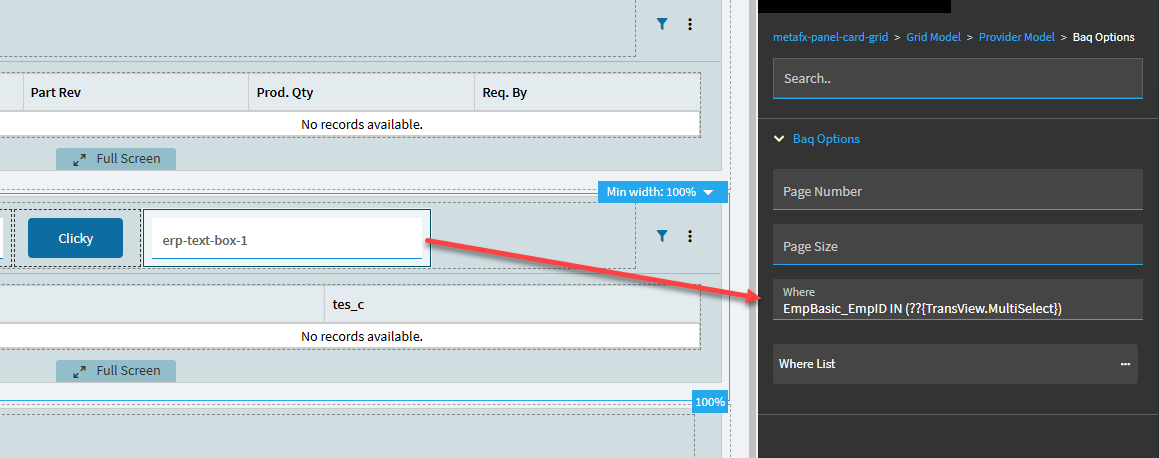
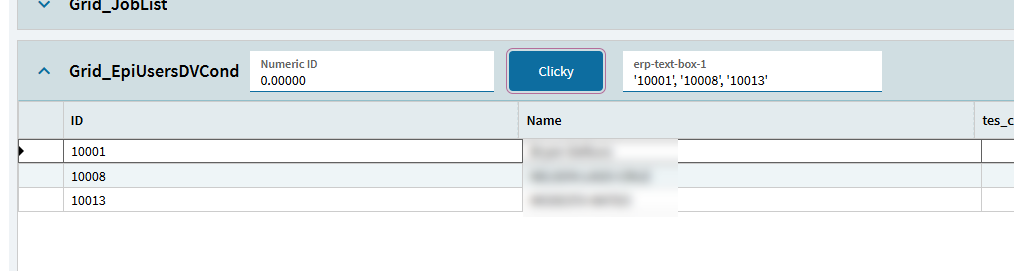
But on that button click, you would need to loop through the selected items using a dataview-condition widget. The iteration event would need to format the values to each be wrapped in single quotes and comma-delimited and then save that to a TransView field of your choosing.
Then you could use the IN operator on the Where clause to filter on multiple values.
Here’s an example where I typed in the values because I was too lazy to set up the pub/sub and events.
Sorry for the delay in feedback, I got pulled into a different, urgent project.
This will work great, I didn’t think of triggering thru a button, but that will definitely work. Seems like several issues have to be resolved by adding buttons/functions and using transview as a holding place.
hello @hmwillett, could you help me detailing this part: "[quote=“hmwillett, post:5, topic:123179”]
The iteration event would need to format the values to each be wrapped in single quotes and comma-delimited
[/quote]
"
not sure how to form the json stuff to do that, could you point me in the right direction, please?
 But its an a good question. I’d have to poke at it for a while.