Hi,
I am trying to pull lot expiry date in packslip. I already pulled lot number in pack slip but not bale to achieve Expiry date.
Please help me in this.
Is this in Customer Shipment Entry? Classic or Kinetic? Or are you working on the printed PackSlip?
Kineti
its normal pack slip
Sorry, the PackSlip report? Are you trying to add columns to your report in Report Builder?
Yes, I already added Lot Number
Where are you pulling the LotNum from (which table)?
PartLot has ExpirationDate, if that’s the column you’re looking for. I would perhaps try adding a relationship to your RDD to join PartLot table.
Yes I am looking for partLot where Expiration date is there
Please guide me if any way to connect
="
 SELECT
    T1.Company,
    T1.LegalNumber,
    T1.PackNum,
    CAST(T1.CustNum AS NVARCHAR) AS CustNum,
    T1.ShipComment,
    T1.ShipDate,
    T1.Calc_BilContct,
    T1.Calc_BillToAddress,
    T1.Calc_SoldToAddress,
    T1.Calc_Contct,
    T1.Calc_CustPartOpts,
    T1.Calc_FOBDescription,
    T1.Calc_LegalNum,
    T1.Calc_NumRecordPerPage,
    T1.Calc_NumTotalParts,
    T1.Calc_SalesRepName,
    T1.Calc_ShipToAddress,
    T1.Calc_ShipViaDescription,
    T1.Calc_stPhone,
    T1.Calc_CusPhone,
    T1.Calc_stFax,
    T1.Calc_EMailAddress,
    T1.Calc_FaxNum,
    T1.Calc_SEmailAddr,
    T1.Calc_CarrierDesc,
    T1.Calc_ShipViaSCAC,
    T1.Calc_CarrierSCAC,
    T1.Calc_CompanyEORINumber,
    T1.Calc_CustShipToEORINumber,

    T2.PackLine,
    T2.Discount,
    T2.ExtPrice,
    T2.HeaderShipComment,
    T2.LineDesc,
    T2.OrderLine,
    T2.OrderNum,
    T2.OrderRelNum,
    T2.PartNum,
    T2.RevisionNum,
    T2.ShipComment AS ShipDtl_ShipComment,
    T2.UnitPrice,
    T2.XPartNum,
    T2.XRevisionNum,
    T2.Calc_DspBackOrdQty,
    T2.Calc_DspBackOrdQtyUom,
    T2.Calc_DspLabDur,
    T2.Calc_DspLabMod,
    T2.Calc_DspLineDesc,
    T2.Calc_DspLineShpQty,
    T2.Calc_DspLineShpQtyUom,
    T2.Calc_DspMatDur,
    T2.Calc_DspMatMod,
    T2.Calc_DspMiscDur,
    T2.Calc_DspMiscMod,
    T2.Calc_DspPlannedQty,
    T2.Calc_DspPlannedQtyUom,
    T2.Calc_DspSerialNumber,
    T2.Calc_DspShipRouting,
    T2.Calc_DspSubShipTo,
    T2.Calc_GetNextLegalNum,
    T2.Calc_LegalText,
    T2.Calc_LinChangd,
    T2.Calc_NextLegalNumID,
    T2.Calc_NumLineByInv,
    T2.Calc_OrdRelRef,
    T2.Calc_POLine,
    T2.Calc_SalesRepName AS ShipDtl_Calc_SalesRepName,
    T2.Calc_SerialNumLabl,
    T2.Calc_TotalLineCost,
    T2.Calc_TotalTax,
    T2.Calc_HidePackLine,
    T2.OrderLine_KitFlag,
    T2.OrderLine_KitParentLine,
    T2.OrderLine_KitPrintCompsPS,
    T2.OrderLine_DisplaySeq,
    T2.OrderLine_KitShipComplete,
    T2.Calc_MarkForAddress,
    T2.OrderNum_PONum,
    T2.PartNum_PartDescription,
    T2.PCID,
    T2.Calc_CommodityCode,
    T2.Calc_AttributeSetShortDesc,
    T2.LotNum,
    T2.Calc_ExpirationDate,

    T3.RptLiteralsLblDescription,
    T3.RptLiteralsLblFax,
    T3.RptLiteralsLblEmail,
    T3.RptLiteralsLblRel,
    T3.RptLiteralsLblPh,
    T3.RptLiteralsLblPO,
    T3.RptLiteralsLblRev,
    T3.RptLiteralsHComponents,
    T3.RptLiteralsLblBckOrQty,
    T3.RptLiteralsLblCustPart,
    T3.RptLiteralsLblDiscAmt,
    T3.RptLiteralsLblExtendedPrice,
    T3.RptLiteralsLblFOB,
    T3.RptLiteralsLblHdngPckSlip,
    T3.RptLiteralsLblLbDu,
    T3.RptLiteralsLblLine,
    T3.RptLiteralsLblMiDu,
    T3.RptLiteralsLblMtDu,
    T3.RptLiteralsLblOurPrt,
    T3.RptLiteralsLblPackSlip,
    T3.RptLiteralsLblPage,
    T3.RptLiteralsLblPlndQty,
    T3.RptLiteralsLblPoLine,
    T3.RptLiteralsLblPrtNum,
    T3.RptLiteralsLblReference,
    T3.RptLiteralsLblSalesOrder,
    T3.RptLiteralsLblSalesperson,
    T3.RptLiteralsLblShipDt,
    T3.RptLiteralsLblShipRouting,
    T3.RptLiteralsLblShipTo,
    T3.RptLiteralsLblShipVia,
    T3.RptLiteralsLblShpdQty,
    T3.RptLiteralsLblSoldTo,
    T3.RptLiteralsLblSrlNum,
    T3.RptLiteralsLblSrlNums,
    T3.RptLiteralsLblSubShipTo,
    T3.RptLiteralsLblTotalLineCost,
    T3.RptLiteralsLblTotalTax,
    T3.RptLiteralsLblUnitPrice,
    T3.RptLiteralsLblYourPO,
    T3.RptLiteralsLLegalText,
    T3.RptLiteralsLLegNum,
    T3.RptLiteralsLSalesKit,
    T3.RptLiteralsLCarrierSCAC,
    T3.RptLiteralsLCarrier,
    T3.RptLiteralsLblShipViaSCAC,
    T3.RptLiteralslblInvNumber,
    T3.RptLiteralslblInvDueDate,
    T3.RptLiteralsLblOf,
    T3.RptLiteralsLblContinueOnNext,
    T3.RptLiteralsLblComeFrom,
    T3.RptLiteralsLblPCID,
    T3.RptLiteralsLCommodityCode,
    T3.RptLiteralsLEORINumber,
    T3.RptLiteralsLblAttributeSet,
    T3.RptLiteralsLblLotNum
 FROM ShipHead_" + Parameters!TableGuid.Value + " T1
 LEFT OUTER JOIN ShipDtl_" + Parameters!TableGuid.Value + " T2
    ON T1.Company = T2.Company
    AND T1.PackNum = T2.PackNum
 LEFT OUTER JOIN RptLabels_" + Parameters!TableGuid.Value + " T3
    ON T1.RptLanguageID = T3.RptLanguageID
"
Hi,
Is there any solution?
NOTE: Below I describe two methods that might work for you.
After thinking through and typing up Route #1 (which may or may not work), it hit me to check and I think Route #2 is a better, easier approach. I would attempt my Route #2 detailed below first.
I’m just too lazy to re-write the whole post below…
~*~
The PartLot table is already on the base PackSlip RDD, joined to the ShipDtl table.
However, it is being joined by using Calc_PackLine and Calc_PartNum columns… and I’m not sure how that table relationship is being used as it is not joined in the actual query. So, there are two routes I would try at this point…
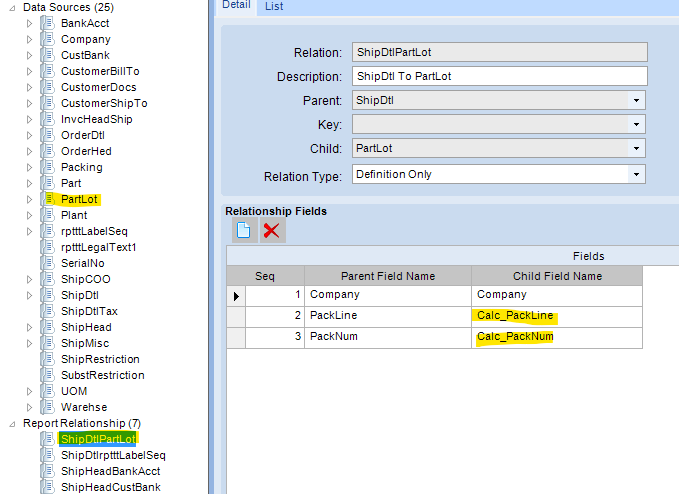
Route #1: Use the existing relationship and hope it works:
Modifications to RDD:
-
If you’re not already working with a copy of the base PackSlip RDD, you’ll need to Duplicate the RDD.
-
Update the ShipDtlPartLot relationship to Relation Type: Output (instead of Definition Only)
-
You then need to un-exclude the ExpirationDate column (or maybe the ExpireDt column?). My company doesn’t use these fields, so I’m not sure which actually would store the date you’re after.
-
Save the RDD.
Modifications your RDL File in Report Builder:
- Modify your query to include the joined table:
LEFT OUTER JOIN PartLot_" + Parameters!TableGuid.Value + " T4
ON T2.Company = T4.Company AND T2.PackLine = T4.Calc_PackLine AND T2.PackNum = T4.Calc_PackNum
-
You’ll need to add
T4.ExpirationDateas a selected field in the query. -
You’ll then need to add ExpirationDate as a query field
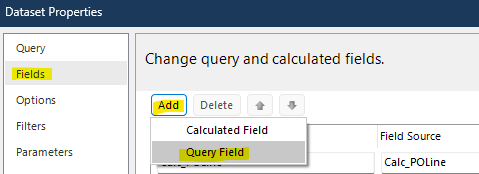
You should then be able to add ExpirationDate field in your report body. Save, upload, test.
~*~
If that doesn’t work (because I don’t know how Epicor is using the ShipDtlPartLot relationship already)… you can try Route #2 (which… may actually be a more straight forward option)… To be honest, I would try this approach FIRST!
Route #2: Use the “Lot” linked table on ShipDtl:
Modify your RDD:
Again, if you don’t already have a custom RDD, you’ll need to Duplicate the existing RDD and save it as your own version.
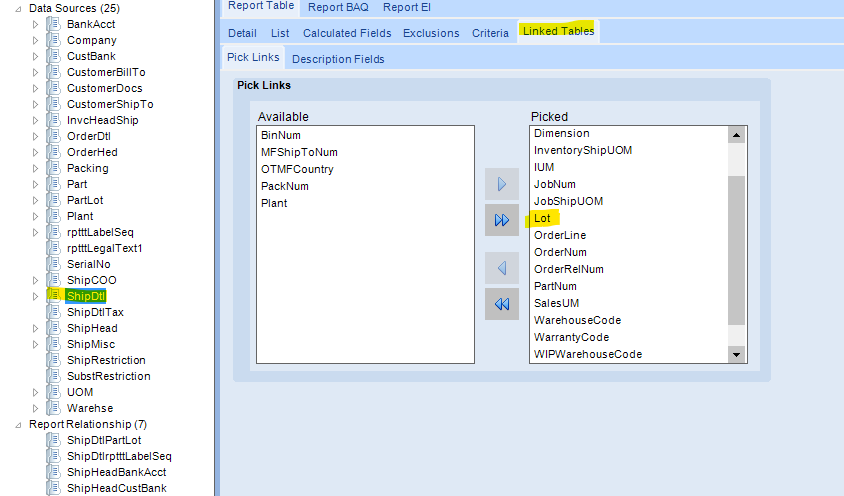
If you look under the ShipDtl Data Source, it is already including the a “Lot” linked table. Based on the fields I see in there, I’m assuming this is the PartLot table.
Under the Description Fields tab, pick your “Lot” Table… and then move the ExpirationDate (and/or ExpireDt) column(s) from Available to Picked:
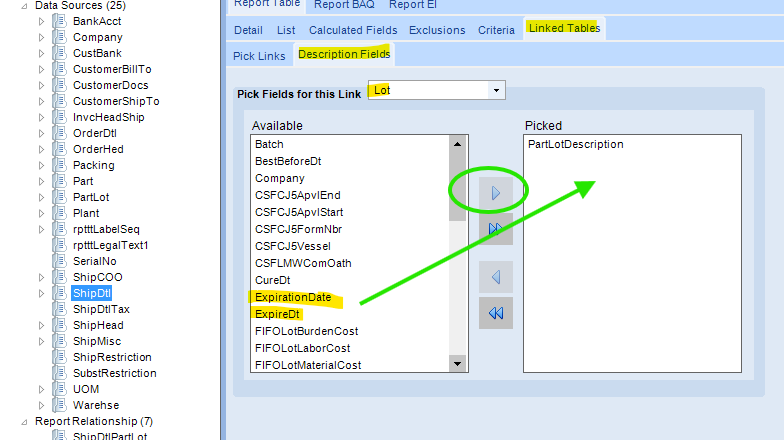
Save the custom RDD.
Modify your RDL:
In your PackSlip report RDL (In report builder). All you’ll need to do is add:
T2.Lot_ExpirationDate, just like you added T2.LotNum
Add Lot_ExpirationDate as a query field.
You should be set to add and use it in your report body.
Save, upload, test.
~*~
In either case, make sure you update your Report Style to point to your custom RDD.
I am getting the below error:
Program Ice.Services.Lib.RunTask when executing task 1205163 raised an unexpected exception with the following message: RunTask:
System.InvalidOperationException: The data source column type ‘Ice.Core.RptBase.GeneratedDataColumn’ in the ‘PartLot.Calc_PackLine’ data source is not supported for relationships.
at Ice.Core.RptBase.RelatedDataSqlBuilder.BuildCriteriaForKeys(DataColumnCollection keyColumns) in C:_releases\ICE\ICE5.1.100.16\Source\Server\Internal\Lib\TaskLib\RptBase\RelatedDataSqlBuilder.cs:line 65
Well, I’m assuming this means you tried Route #1. I do recommend you attempt Route #2 first. I think it is easier and more straight forward.
If you want to continue down Route #1, can you post your updated query? Did you update the Relationship Type to Output in the RDD?
Hi,
I am getting error in second method:
Program Ice.Services.Lib.RunTask when executing task 1205168 raised an unexpected exception with the following message: RunTask:
Ice.Core.SsrsReporting.SsrsCaller.SsrsException: 2026-04-30 14:37:23.3723 UTC The SSRS server returned the status code 500 (InternalServerError) with the following error text:
An error has occurred during report processing. —> Microsoft.ReportingServices.ReportProcessing.ProcessingAbortedException: An error has occurred during report processing. —> Microsoft.ReportingServices.ReportProcessing.ReportProcessingException: Query execution failed for dataset ‘ShipHeadShipDtl’. —> Microsoft.Data.SqlClient.SqlException: Incorrect syntax near the keyword ‘FROM’.
Might be missing a space after you added your field in your query?
Can you paste your query in here so we can see it?
Thank you
you’re right one comma missing now got the receipt date
Are you getting the correct date displaying on your report? Do you mean the Expiration Date?
Yes Thank you for your support
