Maintenance jobs adding '<' and '>' characters to part number / equipment ID

Is there a way for Kinetic not to add these characters to the part number on a maintenance job? It changes part number widget123 to < widget123 >

image

This messes up the barcode because these ‘<’ and ‘>’ characters do not always print, sometimes they print as squares on the Job Traveler and the handheld will not scan it.

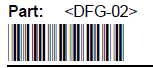
Can this be accomplished natively?

Thanks!
Arno

You can modify the RDL of the report that prints out the barcode to escape these characters.

< need to be replaced with %G

> with %I

Scanners need to be set to Code 39 Extended mode.

Or if you want the barcode to not have them at all, you can just remove the characters.

Thanks @Jgrissom , removing them worked!

image