Menu Alias

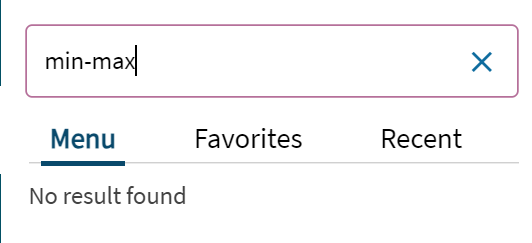
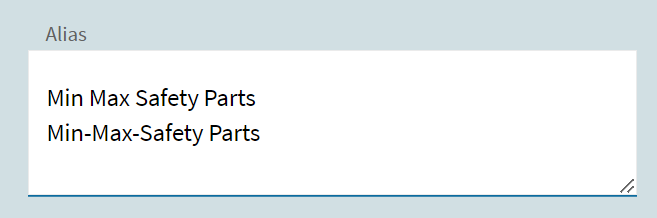
Anyone using the menu Alias and get it to work? I am under the impression that adding an alias will now make the original menu show up in the search if the alias is keyed in. Alas, I added a bunch and this is not the case. What am I doing wrong? or is this one of those cool new Epicor features that don’t work?
image
image

Aliasing doesn’t seem to work in my system either. I also have an issue when I load the kinetic screen to apply an alias where it doesn’t pull in the classic customization that was assigned to that menu item, which means when I saved after changing the alias the customization was cleared.

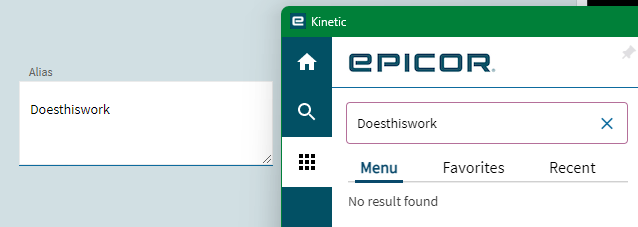
They made it do it has to be a full match, not a starts with. (I don’t know why…) but if you type in the whole thing, it should work.

Am I missing something?
image

I’ve tried typing it complete as well, no luck for me on that front.

I believe it’s suppose to officially be searchable in 2024.1

Anyone on 2024.1 try this again? I have and it still doesn’t work. Despite it being listed in the release notes.

NVM, you have to type the whole damn string as suggested by @Banderson . I guess half a step forward at least.

The help on the bottom now states:

  1. Go to the Alias field. Enter the alternate names that you want this program to use, such as No Counter Sales and SalesAlt. Separate each entry with a semi-colon (;). When users search for the custom program on the Menu panel, they can use these aliases to find and select it.

But it still doesnt work… I think we got this accepted as a bug before, but still broken in 2025.2

Hmmm, I am on 2025.2 saas. I can confirm it works for me, but you for sure have to type the alias out in its entirety. Have not tried multiple with a semicolon, so maybe try just 1 for now.

So you still have to type it all out? Thats probably it then.

i believe it searches for whole words, not just for partial words. so if you search for “Part” it will find all things (base and alias) that have the word part in them.

Here’s a silly example:

Alias set to “Apples and Oranges”

Just using “Apples” (full word)… doesn’t find anything:

But typing out “Apples and Oranges”, does work.

Whatever you put in the alias, must be typed exactly correct (in full) for the system to find it.

Their suggestion to use a semi-colon also doesn’t work (to create multiple aliases):

image

Again, I have to type out the exact string from the Alias field to get it to work (including the semi-colon :rofl:):

can you please submit an Epicor Idea to have this improved? This is not my team’s work… it is part of the ICE Framework, but we can certainly get this addressed. I was just talking earlier about getting the search for applications working smarter using AI so that you can type in a subject and get something without creating all sorts of aliases… ie.. if i type in Supplier, Suplier, supplyer, Vendor, Vend… AI can figure it out, but standard search can’t.

Would we only get that if we pay for prism though?

How about we report it as a bug, since it is a bug.

It doesn’t work as advertised.

Support Response:

I have created the following PRB0313885 with the short description of:

Menu Maintenance Alias does not work

I mentioned that this is only taking the literal string value from the text box and does not accept multiple values. Once this is accepted by our development team, I will follow up on next steps.